And yet another "Java Software Critical Update" virus problem

Hi,
In my initial post, I stated:
Infection date and initial symptoms:
"Some time ago. As I thought it was a "normal" pop-up, I didn't register it as a problem. Seems to be getting worse."
And I am pretty sure I never clicked on this particular download. Must have snuck in somehow else.

Cheers
Leo
 
Good morning,

OK. Switched to Open DNS. Still being redirected to the "Java Software Critical update" download page. :mad:

Cheers
Leo
 
Ok, did those three things.
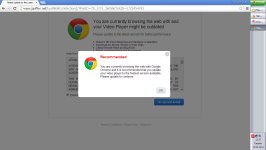
But, still no change. (See attached).
 

Attachments

  • Chrome with 'outdated Java'.jpg
    Chrome with 'outdated Java'.jpg
    85.8 KB · Views: 83
Thing is that I don't see any sign of malware in reports.

Can you try now to run ComboFix using instructions on first page.
 
Hello,
Well, ComboFox crashed again, along with my computer, at/after Stage 27.
I waited 60 minutes before turning it off. Obviously, no report.
(Still the same mess in the Windows Explorer directory tree.)

Regards
Leo
 
Ok, let's start ComboFix this way. Make sure it is located on your Desktop.

Press Windows key + R and copy the following in the Run windows:

Code:
"%userprofile%\Desktop\ComboFix.exe" /KillAll /StepDel /NoMBR

Press OK and ComboFix will start scanning.
 
Hi,
Yes, the problem persists. It has been joined by a variant. See attached.

Leo
 

Attachments

  • Update Video Player.jpg
    Update Video Player.jpg
    85.7 KB · Views: 100
Please download MiniToolBox to Desktop and run it.

Check first 8 boxes.
  • Click Go and copy/paste the log (Result.txt) into your next post.
  • Note: When using "Reset FF Proxy Settings" option Firefox should be closed.
 
That leads us to fact that these sites are probably infected. Your PC is clean. I can recommend you to install Adblock for Chrome.