New Update Announcing Windows 11 Insider Preview builds [Mega-Thread]

  • Bot Thread starter Bot
  • Start date Start date
  • 625 Replies
  • 147,091 Views
Hello Windows Insiders, Today, we’re releasing new Windows 11 Insider Preview builds to the Beta and Experimental channels! Coming straight off the back of our Windows + Surface event, we have some exciting new features entering the Windows Insider Program. New builds this week Select your channel below to view its release notes:
For those on other specific Windows build versions, here are today’s new builds and release notes:

Notable new features:​

[Windows Search]​

Release channel: Experimental, Experimental (26H1)
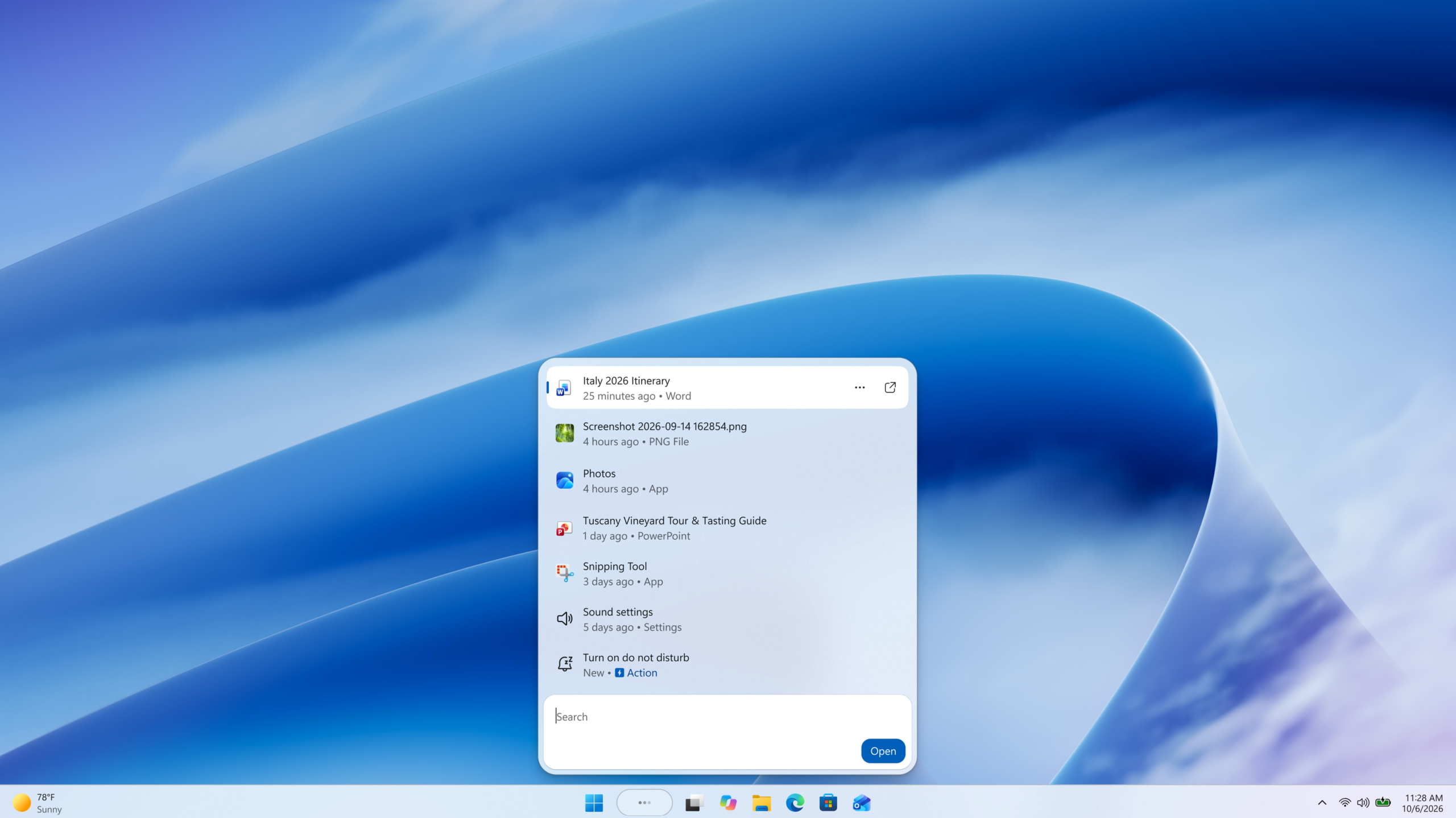
  • New Windows Search experience with inline actions: We're beginning to roll out a new Windows Search experience built on WinUI 3 that is faster, more efficient, and features a streamlined design that makes results easier to scan. We're also introducing inline actions, allowing you to quickly complete tasks directly. Turn on dark mode or Bluetooth, adjust your screen brightness, mute your device, or arrange windows from Windows Search.
  • We're improving how Windows Search understands what you're looking for, including better matching for typos and synonyms. We'll continue fine-tuning these improvements over the coming weeks. For more information detailing the new changes, check out the dedicated Windows Insider Blog.
[caption id="attachment_179190" align="aligncenter" width="2560"]Screenshot of the new Windows Search experience Screenshot of the new Windows Search experience[/caption]
[Battery Status widget]​

Release channel: Experimental
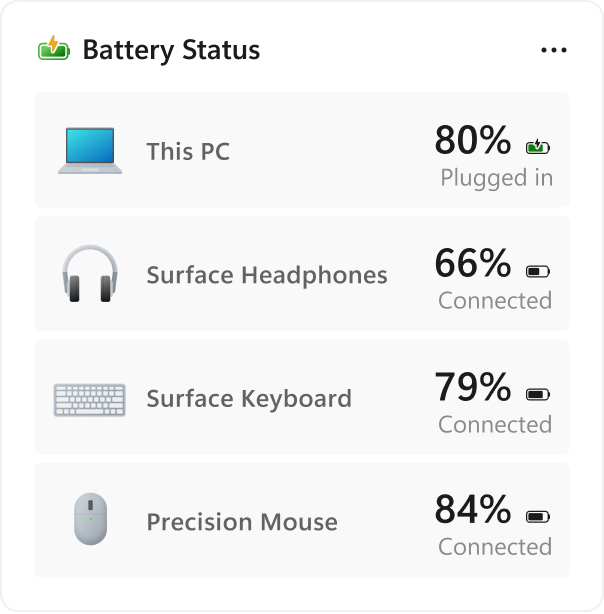
  • As part of our continued commitment to making Widgets more useful for everyday moments, we're introducing the Battery Status widget for Insiders on newer builds. This widget provides a unified view of battery levels for your PC and peripheral devices, helping you quickly assess power status without hunting through multiple UI locations. Add it by going to Widgets board > Add widgets > Battery Status.
[caption id="attachment_179221" align="aligncenter" width="604"]UI showing the new Battery Status widget, providing a unified view of battery levels across your PC and connected devices. UI showing the new Battery Status widget, providing a unified view of battery levels across your PC and connected devices.[/caption] Thanks, Stephen and the Windows Insider Program team

Source: Announcing new builds for 7 October 2026
 
Hello Windows Insiders, Today, we’re releasing new Windows 11 Insider Preview builds to the Beta and Experimental channels. New builds this week Select your channel below to view its release notes:
For those on other specific Windows build versions, here are today’s new builds and release notes:
Also a reminder that next week October 7, we have our Windows and Surface event at 10AM Pacific time! Tune in to watch live via the Windows YouTube channel. Thanks, Stephen and the Windows Insider Program team

Source: Announcing new builds for 2 October 2026
 
Hello Windows Insiders, Today, we’re releasing new Windows 11 Insider Preview builds to the Beta, Experimental, and Release Preview channels. New builds this week Select your channel below to view its release notes:
For those on other specific Windows build versions, here are today’s new builds and release notes:
  • Beta (26H1): Build 28020.3262
  • Experimental (26H1): Build 28120.3272
  • Experimental (Future Platforms): We do not have an Experimental (Future Platforms) build today
We also have Release Preview for Windows 11, version 26H1 and Windows 11, version 25H2/26H2 going out today:
NVIDIA RTX Spark launch Today we also see the launch of the new range of Windows 11 devices powered by the NVIDIA RTX Spark chip. There's never been a better time to join the Windows Insider Program, and we look forward to welcoming a new group of Insiders and devices into the program to provide feedback and continue help shape the future of Windows.

Notable new features:​

[Gaming]​

Release channel: Beta, Experimental
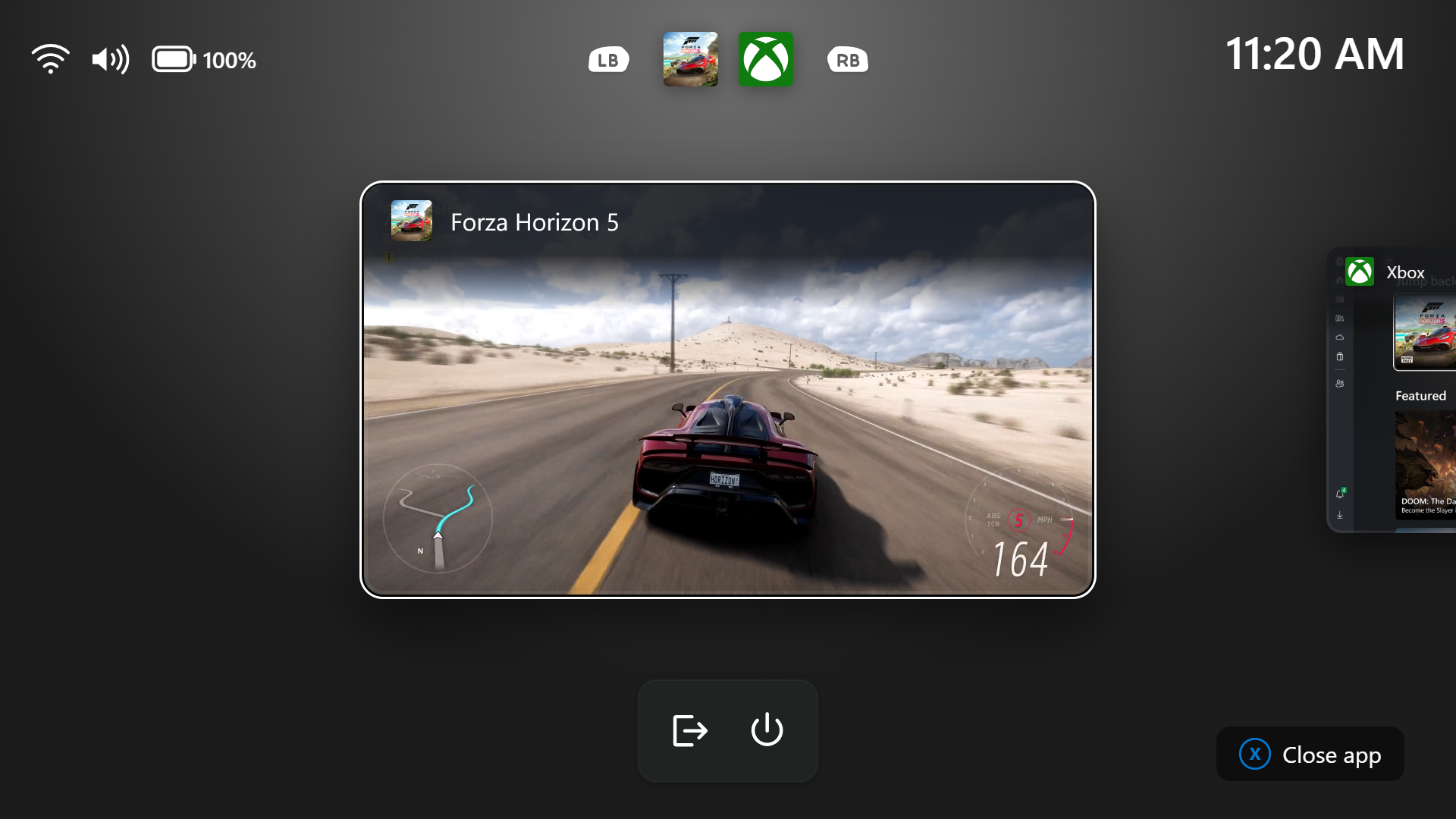
  • We're introducing a refreshed Gaming Task View experience in XBOX mode, featuring a new navigation bar that provides quick access to Exit to Desktop and Power Options. This update makes key system actions easier to access while gaming.
[caption id="attachment_179233" align="aligncenter" width="1920"]Gaming Task View showing the new navigation bar with Exit to Desktop and Power options. Gaming Task View showing the new navigation bar with Exit to Desktop and Power options.[/caption]

[Windows Hello]​

Release channel: Experimental
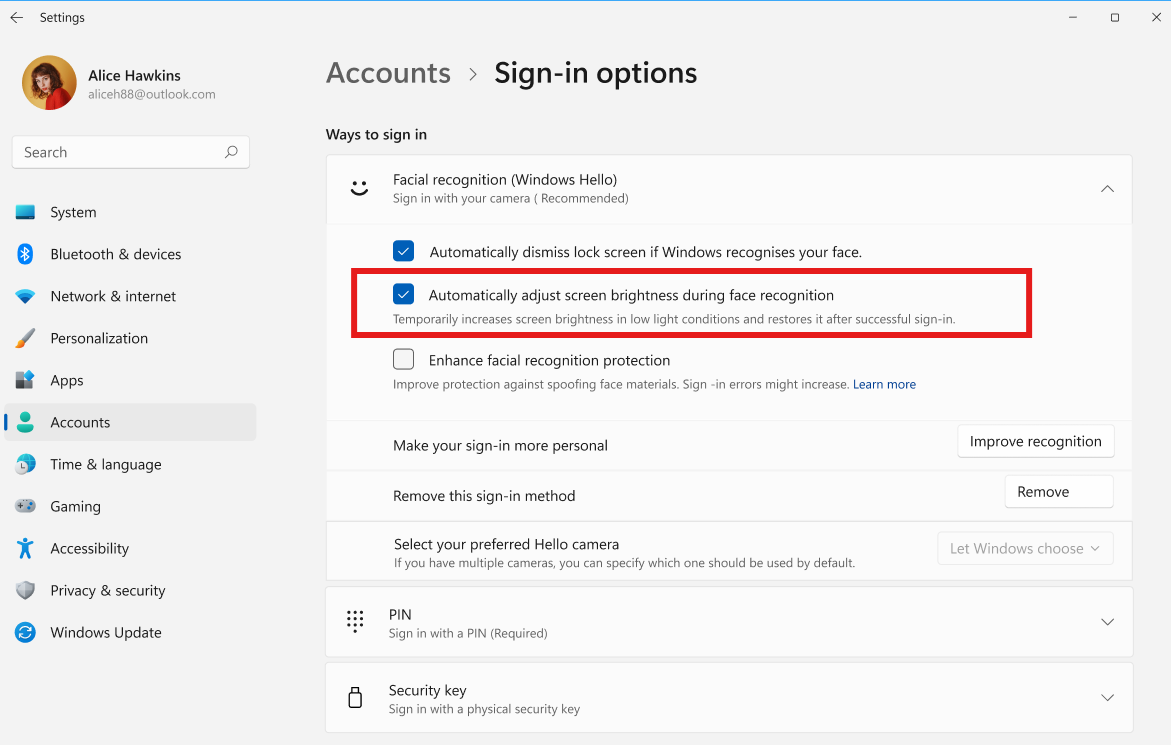
  • Windows Hello facial recognition can temporarily brighten your screen to help you sign in when you're in a dark or dimly lit room.
  • To turn on this feature, go to Settings > Accounts > Sign-in options > Facial recognition (Windows Hello) and turn on Automatically adjust screen brightness during face recognition.
[caption id="attachment_179234" align="aligncenter" width="1171"]The setting to automatically adjust screen brightness during Windows Hello facial recognition. The setting to automatically adjust screen brightness during Windows Hello facial recognition.[/caption] Thanks, Stephen and the Windows Insider Program team

Source: Announcing new builds for 16 October 2026
 
Hello Windows Insiders, Today, we’re releasing new Windows 11 Insider Preview builds to the Beta and Experimental channels. New builds this week Select your channel below to view its release notes:
For those on other specific Windows build versions, here are today’s new builds and release notes:

Notable new features:​

[Windows Insider Settings]​

Release channel: Experimental
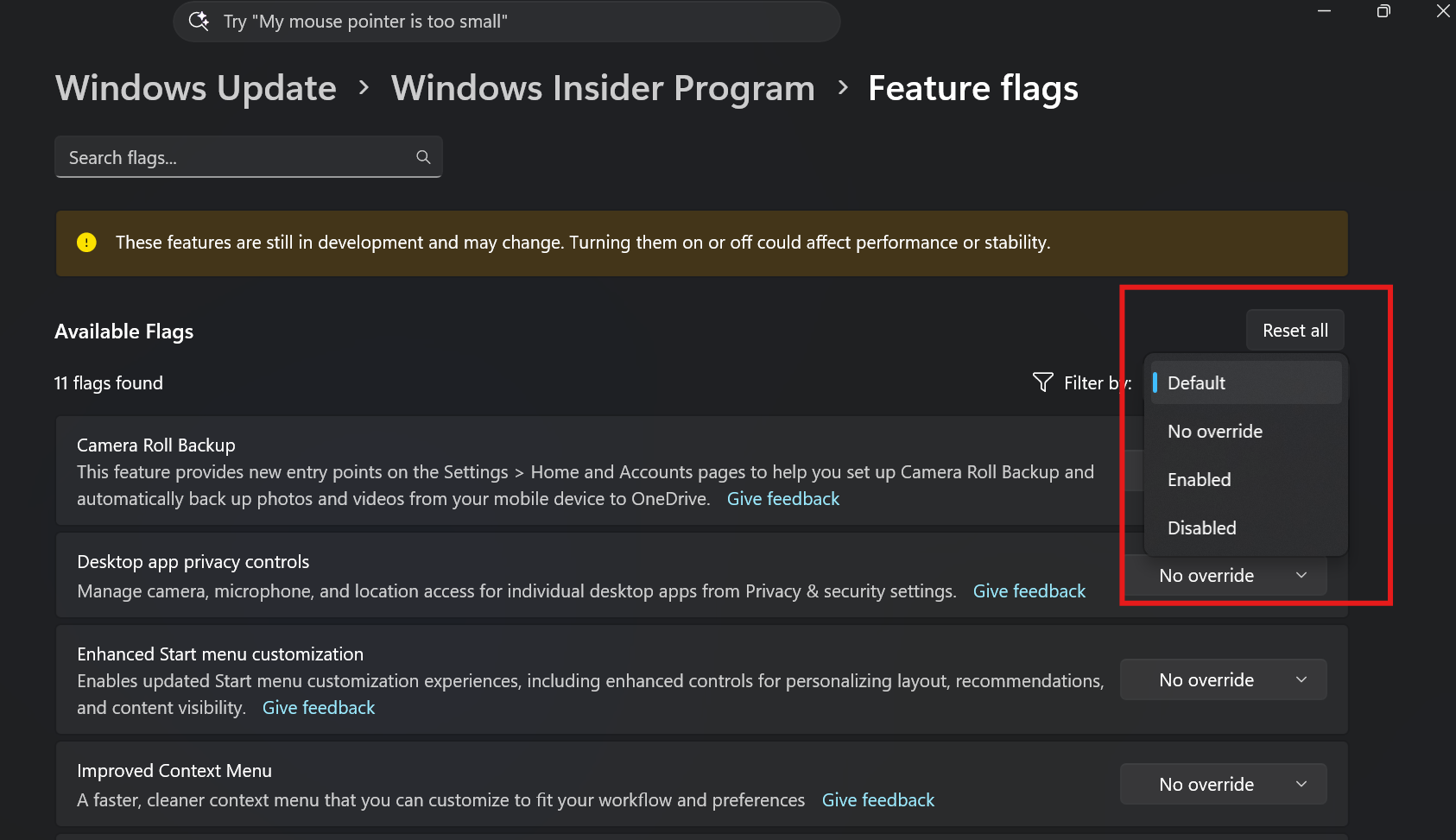
  • We've added the ability to filter Feature flags by enablement state.
[caption id="attachment_179240" align="aligncenter" width="1686"]Feature flags filtered by enablement state on the Windows Insider Program settings page. Feature flags filtered by enablement state on the Windows Insider Program settings page.[/caption]

[Quick Settings]​

Release channel: Experimental Access your phone controls from Quick Settings
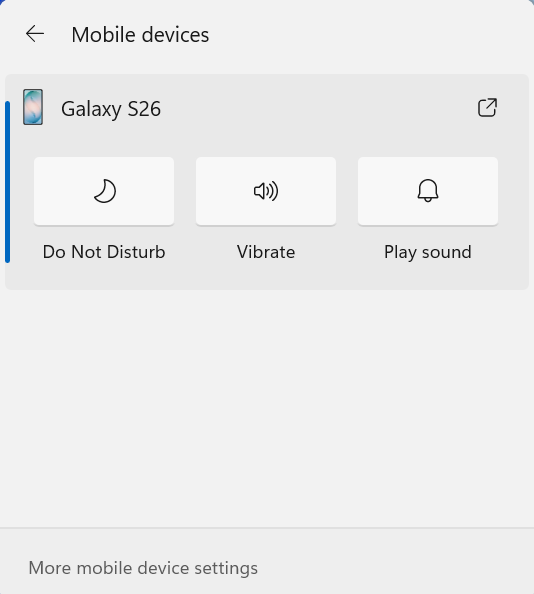
  • We're beginning to roll out a new Mobile devices experience in Quick Settings, making it easier to take quick phone actions (such as ring your phone) without breaking your flow on Windows.
  • With your supported Android phone connected, everyday actions are now just a click away. You can turn Do Not Disturb on before a meeting, change your phone's ringer mode, and play a sound to find your phone nearby.
  • It's a simpler, faster way to manage your phone from the place you already use for quick Windows actions, helping your PC and phone work better together throughout the day.
  • Capabilities can vary by phone platform and device configuration. The initial experience provides the most complete set of controls for Android phones, while iPhone support starts with a more limited status-focused experience.
[caption id="attachment_179242" align="aligncenter" width="534"]UI showing Mobile devices controls in Quick Settings for managing your connected Android phone. UI showing Mobile devices controls in Quick Settings for managing your connected Android phone.[/caption] Check your internet speed directly from Quick Settings
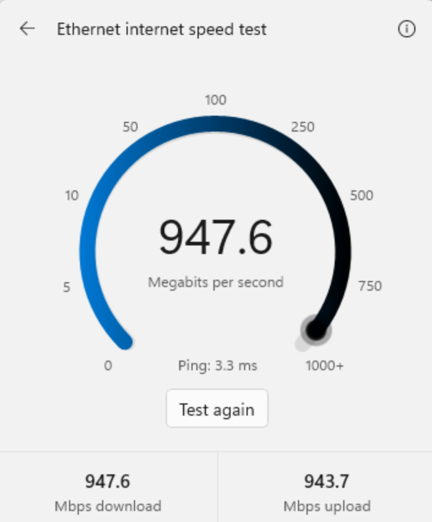
  • We're making it faster and easier to check the performance of your internet connection in Windows. Windows Insiders can now run an internet speed test and see the results directly in Quick Settings, without being redirected to a browser.
  • Start a test from the new Speed test Quick Setting, from the Wi-Fi or Cellular flyout, or by right-clicking the network icon in the system tray and selecting Test internet speed. While the test runs, Quick Settings shows its progress and results, including download speed, upload speed, and ping.
  • Because the test runs against your active internet connection, you can quickly understand how your current connection is performing without leaving your workflow. This updated experience builds on the internet speed test we previously introduced for Windows Insiders, bringing the test and its results directly into Windows.
[caption id="attachment_179244" align="aligncenter" width="432"]Internet speed test results in Windows. Internet speed test results in Windows.[/caption] Thanks, Stephen and the Windows Insider Program team

Source: Announcing new builds for 23 October 2026
 
Hello Windows Insiders, Today, we’re releasing new Windows 11 Insider Preview builds to the Beta and Experimental channels, as well as introducing a new commercial Feedback Hub policy for commercial customers. New builds this week Select your channel below to view its release notes:
For those on other specific Windows build versions, here are today’s new builds and release notes:
Private feedback for commercial customers We’re introducing a new Intune policy that lets commercial customers keep feedback submitted through Feedback Hub by users in their tenant private. When this policy is enabled, feedback cannot be posted to the public community or shared with users outside the organization. Feedback will only be accessible to Microsoft and users within the same organization (tenant). See release notes for more information.

Notable new features:​

[Windows Search]​

Release channel: Experimental, Experimental (26H1) We're expanding the new Windows Search experience that began rolling out earlier this month with more ways to find what you need and take action directly from Search.
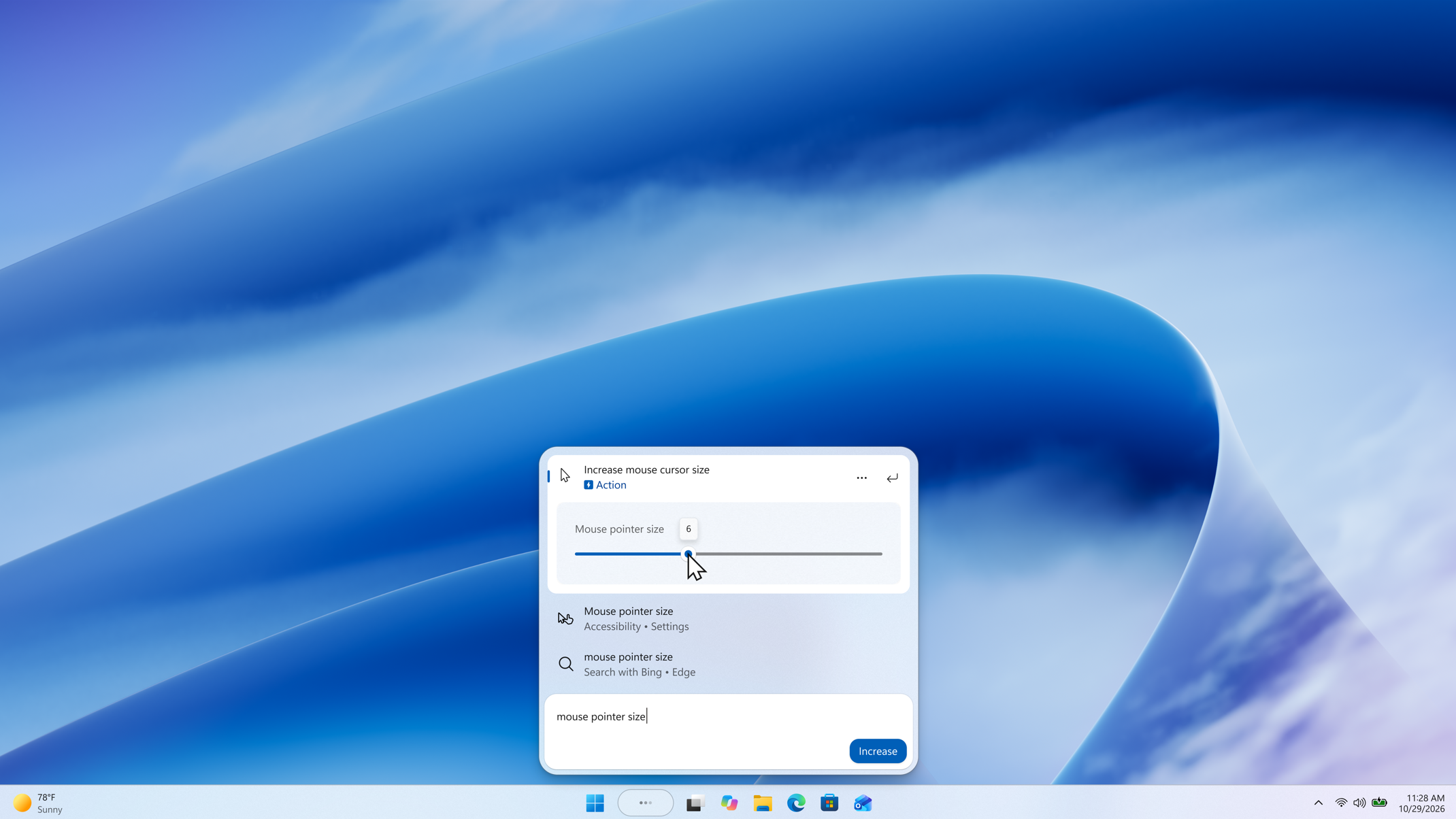
  • Inline actions: Adjust your volume, screen brightness, or cursor size with inline sliders. Actions are more clearly labeled, and suggested actions help you discover more things you can do.
[caption id="attachment_179250" align="aligncenter" width="2140"]A slider control appears in inline action results, allowing the setting to be adjusted directly from Windows Search. A slider control appears in inline action results, allowing the setting to be adjusted directly from Windows Search.[/caption]
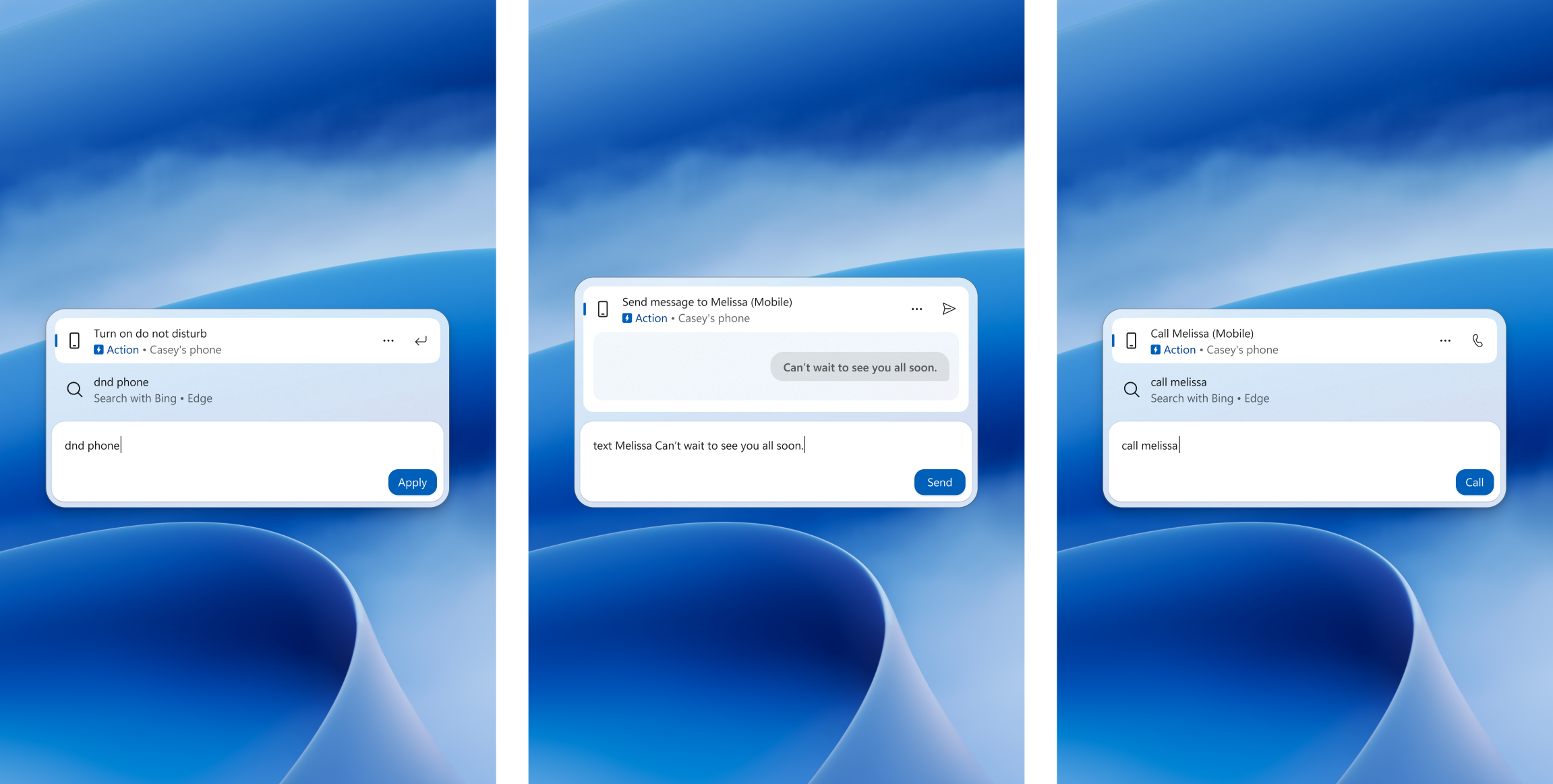
  • Phone actions: With a supported phone connected through Phone Link, you can now call or text a friend and access phone actions such as Do Not Disturb. Android support is available now with iPhone support coming early next year.
[caption id="attachment_179259" align="aligncenter" width="2303"]Three Windows Search views show phone actions for turning on Do Not Disturb, sending a text message, and making a call from a connected phone. Three Windows Search views show phone actions for turning on Do Not Disturb, sending a text message, and making a call from a connected phone.[/caption]
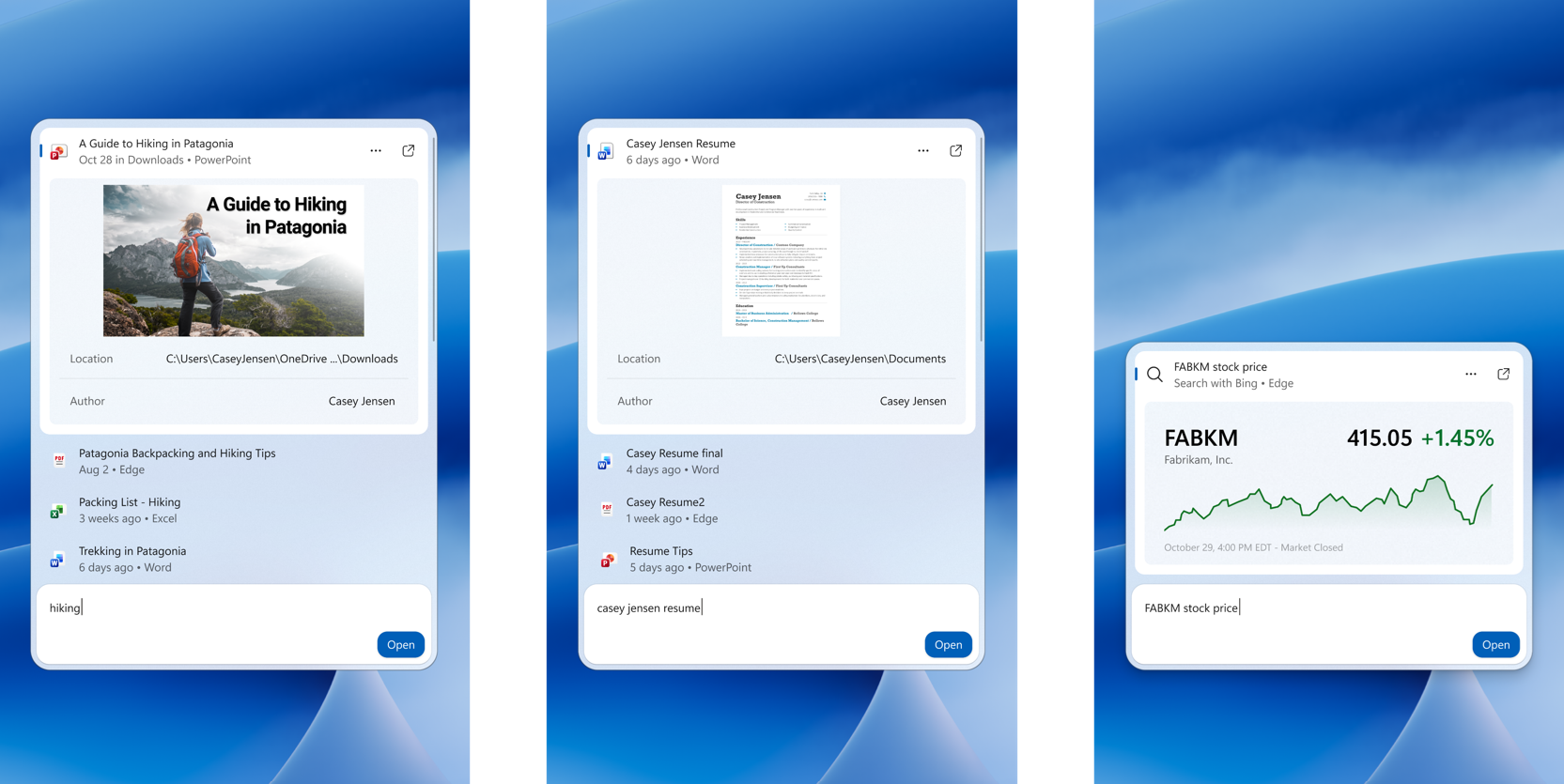
  • Richer results: Preview files and see details such as a file's last modified date, location, and author. Get web answers for weather, stocks, and facts, and discover apps and games from the Microsoft Store. Like web results, app results from the Store can be toggled on or off in Settings > Privacy & security > Search.
[caption id="attachment_179252" align="aligncenter" width="1665"]Three Windows Search views show inline previews of a PowerPoint presentation, a Word document, and a stock price. Three Windows Search views show inline previews of a PowerPoint presentation, a Word document, and a stock price.[/caption]
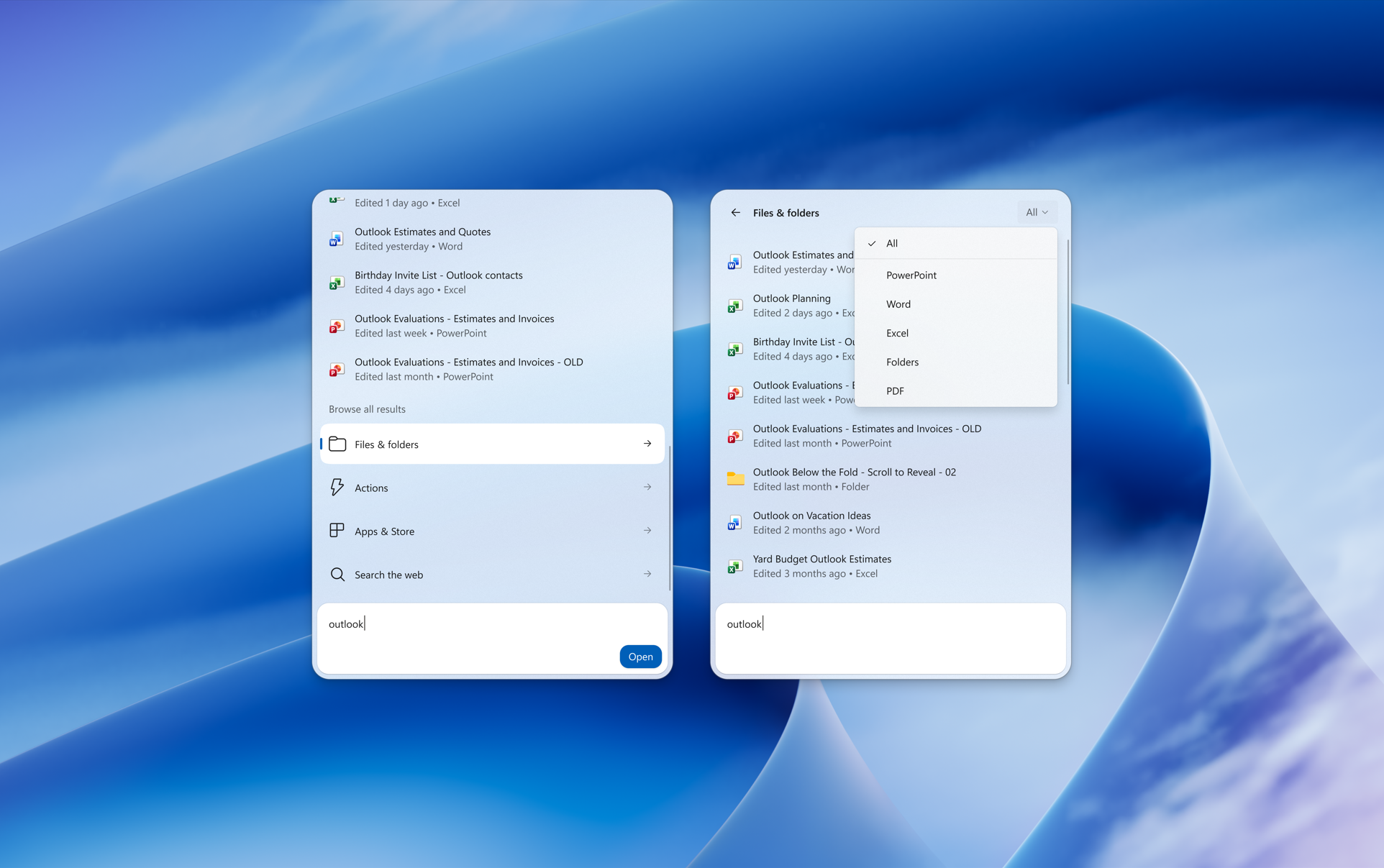
  • Result filters: Scroll to see more results and filter by Files & Folders, Settings, Actions, and more.
[caption id="attachment_179253" align="aligncenter" width="1924"]Two views of Windows Search show a search for outlook with additional options to filter and find results. Two views of Windows Search show a search for "outlook" with additional options to filter and find results.[/caption]
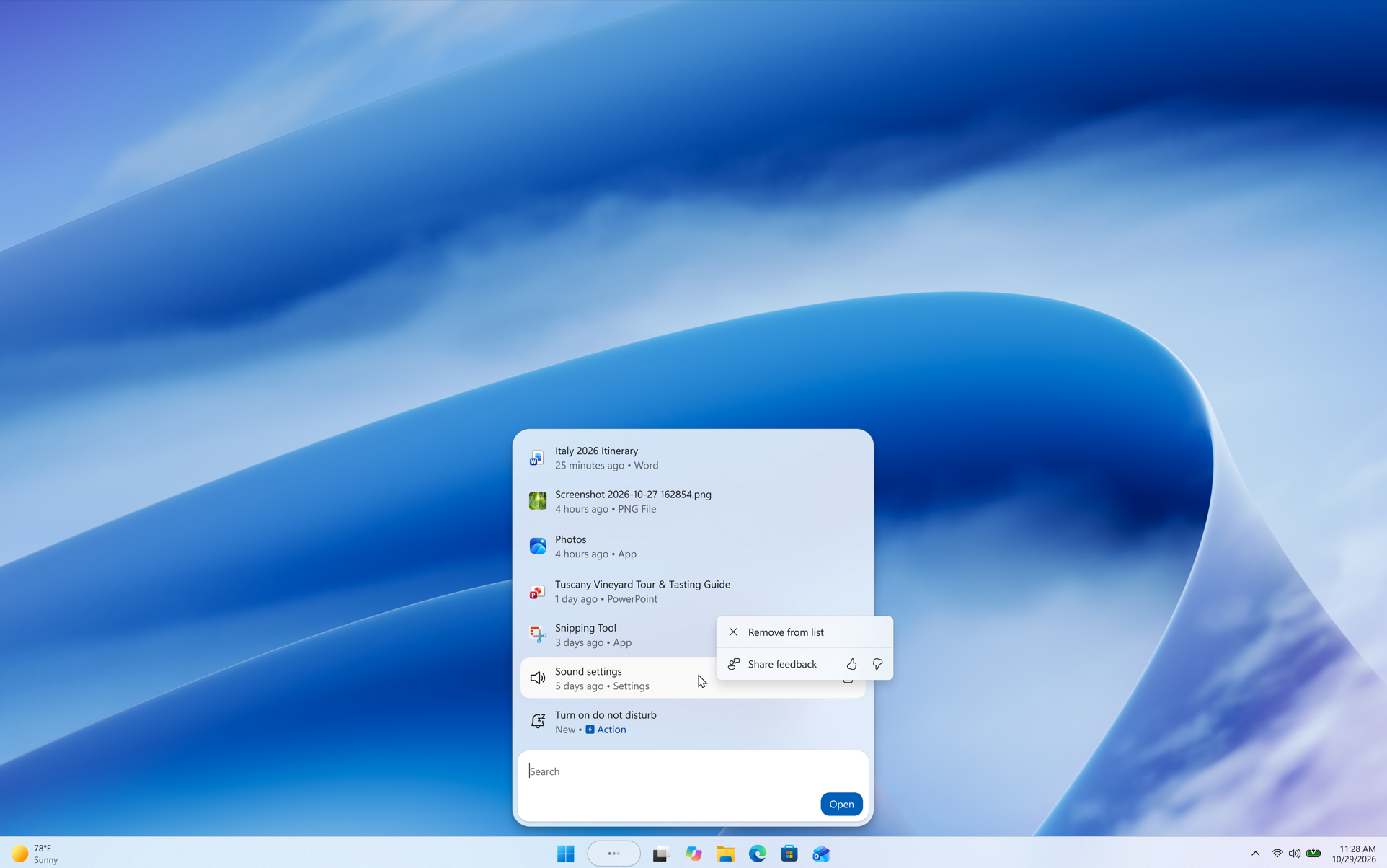
  • Feedback controls: Right-click a result or suggestion and choose thumbs up or thumbs down to tell us whether it was helpful. Thanks to your feedback, you can also remove items from the initial Search view before you type. We've also made small polish improvements to the look and feel of Windows Search based on what you've shared.
[caption id="attachment_179254" align="aligncenter" width="1924"]A context menu for a recent item in Windows Search shows Remove from list and thumbs up or thumbs down buttons for sharing feedback. A context menu for a recent item in Windows Search shows "Remove from list" and thumbs up or thumbs down buttons for sharing feedback.[/caption] As noted in our blog post, the new Windows Search opens at the bottom center of the screen. Work is underway to have it adapt to different taskbar positions and when using search from the Start menu. Thanks, Stephen and the Windows Insider Program team

Source: Announcing new builds for 30 October 2026
 
Hello Windows Insiders, Today, we’re releasing new Windows 11 Insider Preview builds to the Beta and Experimental channels. New builds this week Select your channel below to view its release notes:
For those on other specific Windows build versions, here are today’s new builds and release notes:
Experimental (Future Platforms) synthetic payload releases Insiders in the Experimental (Future Platforms) channel will begin to notice in the coming weeks that we will be releasing a new build version on a weekly basis, in-between our usual weekly Insider preview builds. These in between releases are just synthetic latest cumulative updates (LCU's), and do not contain any new features or payload. They are helping us test backend flighting and updating services. As such, we will not publish weekly release notes or blogs for these updates, but will keep track of versions in Flight Hub.

Notable new features:​

[Windows Hello]​

Release channel: Experimental Windows Hello sign-in improvement
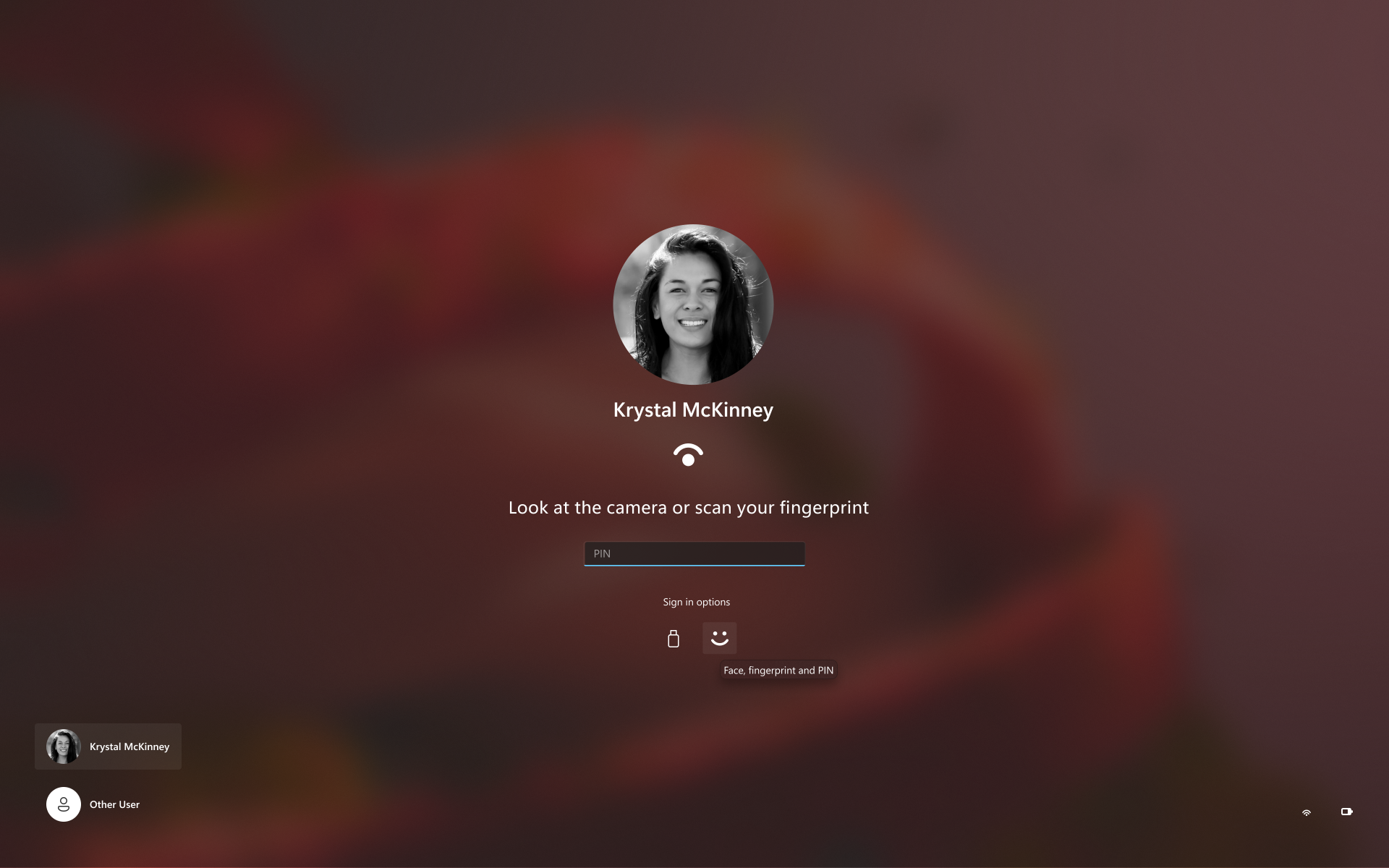
  • Sign-in and unlock now behave more consistently and give clearer guidance. You no longer have to wait for face or fingerprint recognition to finish before entering your PIN. Use whichever method works first. At certain times, such as after a restart, you'll need your PIN first. After that, biometrics work as usual.
[caption id="attachment_179264" align="aligncenter" width="1920"]Sign in with face, fingerprint, or PIN, whichever works first. Sign in with face, fingerprint, or PIN, whichever works first.[/caption] Thanks, Stephen and the Windows Insider Program team

Source: Announcing new builds for 6 November 2026
 

Join the discussion

Write your reply below. You'll create a free account or log in before it's posted.

Recently browsing

Members who viewed this thread in the last 5 minutes

Back
Top