New Update Announcing Windows 11 Insider Preview builds [Mega-Thread]

  • Bot Thread starter Bot
  • Start date Start date
  • 622 Replies
  • 144,665 Views
Hello Windows Insiders, Today, we’re releasing new Windows 11 Insider Preview builds to the Beta and Experimental channels! Coming straight off the back of our Windows + Surface event, we have some exciting new features entering the Windows Insider Program. New builds this week Select your channel below to view its release notes:
For those on other specific Windows build versions, here are today’s new builds and release notes:

Notable new features:​

[Windows Search]​

Release channel: Experimental, Experimental (26H1)
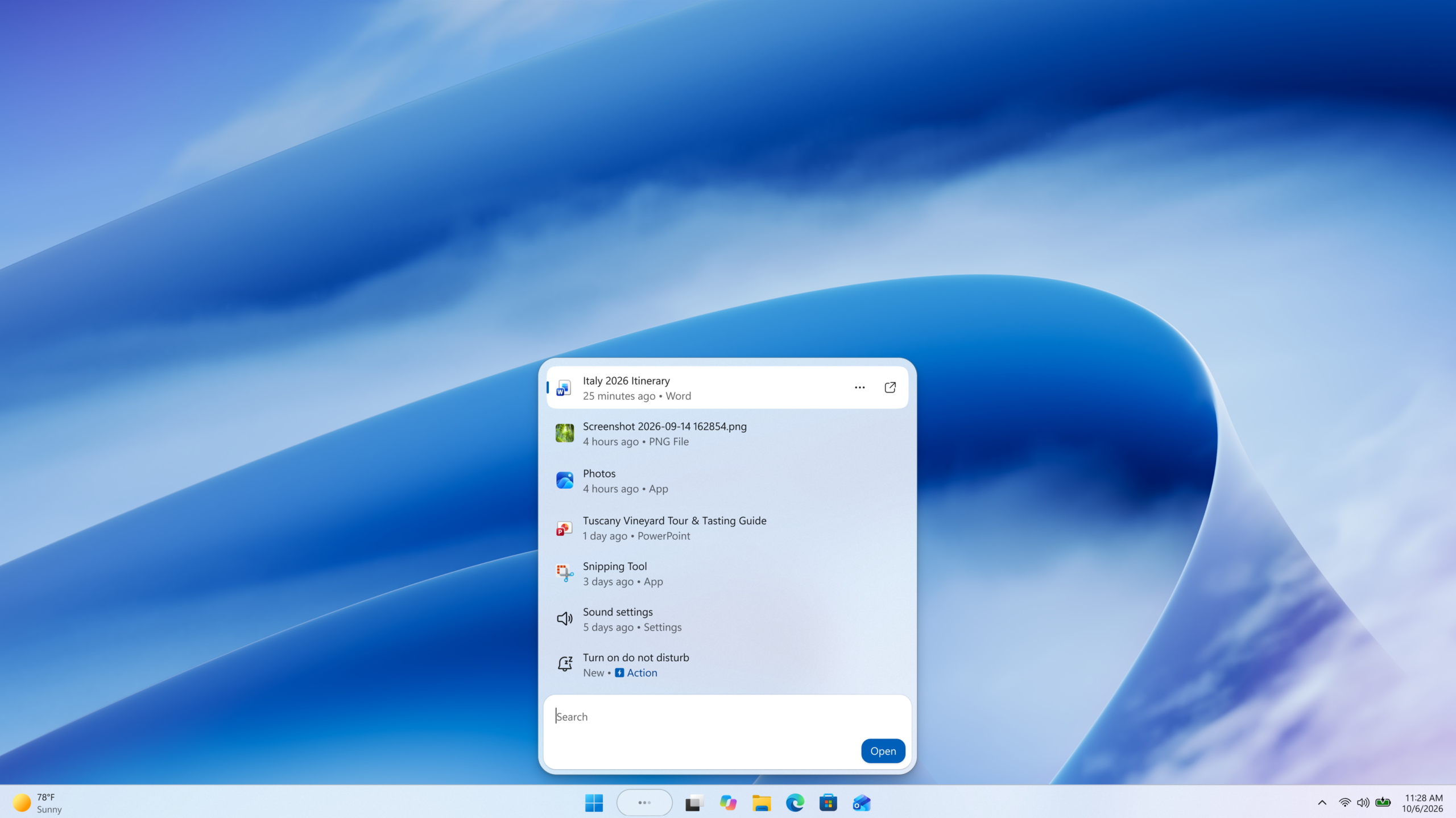
  • New Windows Search experience with inline actions: We're beginning to roll out a new Windows Search experience built on WinUI 3 that is faster, more efficient, and features a streamlined design that makes results easier to scan. We're also introducing inline actions, allowing you to quickly complete tasks directly. Turn on dark mode or Bluetooth, adjust your screen brightness, mute your device, or arrange windows from Windows Search.
  • We're improving how Windows Search understands what you're looking for, including better matching for typos and synonyms. We'll continue fine-tuning these improvements over the coming weeks. For more information detailing the new changes, check out the dedicated Windows Insider Blog.
[caption id="attachment_179190" align="aligncenter" width="2560"]Screenshot of the new Windows Search experience Screenshot of the new Windows Search experience[/caption]
[Battery Status widget]​

Release channel: Experimental
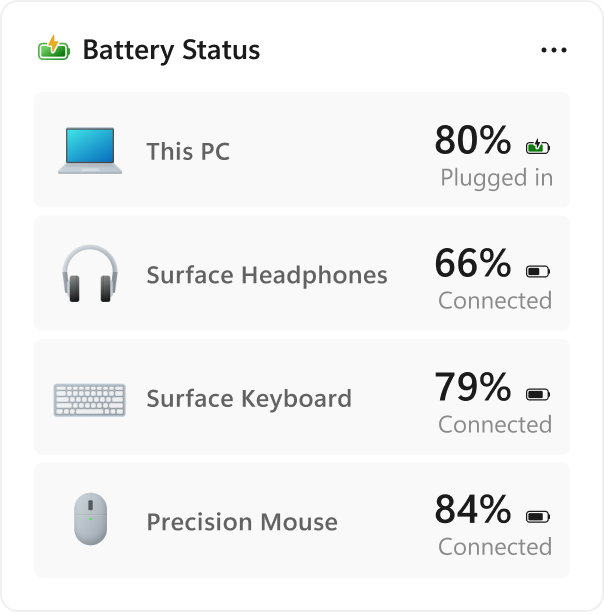
  • As part of our continued commitment to making Widgets more useful for everyday moments, we're introducing the Battery Status widget for Insiders on newer builds. This widget provides a unified view of battery levels for your PC and peripheral devices, helping you quickly assess power status without hunting through multiple UI locations. Add it by going to Widgets board > Add widgets > Battery Status.
[caption id="attachment_179221" align="aligncenter" width="604"]UI showing the new Battery Status widget, providing a unified view of battery levels across your PC and connected devices. UI showing the new Battery Status widget, providing a unified view of battery levels across your PC and connected devices.[/caption] Thanks, Stephen and the Windows Insider Program team

Source: Announcing new builds for 7 October 2026
 
Hello Windows Insiders, Today, we’re releasing new Windows 11 Insider Preview builds to the Beta and Experimental channels. New builds this week Select your channel below to view its release notes:
For those on other specific Windows build versions, here are today’s new builds and release notes:
Also a reminder that next week October 7, we have our Windows and Surface event at 10AM Pacific time! Tune in to watch live via the Windows YouTube channel. Thanks, Stephen and the Windows Insider Program team

Source: Announcing new builds for 2 October 2026
 
Hello Windows Insiders, Today, we’re releasing new Windows 11 Insider Preview builds to the Beta, Experimental, and Release Preview channels. New builds this week Select your channel below to view its release notes:
For those on other specific Windows build versions, here are today’s new builds and release notes:
  • Beta (26H1): Build 28020.3262
  • Experimental (26H1): Build 28120.3272
  • Experimental (Future Platforms): We do not have an Experimental (Future Platforms) build today
We also have Release Preview for Windows 11, version 26H1 and Windows 11, version 25H2/26H2 going out today:
NVIDIA RTX Spark launch Today we also see the launch of the new range of Windows 11 devices powered by the NVIDIA RTX Spark chip. There's never been a better time to join the Windows Insider Program, and we look forward to welcoming a new group of Insiders and devices into the program to provide feedback and continue help shape the future of Windows.

Notable new features:​

[Gaming]​

Release channel: Beta, Experimental
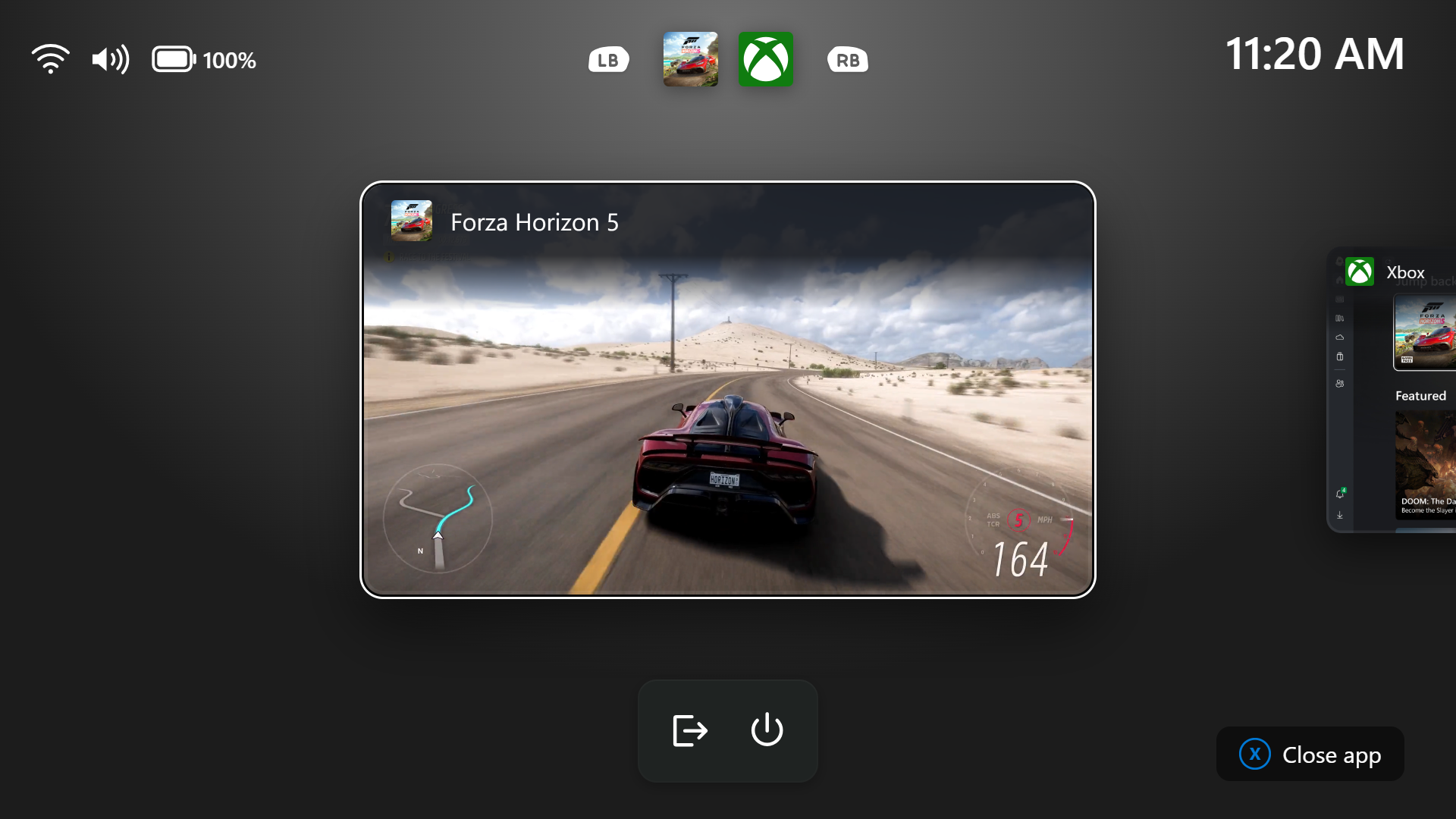
  • We're introducing a refreshed Gaming Task View experience in XBOX mode, featuring a new navigation bar that provides quick access to Exit to Desktop and Power Options. This update makes key system actions easier to access while gaming.
[caption id="attachment_179233" align="aligncenter" width="1920"]Gaming Task View showing the new navigation bar with Exit to Desktop and Power options. Gaming Task View showing the new navigation bar with Exit to Desktop and Power options.[/caption]

[Windows Hello]​

Release channel: Experimental
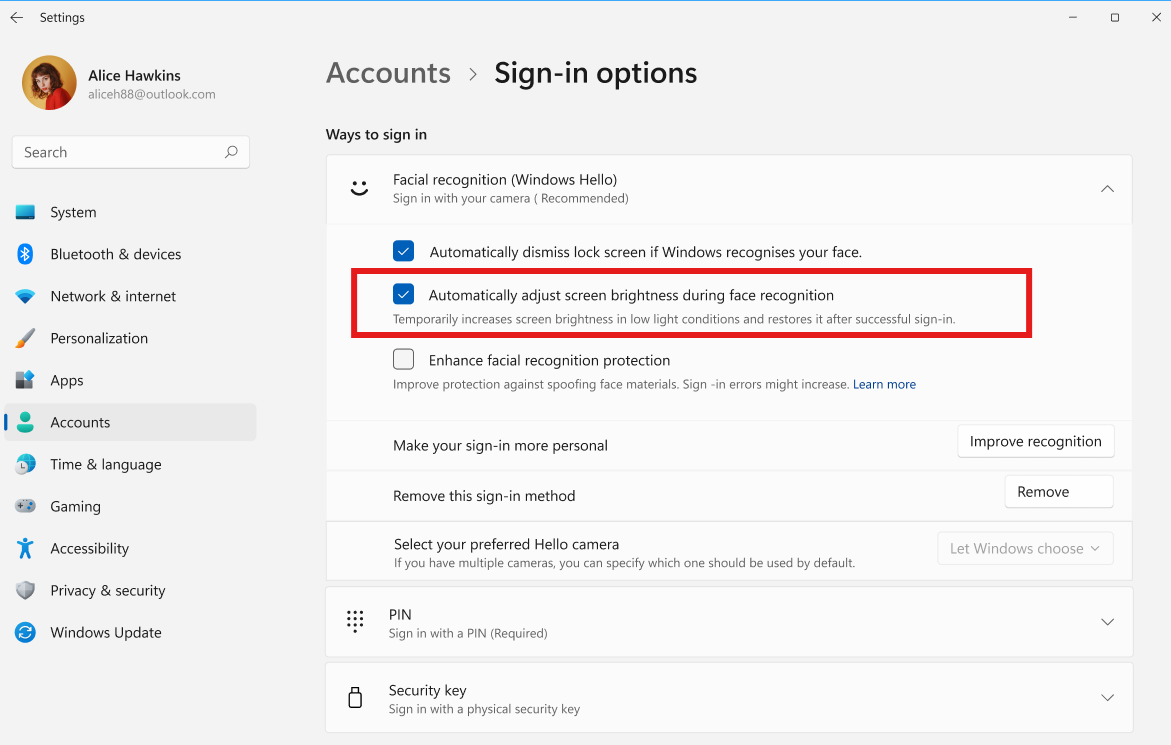
  • Windows Hello facial recognition can temporarily brighten your screen to help you sign in when you're in a dark or dimly lit room.
  • To turn on this feature, go to Settings > Accounts > Sign-in options > Facial recognition (Windows Hello) and turn on Automatically adjust screen brightness during face recognition.
[caption id="attachment_179234" align="aligncenter" width="1171"]The setting to automatically adjust screen brightness during Windows Hello facial recognition. The setting to automatically adjust screen brightness during Windows Hello facial recognition.[/caption] Thanks, Stephen and the Windows Insider Program team

Source: Announcing new builds for 16 October 2026
 

Recently browsing

Members who viewed this thread in the last 5 minutes

Back
Top