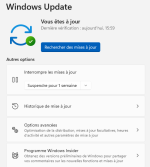
Advice Request Anyone bypass Windows 11 requirements and still get updates afterwards?

Please provide comments and solutions that are helpful to the author of this topic.

Kubla

Level 8
Thread author
Verified
Jan 22, 2017
355
1,005
668
United States
My system passes everything but the CPU requirement, I am thinking about doing the bypass method but have read where you might not get Microsoft updates if you do.

Has anyone bypassed the Windows 11 requirements and upgraded and do you still gets updates like normal?

I don't think it would be worth it if you can't get system and security updates.
 
my PC has "bypass" using RUFUS and everything is running fine with updates
Screenshot 2022-03-23 091210.png
 
My system passes everything but the CPU requirement, I am thinking about doing the bypass method but have read where you might not get Microsoft updates if you do.

I've read where many have done this already and are getting Windows updates for now. BUT, maybe you've already read in the Windows 11 thread, there's a new tactic by Microsoft, now in the DEV Insiders channel, that may display a watermark that "system requirements have not been met." There may be ways to bypass the watermark but I would cross that bridge when the time comes, of course.

 
If Windows 11 can run without the TPM chip and on older CPUs (even if certain security features are disabled) then Microsoft should just allow users to upgrade anyway rather than leaving millions on soon-to-be-unsupported Windows versions or using 3rd party workarounds. I'd rather stay on Windows 10 while its supported than use a workaround which could be disabled at any point leaving you in a worse position that if you'd stayed on 10. Eventually I'll upgrade my system anyway but won't be bumped into doing so by Microsoft when PC still works okay.
 
If only MS would lower specs (like cpu to 7th or 6th) lots of processors are not compatible (why ?).
We have 3 laptops in our house, 1 with AMD A10 (9620) and two with AMD A9 only 1 year old and and the A10 is 2 years old (not good for MS) :cry: all of them have TPM 2.0 but fail with Processor... (but these laptops run fine with W11) used W11upgradetool.
My desktop (2015) is not compatible with TPM and cpu (i3 4150 dual core at 3.5 Ghz) but runs fine with W11
My wife has a new laptop there is no problem with it.
 
Last edited:
If Windows 11 can run without the TPM chip and on older CPUs (even if certain security features are disabled) then Microsoft should just allow users to upgrade anyway rather than leaving millions on soon-to-be-unsupported Windows versions or using 3rd party workarounds. I'd rather stay on Windows 10 while its supported than use a workaround which could be disabled at any point leaving you in a worse position that if you'd stayed on 10. Eventually I'll upgrade my system anyway but won't be bumped into doing so by Microsoft when PC still works okay.
I made a backup of my Windows 10 with Marcrium, then installed 11, so I can always go back ;)
 
i'm thinking of upgradeing my 8 years old Asus X55U to Win 11, but abstained at the same time. Forget about the updates, what if I face performance issues or something major? though minimum 4gb ram and 64 gb hdd requirements is ok, but no tpm and the processor is not compatible I think. so don't know if I should stay on Win 10 or despite everything put myself into an adventure by upgrateing to 11. i'd be glad if any of you give me an idea.
 
i'm thinking of upgradeing my 8 years old Asus X55U to Win 11, but abstained at the same time. Forget about the updates, what if I face performance issues or something major? though minimum 4gb ram and 64 gb hdd requirements is ok, but no tpm and the processor is not compatible I think. so don't know if I should stay on Win 10 or despite everything put myself into an adventure by upgrateing to 11. i'd be glad if any of you give me an idea.
Make a system image backup with Macrium Reflect or some other tool, and then you can try out Win 11 without fear. If you don't like it, you just restore your system image.
By the way, the upgrade from 10 to 11 will also create a backup that allows you to roll back, at least for a few days, until Windows automatically deletes it. But just in case the rollback doesn't work, you should have your own system image.
 
Well, my PC has everything but the TPM module. Why should I upgrade when I have a quite powerful PC?
If that person wanted to use windows 11 he should upgrade parts instead of skipping requirements to be sure he will get updates in future

Im not either passing tpm module and my computer has enough for my own needs, so im not upgrading before 2025 unless im wanting to play something that my current build wont support
 
If that person wanted to use windows 11 he should upgrade parts instead of skipping requirements to be sure he will get updates in future

Im not either passing tpm module and my computer has enough for my own needs, so im not upgrading before 2025 unless im wanting to play something that my current build wont support
I agree with u. Win 11 does not offer anything that I desperately need, so Windows 10 does the job. Moreover, Linux is emerging and it is not what it used to be 5 years ago.