
Is Hardened Mode really gone in Avast One? It was one of their main advantages.
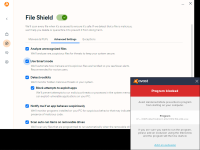
Hardened mode is available if you check this option (disabled by default). If disabled (like in this case), the CyberCapture comes into action.


Open MalwareTips from your Home Screen or desktop. Follow discussions, find answers and pick up where you left off.
If you cannot find an install option, update your browser or use its bookmark option to keep MalwareTips close.
After installation, open the app and sign in. Enable push notifications in Preferences if you want alerts. On iPhone and iPad, push requires a Home Screen web app and iOS or iPadOS 16.4 or later.
Sign in to manage notificationsInstallation is optional. Your notification settings stay under your control.
 Thread starter
SeriousHoax
Thread starter
SeriousHoax
Is Hardened Mode really gone in Avast One? It was one of their main advantages.

That looks like "Do not disturb Mode", not Hardened Mode. Are you sure?View attachment 261317
Hardened mode is available if you check this option (disabled by default). If disabled (like in this case), the CyberCapture comes into action.
Yes, I'm sureThat looks like "Do not disturb Mode", not Hardened Mode. Are you sure?


 forum.avast.com


It looks like a copy of Bitdefender's UI.I just installed the Avast Free Antivirus version, it didnt gave me the option to install the Firewall using the installer but I was able to install it via Avast UI, so I dont see any good reason to use Avast One Essential over the Avast Free Antivirus version at the moment + in Avast the Free Antivirus you are able to select which modules you want to install something you cant do in Avast One Essential version.


The same here.dont know why, but i cant use avat...prefer avg, mutch more clean..i guess
Members who viewed this thread in the last 5 minutes


