Advice Request Best practices for setting up a new router: single vs multi-band SSID & firewall security level?

Please provide comments and solutions that are helpful to the author of this topic.
After three days of using the router, I discovered that all of my devices were using 2.4 GHz and none were using 5 GHz when I used a single SSID for both bands. I'm not sure if this is because the router is in the living room and the connected devices are in the other rooms, or if I need to split the bands as some advised and connect specific devices to 5 GHz if I want those devices to use it. However, I've read that 5 GHz isn't for long distances, and since our walls are made of cement, will 5 GHz work well in that scenario?
 
As @stonjean633 already posted, better to spilt reasons:

1. Let the fastest devices use the fastest band.
To optimize throughput, put slow devices of 2.4 and faster on 5Ghz and gaming on Wifi6. This is because your router tries to apply fair use. What is fair use? Imagine your wifi being a train with say (when you have 4 devices) with wagons number A, B. C, D, E.. Then the Wifi networks gives wagons to every device in repeated sets of A-B-C-D wagons,. Problem is the slow devices occasionally mis a wagon, so your wagon allocations looks like A - used (fast device), B (used), C empty (slow device), D used next set of wagons A used, B used, C half used, D empty, etc.

So the fast devices end up in traffic jam caused by the slow devices (they could have used the empty wagons), because your router tries to find a middle ground.

2. Dump old protocols on 5 GHz and 6Ghz networks
This only applies when your device has more than one CPU to monitor and manage network traffic. When the CPU has less protocols to manage, it has a smaller reference set and assigns traffic a tiny bit faster because it does not has to look for slow old protocols

3. Last and best reason to spilt
2.4 usually broadcast stronger signal than 5 Ghz, therefore your fast gaming device get assigned to slow 2.4 Ghz network (because the signal is stronger). Then slow devices join in with old protocols (nearly all IOT devices use cheap old protocols because they have to send little data) and they have to be connected to your 2.4 network. So you end up with a lame half used router
Tip: set signal strenght on 5 Ghz to strong
 
Last edited:
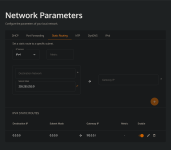
To ensure nothing is missed, here are the available settings on my ISP router. Are they configured correctly, or do you recommend any modifications?

View attachment 299115View attachment 299116View attachment 299117View attachment 299118View attachment 299119
Well, there's not much you can change and most of these don't have any effect on security anyway. I'd change default DNS servers though.
Not going to happen until either the bubble bursts or 2032 at the soonest. SSD/HDD/DDR prices have gone up 500% just on Amazon alone.
Soon. From what I recently read, for the first time ever, Google spend more money than what they earned due to investments in AI. This is why they are so desperate users using it and why they reduced the pricing for Gemini.

Once bubble bursts, it won't be nice... for them. It will be terrific for us.
That's a nice router (y)(y)(y) I have the GT-BE98 myself.
I have TUF-AX3000 V2 for a few years now and I don't see why would anyone need Wi-Fi 7. 6 and 6E are enough for everyone. I may get one if current one dies, but while it still works, no reason to change.
After three days of using the router, I discovered that all of my devices were using 2.4 GHz and none were using 5 GHz when I used a single SSID for both bands. I'm not sure if this is because the router is in the living room and the connected devices are in the other rooms, or if I need to split the bands as some advised and connect specific devices to 5 GHz if I want those devices to use it. However, I've read that 5 GHz isn't for long distances, and since our walls are made of cement, will 5 GHz work well in that scenario?
That's what I said. It's really bad system that doesn't work correctly sometimes. I'm not sure if that's router acting up or devices. Nonetheless, I don't recommend combining SSIDs into one.
 
Which DNS server is best for a home network, in your opinion?
Well... I'm using 1.1.1.1 over DoT on my Asus router. While I personally use Control D on my devices, not everyone wants filtering DNS. The most important thing for me is that the router provides fast, private, safe and uncensored DNS server to all clients. If anyone wants to use anything else on their device, they are free to do so as 1.1.1.1 won't override user choice. I set it like that on purpose.

ISP DNS servers are out of the question. In this day and age, it doesn't have DNSSEC, it doesn't support ECH; it simply doesn't have any privacy and safety features enabled whatsoever. Response time is also out of the roof, despite having fiber connection and is hosted relatively near me. I get way 3x better response time with Control D in Frankfurt than what I get ISP provided DNS servers. That says it all!
 
As @stonjean633 already posted, better to spilt reasons:

1. Let the fastest devices use the fastest band.
To optimize throughput, put slow devices of 2.4 and faster on 5Ghz and gaming on Wifi6. This is because your router tries to apply fair use. What is fair use? Imagine your wifi being a train with say (when you have 4 devices) with wagons number A, B. C, D, E.. Then the Wifi networks gives wagons to every device in repeated sets of A-B-C-D wagons,. Problem is the slow devices occasionally mis a wagon, so your wagon allocations looks like A - used (fast device), B (used), C empty (slow device), D used next set of wagons A used, B used, C half used, D empty, etc.

So the fast devices end up in traffic jam caused by the slow devices (they could have used the empty wagons), because your router tries to find a middle ground.

2. Dump old protocols on 5 GHz and 6Ghz networks
This only applies when your device has more than one CPU to monitor and manage network traffic. When the CPU has less protocols to manage, it has a smaller reference set and assigns traffic a tiny bit faster because it does not has to look for slow old protocols

3. Last and best reason to spilt
2.4 usually broadcast stronger signal than 5 Ghz, therefore your fast gaming device get assigned to slow 2.4 Ghz network (because the signal is stronger). Then slow devices join in with old protocols (nearly all IOT devices use cheap old protocols because they have to send little data) and they have to be connected to your 2.4 network. So you end up with a lame half used router
Tip: set signal strenght on 5 Ghz to strong


To be honest i feel things used to be that way but i no longer see it like that, all my devices connect at decent speeds, I get over 700 on both iPhones & two iPads, as I said the furthest device connects on 2.4 as it should and still get 130, my IOT cameras are on 2.4 fixed, I really do not think its how it was anymore, it may be for some but give it a try on mixed, works well here & I always used to decide myself the frequency, this PC however is on Ethernet as its only a 3 meters from the router all else is on Wifi, just my opinion here - My Panasonic TV in my lounge 15+ meters from the router with a wall between is on 6Ghz because it can & gives speeds of 350, just looked, how fast do I want a TV to connect, I feel you can faff around & gain nothing??
 
Last edited:
  • Wow
Reactions: lokamoka820
Well... I'm using 1.1.1.1 over DoT on my Asus router. While I personally use Control D on my devices, not everyone wants filtering DNS. The most important thing for me is that the router provides fast, private, safe and uncensored DNS server to all clients. If anyone wants to use anything else on their device, they are free to do so as 1.1.1.1 won't override user choice. I set it like that on purpose.

ISP DNS servers are out of the question. In this day and age, it doesn't have DNSSEC, it doesn't support ECH; it simply doesn't have any privacy and safety features enabled whatsoever. Response time is also out of the roof, despite having fiber connection and is hosted relatively near me. I get way 3x better response time with Control D in Frankfurt than what I get ISP provided DNS servers. That says it all!
I tried changing the "Primary DNS" to 1.1.1.1, but when I tested, it still indicated that I was using an ISP DNS. Should I change the "Gateway Address" instead?
 
I tried changing the "Primary DNS" to 1.1.1.1, but when I tested, it still indicated that I was using an ISP DNS. Should I change the "Gateway Address" instead?
No. Gateway address is the IP address of the router itself.

Change it again, put 1.1.1.1 as a primary DNS and 1.0.0.1 as a secondary DNS. Save settings and restart the router. Then, clear the DNS cache on your device and
go to dnscheck.tools to see if Cloudflare appears as your DNS. If it's still showing your ISP DNS, we'll go further steps.
 
I discovered that all of my devices were using 2.4 GHz and none were using 5 GHz when I used a single SSID for both bands. I'm not sure if this is because the router is in the living room and the connected devices are in the other rooms, or if I need to split the bands as some advised and connect specific devices to 5 GHz if I want those devices to use it. However, I've read that 5 GHz isn't for long distances, and since our walls are made of cement, will 5 GHz work well in that scenario?
On Android, I use "Network Analyzer" by Jiri Techet to see the signals. It shows both the 2.4Ghz and 5Ghz bands even with the same SSIDs. On the PC, I use "inSSIDer" wifi-analyzer by MetaGeek (by somebody else now?), but much less frequently.
 
  • Thanks
Reactions: lokamoka820
I tried changing the "Primary DNS" to 1.1.1.1, but when I tested, it still indicated that I was using an ISP DNS. Should I change the "Gateway Address" instead?
Your browser could be bypassing the router DNS. Turn OFF SECURE DNS in your browsers. Then if your router has the capability to force all clients to use the router DNS no matter what config is in the browser,then there should be no bypass. Asus have this option.
 
Your browser could be bypassing the router DNS. Turn OFF SECURE DNS in your browsers. Then if your router has the capability to force all clients to use the router DNS no matter what config is in the browser,then there should be no bypass. Asus have this option.
I didn't try restarting the router after changing the DNS, so perhaps that was the problem. I'll try again tonight.