Bitdefender blocking suspicious files and windows defender randomly disabled

wordyrobot

New Member
Thread author
Verified
Nov 25, 2015
16
0
5
43
United States
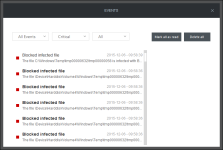
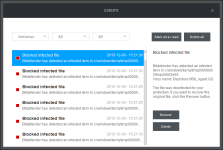
so i already got help from this site before and it actually fixed mostly every problem i had. then about a week or 2 later ive been getting all these blocked viruses on bitdefender. usually bitdefender is very good at what it does so i thought that i should look at what it said. when i check it out i see all these "device\harddiskvolume4/temp/tmp00000632" and "c:\windows\temp\tmp00000632" viruses being blocked. i see like 10 of each of those being deleted. whenever i restart my computer bitdefender blocks them again. also when i started my computer up windows defender blocked it as well but then like 2 minutes later i see windows defender randomly turns off and i didnt do anything. i try to turn it back on but it doesn't let me for some reason. i dont remember downloading anything that is suspicious but i could be wrong. i have no idea what harddiskvolume4 is or the tmp00000632. i provided a frst and addition file to speed up the process. thanks! :)
 

Attachments

alright but is harddiskvolume4 malicious or anything because whenever i restart my computer those are blocked again and windows defender randomly turns off
 
51a612a8b27e2-Zoek.png
Scan with ZOEK

Please download ZOEK by Smeenk and save it to your desktop.
Temporary disable your AntiVirus and AntiSpyware protection - instructions here.

  • Right-click on
    51a612a8b27e2-Zoek.png
    icon and select
    RunAsAdmin.jpg
    Run as Administrator to start the tool.
  • Wait patiently until the main console will appear, it may take a minute or two.
  • In the main box please paste in the following script:
    Code:
    createsrpoint;
    autoclean;
    emptyclsid;
    emptyalltemp;
    ipconfig /flushdns >>"%temp%\log.txt";b
  • Make sure that Scan All Users option is checked.
  • Push Run Script and wait patiently. The scan may take a couple of minutes.
  • When the scan completes, a zoek-results logfile should open in notepad.
  • If a reboot is needed, it will be opened after it. You may also find it at your main drive (usually C:\ drive)

Upload it in your next reply.
 
ok i usually dont get on past 6 on regular weekdays so sorry about that and ive noticed a few more other weird things happening. sometimes when on chrome, it'll just randomly go to the bottom of the webpage and when i was doing the zoek scan google chrome closed randomly like 3 times. dont know if thats because zoek closes chrome or not but id still like to tell you about that. dont know if it matters or not but when i was on steam, it kept setting me to offline to online really fast like 20 times but that could be because of steam updates a few minutes before that happened. thanks! zoek results below
 

Attachments