It seems that Kaspersky has been blocked by Google from being activated in the Android's accessibility menu. Is anyone having the same problem? I know that they have removed it from play store but this is new.


The MalwareTips app
Your community, one tap away.
Open MalwareTips from your Home Screen or desktop. Follow discussions, find answers and pick up where you left off.
- Home Screen access
- Optional push alerts
- Your community
You're ready to explore.Explore what's new
Installation instructions
iPhone & iPad
- Open MalwareTips in Safari and tap Share. You may need to open the Page Menu first.
- Choose Add to Home Screen. If it is not listed, use Edit Actions to add it.
- Keep Open as Web App enabled if shown, then tap Add.
Android
- Open MalwareTips in Chrome or another browser that supports app installation.
- Open the browser menu and look for Install app, Install and create shortcut, or Add to Home screen.
- Choose Install and confirm. Wording varies by browser.
Desktop
- Chrome: use the install icon in the address bar, or the menu under Cast, save and share.
- Edge: open the menu, then More tools, Apps and Install this site as an app.
- Safari on Mac: choose Share or File, then Add to Dock. Firefox on Windows: look for the web apps button in the address bar.
If you cannot find an install option, update your browser or use its bookmark option to keep MalwareTips close.
Keep up with your conversations
After installation, open the app and sign in. Enable push notifications in Preferences if you want alerts. On iPhone and iPad, push requires a Home Screen web app and iOS or iPadOS 16.4 or later.
Sign in to manage notificationsInstallation is optional. Your notification settings stay under your control.
You are using an out of date browser. It may not display this or other websites correctly.
You should upgrade or use an alternative browser.
You should upgrade or use an alternative browser.
Solved Can't activate Kaspersky in Android's accessibility menu
- Thread starter Abhishek Singha
- Start date
Kaspersky
6 Replies
1,589 Views


I got some cases in Kaspersky Spanish section:
 forum.kaspersky.com
 forum.kaspersky.com
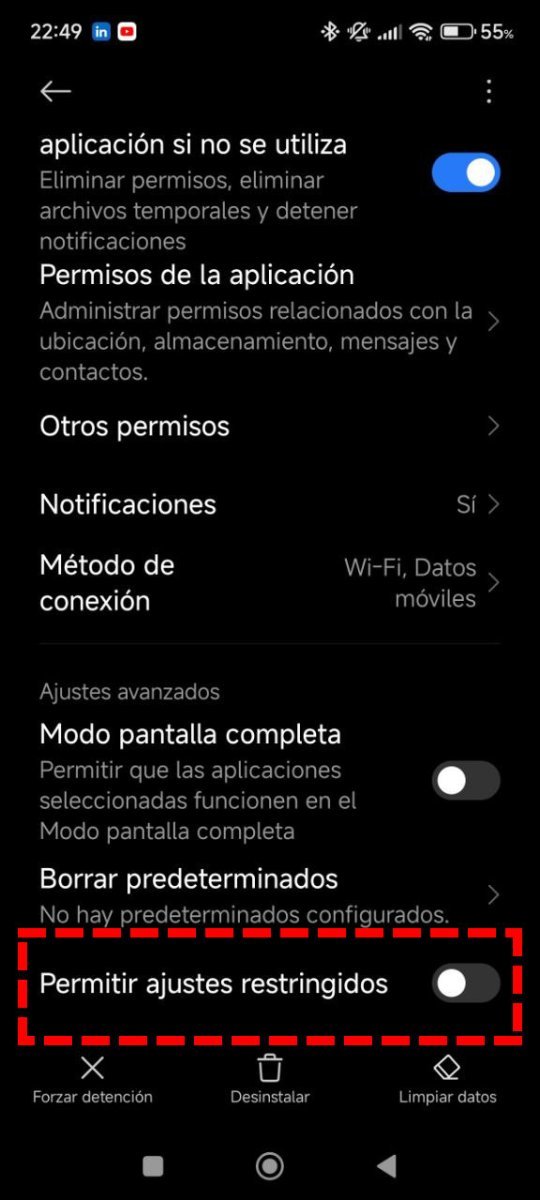
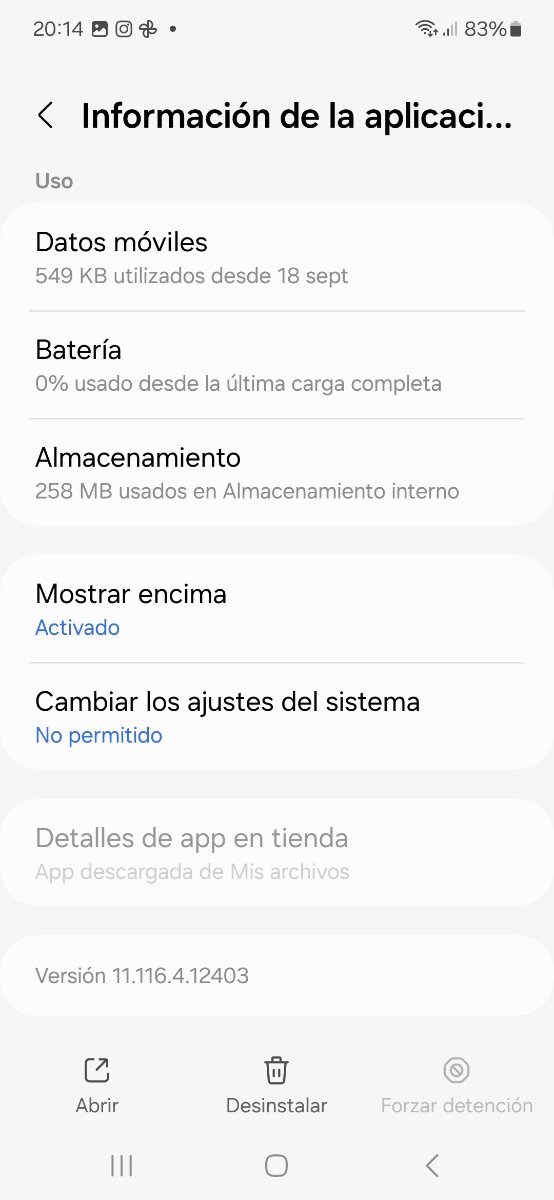
So, you have to go to Applications -> Kaspersky app -> rights, and unlock there.
Accesibilidad Restingida para activar protección Web Web (Kaspersky Andorid)
Hola, Soy otro de los sufridores de la desaparición de Kaspersky en Play Store. Justo me ha coincido con la renovación de licencia y tras actualizar la versión de Android de Kaspersky, vía APK desde la web del propio Kaspersky, a la hora de intentar la protección web pide activar en Accesibilidad...
forum.kaspersky.com
¡Por favor! ¿Cómo me puedo poner en contacto, y que sea atendido por el servicio técnico de Kaspersky en castellano?
Hola. Sé, que esta cosas no se debían, o no se podían preguntar por aquí. Pero una vez que explique mi situación, os preguntaría. ¿Qué hago?. Soy un usuario particular, tengo el Kaspersky Premium para cinco dispositivos. En uno de ello. En concreto, en un teléfono móvil, algunas de las aplicacion...
forum.kaspersky.com
So, you have to go to Applications -> Kaspersky app -> rights, and unlock there.

Also now because it's not on Play store. Google is restricting rights of "sideloaded" apps as a new baseline to limit their damage.
Why are they behaving like Apple? It's lame.Also now because it's not on Play store. Google is restricting rights of "sideloaded" apps as a new baseline to limit their damage.
If an user is installing a certain app, the user should be allowed to decide whether the access should be given or not.
What's the meaning of using Android then?
Found it & working... ThanksI got some cases in Kaspersky Spanish section:
Accesibilidad Restingida para activar protección Web Web (Kaspersky Andorid)
Hola, Soy otro de los sufridores de la desaparición de Kaspersky en Play Store. Justo me ha coincido con la renovación de licencia y tras actualizar la versión de Android de Kaspersky, vía APK desde la web del propio Kaspersky, a la hora de intentar la protección web pide activar en Accesibilidad...
¡Por favor! ¿Cómo me puedo poner en contacto, y que sea atendido por el servicio técnico de Kaspersky en castellano?
Hola. Sé, que esta cosas no se debían, o no se podían preguntar por aquí. Pero una vez que explique mi situación, os preguntaría. ¿Qué hago?. Soy un usuario particular, tengo el Kaspersky Premium para cinco dispositivos. En uno de ello. En concreto, en un teléfono móvil, algunas de las aplicacion...
So, you have to go to Applications -> Kaspersky app -> rights, and unlock there.
There is a workaround but it's still an issue for most users to deal with.
Recently browsing
Members who viewed this thread in the last 5 minutes

