Can't get past boot manager screen and computer won't access USB or DVD

Image is good, and told us that you didn't set up your BIOS to boot from USB correctly. Try to plug in your USB on the back side of your PC, sometimes front side won't work.

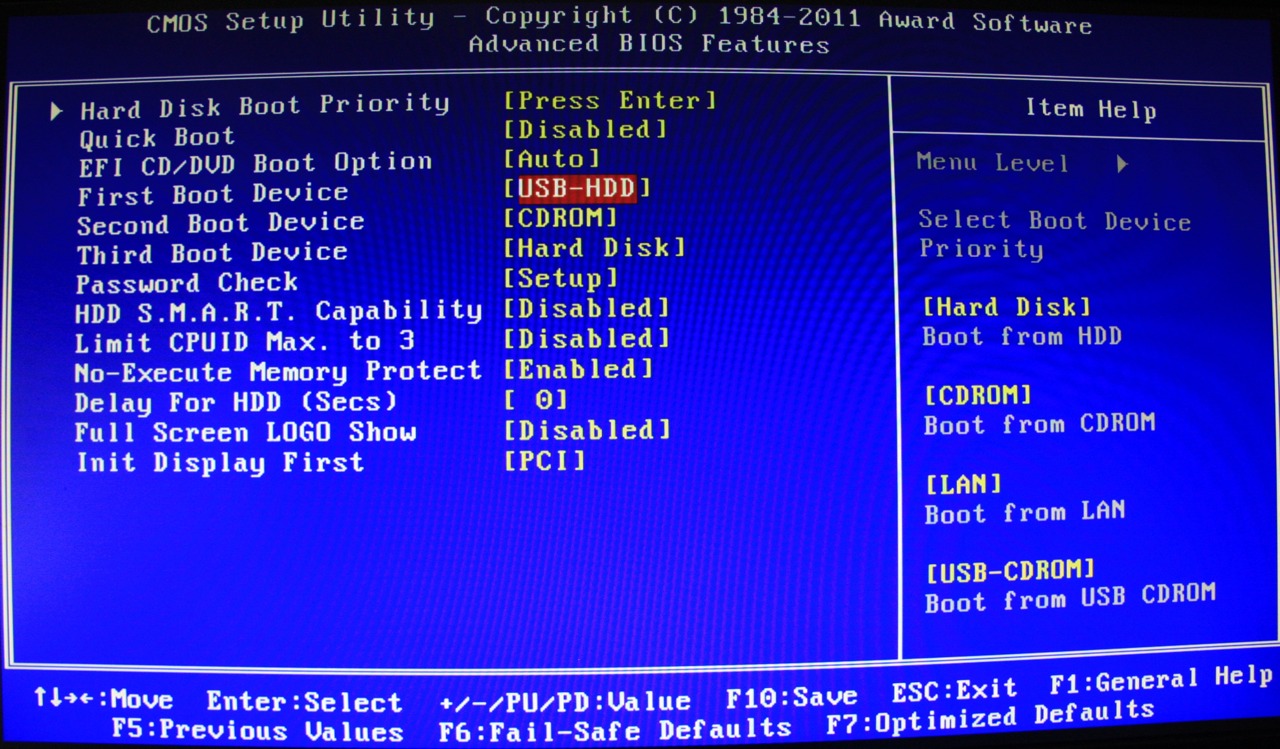
Then go to BIOS, similar like below. Try to set first boot device to be Hard Disk and above at Hard Disk Boot Priority make your USB to be first, by pressing + or - on your keyboard right side. Then your press F10, confirm to save setting and try again.

boot+device.jpg
 
Sorry, can't do that... no BIOS for me I'm afraid. I am unable to access the BIOS. Although, the first screen that comes up upon booting the computer, has the option of f2 or f12, the keys are both nonfunctional when pressed. At one point in time, when I was able to access the BIOS, I had tried the change you suggested but it did not do anything. I tried a couple other alternatives as well, such as booting from a CD/DVD or from my second hard drive.
I will certainly try putting the USB stick in the other ports though.
 
Try to press F2 several times. Or press Delete several times to access bios. Or try to press F12 and then choose USB HDD option. What is the name of your PC, model?
 
Tried that too. In fact, I'm sure I've tried every key on the keyboard... unless there was a secret key combination that I am not aware of.
 
Okay. I understand. Thanks for all your efforts. It is much appreciated. Would I be able to bother you to help me with making sure I have all the malware removed from my other computer? Or do I need to start a new thread?
 

Recently browsing

Members who viewed this thread in the last 5 minutes

Back
Top