App Review Comodo Firewall 10 Setup

It is advised to take all reviews with a grain of salt. In extreme cases some reviews use dramatization for entertainment purposes.
unless we disable the cloud lookup, we need an AV to supplement CF
Although the infections by wrong cloud ratings are not very common

I'm trying EAM with CF@CS settings. But I have not tested it against any malware. Only thing notice is that vbox has to force close win7 since installed EAM. So I disabled EAM self protection, but not sure that issue is solved... :confused:
 
  • Like
Reactions: AtlBo
Even nothing will be safer than default setting :D
Now, now. CFW installs by default in Firewall config, with HIPS and Firewall enabled in safe mode, and plenty of other mitigations enabled, such as embedded code detection for powershell, for instance.
That's pretty safe for the average human being, if not for Umbra...
 
I'm trying EAM with CF@CS settings. But I have not tested it against any malware. Only thing notice is that vbox has to force close Windows 7 since installed EAM. So I disabled EAM self protection, but not sure that issue is solved... :confused:
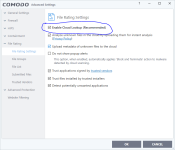
just disable this option in the attachment and you don't need EAM because that will waste your resource

if you want, you can add zemana antilogger. It's so light and works really well with CF
 

Attachments

  • Capture.PNG
    Capture.PNG
    36.7 KB · Views: 522
Personally I would never use Comodo at default.

And one other thing- I was rushing apparently too much earlier and didn't have time to try the malware on a totally clean system. Without any protection involved, it will drop to a few places (mainly system32), set itself up for persistence, and will try to connect out. So the file is indeed fully formed.

As this is an info-stealer, consider what it must do to exploit your system- it must have a component to harvest the stolen data as well as a component to transmit this data out to the Blackhat. So a stop for either of these components will protect the system (thus the need for an outbound alerting firewall). In the case of CF, even if a person sets up their Comodo in a way that permits the payload drop, the Firewall would still either alert the user of something trying to connect out, or with my settings just block the Outbound request silently.
 
Guys! I can't leave you for a minute, can I?

I just tried this specific malware-dcd0e73b264427269c262d6dc070570ce76c56faaf5ccfcebc0ae79b4e32130d (if you can really call it malware, as it seems this is just a test of a component of an info-stealer of some type), and at my settings it was totally contained. No startups, no real system changes, and certainly no registry changes.

AVG- did you do a scan of your system prior to running the malware? And also, as this particular file, as a component, does not have the ability to make changes as shown in your screenshots, I'm really curious as to how this could have happened anyway.

ps- the only file that would have been contained was the original malware as nothing further was dropped. And being unsigned it certainly wasn't trusted on my system!


Personally I would never use Comodo at default.

And one other thing- I was rushing apparently too much earlier and didn't have time to try the malware on a totally clean system. Without any protection involved, it will drop to a few places (mainly system32), set itself up for persistence, and will try to connect out. So the file is indeed fully formed.

As this is an info-stealer, consider what it must do to exploit your system- it must have a component to harvest the stolen data as well as a component to transmit this data out to the Blackhat. So a stop for either of these components will protect the system (thus the need for an outbound alerting firewall). In the case of CF, even if a person sets up their Comodo in a way that permits the payload drop, the Firewall would still either alert the user of something trying to connect out, or with my settings just block the Outbound request silently.

So this first massages was wrong call by you?
Second is right?

Would you call it "System Infected" at the end of the test or...?
 
Worst Comodo is uninstalled Comodo.

LoL

I tend to agree anymore but then I always seem to be busy elsewhere when these nice improvements are released.

Used to run and liked a lot the ComodoFW 5 Defense+ I think (it's been awhile).

If I'm going to run a "Live" system online I do want this program (set to CS rules) also up front and center.
 
When I ran the malware on an UNPROTECTED system I initially didn't notice one of the drops (into System32) which gave led to the OutBound connections.

As far as CF is concerned, the malware was contained. Actually when the drops were prevented (in the first second or two) the malware just shut down. Now if you turned off the firewall and sandbox (obviously the Cloud AV has to be disabled since Comodo now has a definition for it) and just use the HIPS (safe mode), the malware would keep running and there would be 9 HIPS alerts for various things in the first minute.

With HIPS at safe Mode AND the sandbox at my settings there would have been just the initial HIPS alert that a file was being run. After that there would have been nothing for the HIPS do as the malware was prevented from doing anything other than dying.

But in either case nothing changed on reboot.
 
just disable this option in the attachment and you don't need EAM because that will waste your resource
if you want, you can add zemana antilogger. It's so light and works really well with CF

thanks for the feedback. I've seen that suggestion posted several times due to comodo cloud sometimes getting a file wrong. hardware here is relatively new and strong, resources seem like not an issue, but I take your suggestion seriously. thanks.
 
thanks for the feedback. I've seen that suggestion posted several times due to comodo cloud sometimes getting a file wrong. hardware here is relatively new and strong, resources seem like not an issue, but I take your suggestion seriously. thanks.

PS.
 
  • Like
Reactions: AtlBo
Exactly, any experienced Comodo users will tell you that. All known comodo bypasses were made when it was at default settings.
CFW default config is good, CS config is better, Umbra config is best (for advanced users).

The bad config is the default one for Comodo Internet Security.
If you install CIS, it defaults to internet config, and that's weak, because it relies too heavily on the AV component.