

The MalwareTips app
Your community, one tap away.
Open MalwareTips from your Home Screen or desktop. Follow discussions, find answers and pick up where you left off.
- Home Screen access
- Optional push alerts
- Your community
You're ready to explore.Explore what's new
Installation instructions
iPhone & iPad
- Open MalwareTips in Safari and tap Share. You may need to open the Page Menu first.
- Choose Add to Home Screen. If it is not listed, use Edit Actions to add it.
- Keep Open as Web App enabled if shown, then tap Add.
Android
- Open MalwareTips in Chrome or another browser that supports app installation.
- Open the browser menu and look for Install app, Install and create shortcut, or Add to Home screen.
- Choose Install and confirm. Wording varies by browser.
Desktop
- Chrome: use the install icon in the address bar, or the menu under Cast, save and share.
- Edge: open the menu, then More tools, Apps and Install this site as an app.
- Safari on Mac: choose Share or File, then Add to Dock. Firefox on Windows: look for the web apps button in the address bar.
If you cannot find an install option, update your browser or use its bookmark option to keep MalwareTips close.
Keep up with your conversations
After installation, open the app and sign in. Enable push notifications in Preferences if you want alerts. On iPhone and iPad, push requires a Home Screen web app and iOS or iPadOS 16.4 or later.
Sign in to manage notificationsInstallation is optional. Your notification settings stay under your control.
You are using an out of date browser. It may not display this or other websites correctly.
You should upgrade or use an alternative browser.
You should upgrade or use an alternative browser.
Crystal Security 3.5
-
 Thread starter
Kardo Kristal
Thread starter
Kardo Kristal
- Start date
- 1,165 Replies
- 286,344 Views
- Status
- Not open for further replies.


Hi everyone,
BetaNews made a review of Crystal Security.
Install any anti-malware with real-time protection and you’re generally weighing down your system with services, drivers, DLLs, background processes and more.
Crystal Security does things differently..
You can read review here.

Give and receive love this holiday season and you will surely have a joyous Xmas. Best wishes to your family this season and always.
May Christmas spread cheer in your lives!
Thanks to all the feedback, suggestions, reviews and tests.
Regards,
Kardo
BetaNews made a review of Crystal Security.
Install any anti-malware with real-time protection and you’re generally weighing down your system with services, drivers, DLLs, background processes and more.
Crystal Security does things differently..
You can read review here.
Give and receive love this holiday season and you will surely have a joyous Xmas. Best wishes to your family this season and always.
May Christmas spread cheer in your lives!
Thanks to all the feedback, suggestions, reviews and tests.
Regards,
Kardo
S
Sr. Normal
Hi everyone,
BetaNews made a review of Crystal Security.
Install any anti-malware with real-time protection and you’re generally weighing down your system with services, drivers, DLLs, background processes and more.
Crystal Security does things differently..
You can read review here.
Give and receive love this holiday season and you will surely have a joyous Xmas. Best wishes to your family this season and always.
May Christmas spread cheer in your lives!
Thanks to all the feedback, suggestions, reviews and tests.
Regards,
Kardo
"Crystal Security offers plenty of useful functions and features in an ultra-lightweight package, and if you’ve security experience – and the time to experiment – it’s worth a closer look."
I only can recommend having it a season to your computer to test it. Then, it will become an essential soft in your computer
Big hug my friend and a happy new year!
D
Deleted Member 333v73x
@Kardo Kristal Crystal Security portable is blocked by Windows SmartScreen, you may need to get in contact with Microsoft.
"Crystal Security offers plenty of useful functions and features in an ultra-lightweight package, and if you’ve security experience – and the time to experiment – it’s worth a closer look."
I only can recommend having it a season to your computer to test it. Then, it will become an essential soft in your computer
Big hug my friend and a happy new year!
@Sr. Normal Thanks for the feedback and tests (Malware Hub).
@Kardo Kristal Crystal Security portable is blocked by Windows SmartScreen, you may need to get in contact with Microsoft.
@Anti-Malware Reviewer Thank you for the information.

Regards,
Kardo

@Kardo Kristal At each restart my computer I have to confirm the launch of Crystal Security (or not) by the windows system (which checks whether software can modify the system or not). It is rather annoying x)
@Kardo Kristal At each restart my computer I have to confirm the launch of Crystal Security (or not) by the windows system (which checks whether software can modify the system or not). It is rather annoying x)
Hi @Malfhas,
Thanks for the interest.
Please try the following workaround (tested by @Davidov)
Hello goes to run without the help of UAC is a little trick .-)) In cristal uncheck automatically start at boot How To Use The Task Scheduler To Launch Programs Without UAC Prompts
I hope it helps.
Regards,
Kardo

The workaround in the post above works great, tried it myself just last week! GJ Kardo, keep up the good work!
P.S. Privacy Badger is blocking your images (signature and graphic in your post about the new betanews review)!
I guess it does not trust postimg.org
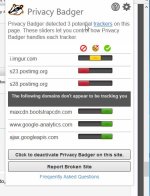
P.S. Privacy Badger is blocking your images (signature and graphic in your post about the new betanews review)!
I guess it does not trust postimg.org
Last edited:
The workaround in the post above works great, tried it myself just last week! GJ Kardo, keep up the good work!
@Hangtooth Thanks for the feedback.
I guess it does not trust postimg.org
Interesting. It is quite good hosting service. Maybe it is blocked because of the ads.
Regards,
Kardo
I peeked around and seems to be a problem with privacy badger and firefox perhaps, github has 1 report and he closed it it appears:
"Embedded images from Postimg.org blocked by Privacy Badger #58"
Embedded images from Postimg.org blocked by Privacy Badger · Issue #582 · EFForg/privacybadgerfirefox · GitHub
"the ones i uploaded to postimage.org aren't displaying...a-ha! privacy badger was blocking it."
http://www.tomshardware.com/forum/id-2148017/character-image-limit-forum-post.html
I just checked they work fine on Chrome + Privacy Badger. Must be a firefox + privacy badger thing =(
Sorry for this minor thing I figured you'd rather know as sometimes presentation counts for everything in first impressions! Reported imgpost.org via privacy badger broken site reporting tool, maybe they'll fix it.
"Embedded images from Postimg.org blocked by Privacy Badger #58"
Embedded images from Postimg.org blocked by Privacy Badger · Issue #582 · EFForg/privacybadgerfirefox · GitHub
"the ones i uploaded to postimage.org aren't displaying...a-ha! privacy badger was blocking it."
http://www.tomshardware.com/forum/id-2148017/character-image-limit-forum-post.html
I just checked they work fine on Chrome + Privacy Badger. Must be a firefox + privacy badger thing =(
Sorry for this minor thing I figured you'd rather know as sometimes presentation counts for everything in first impressions! Reported imgpost.org via privacy badger broken site reporting tool, maybe they'll fix it.
Last edited:
Hi @Kardo Kristal ,
Thank you for help, now its ok
Now he only needs the scan shortcut, right click, and your software is perfect for me.
With Norton Security My system is not slowed down (Windows 10 Pro), and I have a powerful detection!
Thank you for help, now its ok
Now he only needs the scan shortcut, right click, and your software is perfect for me.
With Norton Security My system is not slowed down (Windows 10 Pro), and I have a powerful detection!

@Kardo Kristal Hey man, new version working really well however I'v noticed just a small annoyance.Since I'v finally been using crystal security for a longer time now that it's become this stable i randomly checked task manager after I started up my pc one morning.Since I told you already I'v got crystal security starting up using task scheduler to avoid the uac popup but when I start my pc up everything seems fine crystal security is minimized but in task manager instead of being under background processes it shows up under apps like it wasn't minimized.I have to double click the tray icon then close it and then it moves under background processes like it should.Any chance you can fix this or know why this is happening?

yeah I find that annoying too@Kardo Kristal Hey man, new version working really well however I'v noticed just a small annoyance.Since I'v finally been using crystal security for a longer time now that it's become this stable i randomly checked task manager after I started up my pc one morning.Since I told you already I'v got crystal security starting up using task scheduler to avoid the uac popup but when I start my pc up everything seems fine crystal security is minimized but in task manager instead of being under background processes it shows up under apps like it wasn't minimized.I have to double click the tray icon then close it and then it moves under background processes like it should.Any chance you can fix this or know why this is happening?
I just checked they work fine on Chrome + Privacy Badger. Must be a firefox + privacy badger thing =(
@Hangtooth Thanks for the information.
Now he only needs the scan shortcut, right click, and your software is perfect for me.
@Malfhas Do you mean context menu scan to scan individual file or folder?
If yes then please try to enable Shell integration feature under Settings: Click on Settings => choose General tab => enable Shell integration checkbox => Finally click on Apply to confirm changes. After that you should see new entry under Overview section.
Now please try to right click on individual file or folder and choose Analyze with Crystal Security. Analyzed files should appear under Overview section. Please note that when file is Safe then you may not see any alert (depends on the Settings).
when I start my pc up everything seems fine crystal security is minimized but in task manager instead of being under background processes it shows up under apps like it wasn't minimized.I have to double click the tray icon then close it and then it moves under background processes like it should.Any chance you can fix this or know why this is happening?
@Black Faith Thanks for the feedback. I'll look into it.
Regards,
Kardo
Hi @Kardo Kristal ,
Thank you for your help.
I have now button when I want to scan a folder but when I click on it nothing happens, I have perhaps restart my computer?
I noticed another thing, real-time detection does not detect viruses if the ".exe" is removed. If I add myself to the .exe malware, Crystal detects anything directly, I have to compress with winrar and then decompress for Crystal detects and blocks directly. It is rather strange.
Thank you for your help.
I have now button when I want to scan a folder but when I click on it nothing happens, I have perhaps restart my computer?
I noticed another thing, real-time detection does not detect viruses if the ".exe" is removed. If I add myself to the .exe malware, Crystal detects anything directly, I have to compress with winrar and then decompress for Crystal detects and blocks directly. It is rather strange.
I have now button when I want to scan a folder but when I click on it nothing happens, I have perhaps restart my computer?
@Malfhas Restart is not needed.
Do you see Shell Integration.exe entry under Overview section?
Under Registry Editor you should see the following entries.
Entry for Files
Entry for Folders
Now when you try to scan folder (with executable files):
Files with results should appear under Overview section:
Please be sure that Crystal Security is running when you try to scan files/folders with right-click.
I hope it helps.
Regards,
Kardo
Hi @Kardo Kristal
I currently have a bug with Crystal Security, indeed at times when my PC is turned on for several hours, Crystal Security is blocking anything.
I fas test here: Testez votre anti-virus
Usually Crystal Security blocks all in the time of writing it is not blocking anything (that is not a reporting problem because the file is still present).
I am a user on Windows Pro October 64 bits with a clean installation that date two weeks.
An idea of the problem?
Thank you.
I currently have a bug with Crystal Security, indeed at times when my PC is turned on for several hours, Crystal Security is blocking anything.
I fas test here: Testez votre anti-virus
Usually Crystal Security blocks all in the time of writing it is not blocking anything (that is not a reporting problem because the file is still present).
I am a user on Windows Pro October 64 bits with a clean installation that date two weeks.
An idea of the problem?
Thank you.
I currently have a bug with Crystal Security, indeed at times when my PC is turned on for several hours, Crystal Security is blocking anything.
I fas test here: Testez votre anti-virus
@Malfhas Thanks for the feedback.
I just tested all samples from provided link and Crystal Security blocked all samples successfully.
Tested on Windows 10 Pro (64-bit). Downloaded samples via Google Chrome.
Please try to restart Crystal Security and then try to download samples again.
Regards,
Kardo
@Kardo Kristal No issues here in terms of Crystal Security detecting stuff even after 2-3 days uptime.Only the bug I already reported.Btw don't wanna pressure you or anything but any progress on the bug I reported?
?- Status
- Not open for further replies.
Recently browsing
Members who viewed this thread in the last 5 minutes
You may also like...
-

-
 Advanced Plus Security harlan4096's PC Security Config
 -
 Advanced Security Spartan's PC Security Config
 -
 Software Review Avira Free Security 2026
 -
