


The MalwareTips app
Your community, one tap away.
Open MalwareTips from your Home Screen or desktop. Follow discussions, find answers and pick up where you left off.
- Home Screen access
- Optional push alerts
- Your community
You're ready to explore.Explore what's new
Installation instructions
iPhone & iPad
- Open MalwareTips in Safari and tap Share. You may need to open the Page Menu first.
- Choose Add to Home Screen. If it is not listed, use Edit Actions to add it.
- Keep Open as Web App enabled if shown, then tap Add.
Android
- Open MalwareTips in Chrome or another browser that supports app installation.
- Open the browser menu and look for Install app, Install and create shortcut, or Add to Home screen.
- Choose Install and confirm. Wording varies by browser.
Desktop
- Chrome: use the install icon in the address bar, or the menu under Cast, save and share.
- Edge: open the menu, then More tools, Apps and Install this site as an app.
- Safari on Mac: choose Share or File, then Add to Dock. Firefox on Windows: look for the web apps button in the address bar.
If you cannot find an install option, update your browser or use its bookmark option to keep MalwareTips close.
Keep up with your conversations
After installation, open the app and sign in. Enable push notifications in Preferences if you want alerts. On iPhone and iPad, push requires a Home Screen web app and iOS or iPadOS 16.4 or later.
Sign in to manage notificationsInstallation is optional. Your notification settings stay under your control.
You are using an out of date browser. It may not display this or other websites correctly.
You should upgrade or use an alternative browser.
You should upgrade or use an alternative browser.
New Update Defender Hardening Console Executable
- Thread starter Trident
- Start date
Other security for Windows, Mac, Linux
506 Replies
75,141 Views

You can run a scan and it will just add the new programs. When you restart the application it performs rule deduplication and I will add cleanup soon so it gets rid of removed programs.@Trident
If in the future I should run again Deep Firewall scan because I will install new programs and I wish to scan them, should I delete all rules first or I can simply run the scan and Deep Firewall will add the rules for the new programs it will find ?
So, if I understand correctly, (sorry, English isn't my native language, I'm Italian) Deep Firewall scan doesn't create duplicate rules but currently it doesn't have a feature for purging rules that refers to programs / executable that don't exist anymore.When you restart the application it performs rule deduplication and I will add cleanup soon so it gets rid of removed programs.
Yes, the auto-cleanup will be added to the next version.So, if I understand correctly, (sorry, English isn't my native language, I'm Italian) Deep Firewall scan doesn't create duplicate rules but currently it doesn't have a feature for purging rules that refers to programs / executable that don't exist anymore.

From the same menu I ran both a Total Care Scan than a Aggressive Scan. They completed successfully and Defender Hardening Console automatically saved a html report of the latest scan in folder C:\Users\WindowsUsername\Documents\Helios Reports. The Aggressive Scan was very quick (2859 scanned items in 19.8 seconds), I guess the reason is that I had run the Total Care Scan some minutes before (2224 scanned items in 206.2 seconds) so the Aggressive scan could benefit from some sort of "scanned items cache".


Last edited:
It always says 0 the network scan because the connections are not really files.

@Avethil your posts are very clear. thanks for all your testing...So, if I understand correctly, (sorry, English isn't my native language,


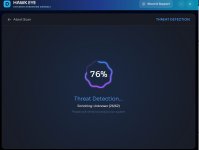
These are not TCP but UDP listeners.During the Network Scan or Total Care Scan some items appear as "Unknown". What does that mean ?
View attachment 295479View attachment 295480
The script (Orion Malware Cleaner later changed to HEAT) did map the UDP listeners to the process name and used some heuristics to flag suspicious listeners.
However this has not yet been implemented in the C++ version so the connection reputation is examined but no behavioural heuristics yet.
There are behavioural heuristics for TCP connections.
The enriching process adds information for the heuristics.
In higher versions of the engine, this has been sped up.

Web Marshall | AI Browser Protection
Free browser extension blocking dangerous sites before they load. 2M+ domains, 195 countries, verdicts in microseconds. No data collected.

Shadowra
Level 42
Verified
Top Poster
Content Creator
Malware Tester
Well-known
High Reputation
Forum Veteran
A well known component will soon reappear (rewritten in blazing fast C++) as part of Defender Hardening Console.
View attachment 295661View attachment 295662
Have you created web protection?

Are you basing it on something or a proprietary database?
Yes, it was available before as well, but now I have rewritten it to use C++, which due to SIMD makes handling the bloom filter quicker. So the C++ version is coming very soon.Have you created web protection?
Are you basing it on something or a proprietary database?
It uses a proprietary AI model and several feeds.

Web Marshall | AI Browser Protection
Free browser extension blocking dangerous sites before they load. 2M+ domains, 195 countries, verdicts in microseconds. No data collected.hea-p.com
Interesting, considering my atavistic allergy to installed software due to the proportional increase in attack surface, I will wait for an evaluation of the extensions.
When will they be available?
Shadowra
Level 42
Verified
Top Poster
Content Creator
Malware Tester
Well-known
High Reputation
Forum Veteran
Yes, it was available before as well, but now I have rewritten it to use C++, which due to SIMD makes handling the bloom filter quicker. So the C++ version is coming very soon.
It uses a proprietary AI model and several feeds.
Let me know when it's available!
I'll try to test it all out, since I made the first version of your tools.
I will send you a quick text when doneLet me know when it's available!
I'll try to test it all out, since I made the first version of your tools.
It will probably be in a few days.
Recently browsing
Members who viewed this thread in the last 5 minutes
You may also like...
-

-

-
-

-
M
- Opera
- Maciej Kocemba
- · 0