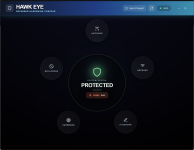
New Update Defender Hardening Console Executable

How do I know I have the latest version?
I have now version 1.0.0.1, downloaded from the link above, but I cannot find the Deep Firewall Control.
The App & Browser Control issue is fixed (y)
They all say 1.0.0.1, this is yet another “thing” that requires manual updating, unless I am able to create a pre-build script.

I will do an about button in the future.

Try downloading now.
 
Unfortunately, I still cannot find the Deep Firewall Control after a fresh download.
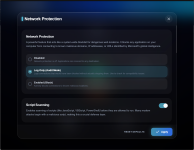
It is under network

1767125082219.png

1767125107074.png
 
Really great job! It looks so clean and better than most AVs out there. Now I need to reconsider if I keep on using Deep Instinct or if I try MD again 👀
You can still use the Quick Scan and the Deep Firewall Control with Deep Instinct.

Although the quick scan (Helios UltraQuick) is designed to detect persistent, evasive and fileless malware which with DI doesn’t really get a chance…

There is Helios Pro which is designed for wider coverage.

But nevertheless, the DFC feature is quite neat.

The interface is called OrbitUI and fits well within the star/cosmic/cosmic light and glass overall brand theme.

I think OrbitUI will make its way into all products…
 
You can still use the Quick Scan and the Deep Firewall Control with Deep Instinct.

Although the quick scan (Helios UltraQuick) is designed to detect persistent, evasive and fileless malware which with DI doesn’t really get a chance…

There is Helios Pro which is designed for wider coverage.

But nevertheless, the DFC feature is quite neat.

The interface is called OrbitUI and fits well within the star/cosmic/cosmic light and glass overall brand theme.

I think OrbitUI will make its way into all products…
Just tried it. Unfortunately the network protection is locked and the quick scan only detects Deep Instinct 😅
 
Just tried it. Unfortunately the network protection is locked and the quick scan only detects Deep Instinct 😅
If you execute it as admin and you scan, does the issue still persist? I am trying to find out what’s causing it.
 
That’s all the information I need, thanks. The problem is that the DeepInstinct service uses either user mode hook or kernel mode calls management to deter access. So the digital signature can’t be verified.

It will get fixed, after I enjoy ma champaign tonight.

Do you have any idea why it won't load on my VM? Everything is up to date and MS Defender is enabled :/
 

Recently browsing

Members who viewed this thread in the last 5 minutes

Back
Top