
I am on the way of releasing it. Thanks.Ahhh much better name, when I have time I'll try it out


Open MalwareTips from your Home Screen or desktop. Follow discussions, find answers and pick up where you left off.
If you cannot find an install option, update your browser or use its bookmark option to keep MalwareTips close.
After installation, open the app and sign in. Enable push notifications in Preferences if you want alerts. On iPhone and iPad, push requires a Home Screen web app and iOS or iPadOS 16.4 or later.
Sign in to manage notificationsInstallation is optional. Your notification settings stay under your control.
I am on the way of releasing it. Thanks.Ahhh much better name, when I have time I'll try it out

Hello, I'm sorry but I don't understand what you mean (i.e backend). Installing Helios Web Marshall extension from Chrome Web Store isn't enough ? Helios Web Marshall - Chrome Web Store Do you mean I have to keep Defender Hardening Console always opened / active ? Or Helios Web Marshall will be released as a component of Defender Hardening Console (or as a separate app) and it will work in conjunction with the extension ? I guess it's the latter because on Web Marshall | The Web, Without the Worry is written "Coming Soon"Do not attempt to install the extension without the backend, it will not work.



Exactly, the upcoming Helios Web Marshall app should be released soon New Update - Defender Hardening Console ExecutableWhat I understand is that you need to install something on your pc before you can use this extension.
They will be distributed together and users will have a choice what exactly they want to install.Exactly, the upcoming Helios Web Marshall app should be released soon New Update - Defender Hardening Console Executable
From what I can see in that post's screenshots it will be a new app, separate from Defender Hardening Console.

+1so if the browser extension needs DHC service running then assume Helios Web Marshall will not work with firefox running in linux (or you can bend it to do either, please)
(or Brave in Flatpak in Linux)

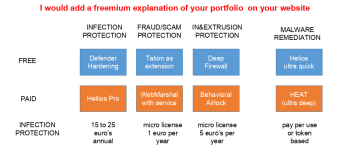
Heat scanner is an old reference that hasn’t been updated for a while, HEAT (Hawk Eye Analysis/Antivirus Tool) will be the real time protection software powered by Helios Pro.@Trident, jusy browsed your website it looks amazing. I have no idea how your products will perform in real life, but the website looks great.
A question and a remark
QUESTION: how do HEAT scanner and HELIOS ultra quick relate to each other?
REMARK: For me it would make more sense to have a clear free and a premium product line. See picture
View attachment 295945
RE
The entire Web Marshall extension serves this purpose but to provide the level of experience that I want to provide (Download Protection/Second opinion scan, user communication and so on), a C++ backend does better job. The bloom filter lookup time on logs is around 100-200 microseconds and for over 2 million domains there is no cloud call whatsoever, so it’s much better for privacy.Talion as an extension would be something like VT4Browser extension or Trustpilot check

Is there a separate HEAT scanner? The website says it's portable.Heat scanner is an old reference that hasn’t been updated for a while, HEAT (Hawk Eye Analysis/Antivirus Tool) will be the real time protection software powered by Helios Pro.
It’s integrated with Defender Hardening Console, but you don’t necessarily have to use the hardening features, you can just use the scan. Opt for the portable option when you hit download and for better results, execute as admin.Is there a separate HEAT scanner? The website says it's portable.
I don't get an option when I download. I get AIdefender.exe.It’s integrated with Defender Hardening Console, but you don’t necessarily have to use the hardening features, you can just use the scan. Opt for the portable option when you hit download and for better results, execute as admin.
I don't get an option when I download. I get AIdefender.exe.
Hello, it's weird. I've just tried now on Windows Defender Hardening Console | Free Security Tool with Firefox and I get the 2 options. It could be that you have some browser addon that blocks popup, I wouldn't know.I don't get an option when I download. I get AIdefender.exe.
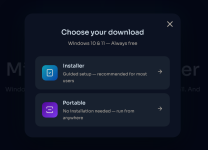
I think @oldschool tried to download Helios Web Marshall, already excited for the release before it has happenedHello, it's weird. I've just tried now on Windows Defender Hardening Console | Free Security Tool with Firefox and I get the 2 options. I could be that you have some browser addon that blocks popup, I wouldn't know.
View attachment 295947

Members who viewed this thread in the last 5 minutes


