Troubleshoot Dell PC Does not power on

JakeXPMan

Level 17
Thread author
Verified
Top Poster
Well-known
Oct 20, 2014
825
3
3,245
1,568
45
USA
Briefly explain your current issue(s)
PSU test works, shows it's green light but PC is not powering on
Steps taken to resolve, but have been unsuccessful
Power drain (worked first time, but failed all other attempts) changed power plug, switched the jumper, tried to short the pins to turn on.
Your current Antivirus
Windows Defender
Well, after a successful thermal and fan addition, the Dell Optiplex PC was working just fine for a week. so it was time to move it to my Computer area, to replace my old PC.
I plug it in surge protector outlet, nothing happens. ok?! panic... *check internet* Ok, try a power drain for 15-30 seconds. So I did that, took the PC back to working area, plugged in, it's back!

A huge relief, okay... I power it down, (drain power for 30 seconds) Plug back into my main Computer area (the one I am currently using to type this) and it's powering on fine or so it seems, but I then hook up the monitor (wanted to make sure it would turn on!) a different keyboard and mouse too, but I can't see anything the mouse and keyboard aren't bringing me any screen to see. My monitor shows orange. Ok, I need to turn it off and maybe switch monitors, so I push the power button, it shuts down about 3 seconds later. Seems normal shut down (even if I cannot see it).

I try to power it on a few mins later, it won't... tried 5 more power drains for minutes holding the power button, no change. Next day, one more power drain, nothing. So I moved the jumper over (to reset CMOS) and then plug cord in, wait 30 seconds, put it back to original spot... nothing. Then I used screwdriver to try to short the pins to get PC on, nothing.

To say it's a disappointment, is an understatement. Can't afford to buy anything for the next few months or so.
I pretty much give up hope this PC will be useable, I am beyond curious to what in the DELL-HELL happened to my ideal specs Windows 11 PC?! It looks clean as a whistle inside.
It doesn't make sense to me... one day it's working, then it's refusing everything! Removing the power switch from the motherboard pins was like pulling teeth... I never seen such small holes for a pin to fit into!!!

One thing grateful for, is learning things and that fact my old PC I'm on right now... works (still)
 
Your Motherboard probably is the issue. If you don't have much cash but are willing to spend a bit more, see if you can get a reconditioned Motherboard that will accept your CPU and RAM (btw- what CPU and MB brand do you have?).

Good Luck!!!
 
Upvote 0
Does it boot up with no peripherals attached whatsoever as in no monitor or anything including any USB devices?
Tried that, no lucks with it.

Only thing left to try, is remove ram sticks, and or the battery.

I don't see these having much effect on powering a PC on, it reminds me more if it doesn't post or boot.
 
  • Like
Reactions: Sorrento
Upvote 0
Have you checked all the power cables are attached esp the 4 pin if there for the PCU, I have had this or similar issue in the past & trying to think of the cause? Peripherals can cause a PC not to boot in my experience even a simple USB device such as a keyboard.
 
Upvote 0
As above does it boot elsewhere by plugging it in to another socket without a extension of any sort.

From what I red, it seems it's not booting now at all after changing places back and forth. I was thinking maybe something fried with the psu or surge protector. Is this the case noq not booting at all or still boots?

Best case is he just needs to reseat the internal components like ram, gpu etc as they could have moved when changing places.
 
Upvote 0
My main suspect is the surge protector or the power supply. Maybe when you moved it the Surge Protector is not capable of handling the wattage of the psu. Try removing ram sticks,reset cmos again.
That's interesting.

This Dell passed all the hardware tests a few days ago, CPU, motherboard, (now fan), and the like...

The power drain worked the first time I tried, but unfortunately something went wrong again, and doesn't fix it now. There was NO sudden sparks or smoke, or any unusual bursts of power, so I don't see why the problem is even happening.

I think the wattage of PSU is about the same as the PC I'm currently using, but not fully sure though.

It's Dell Optiplex MT, 290w Dell standard PSU. Could power still be stuck in the RAM ? (even after power reset?) I read this type of PC has a shutdown to protect PC components on the motherboard.
 
  • Like
Reactions: Sorrento
Upvote 0
One question: The Dell PC's power switch cord was very difficult to get the connector part off of the motherboard 5 pins (PWR) very small, and took A LOT of careful pulling to remove it. Should I attempt to put it back onto the PC? I worry of pushing down the cable and bending the PWR pins on the board, if the problem isn't the board, I don't want to create a new one.

If I reset RAM, and CMOS again, could I try to turn on with a screwdriver (short the pins) ?
 
Upvote 0
One question: The Dell PC's power switch cord was very difficult to get the connector part off of the motherboard 5 pins (PWR) very small, and took A LOT of careful pulling to remove it. Should I attempt to put it back onto the PC? I worry of pushing down the cable and bending the PWR pins on the board, if the problem isn't the board, I don't want to create a new one.

If I reset RAM, and CMOS again, could I try to turn on with a screwdriver (short the pins) ?
If you short the pwr pin using the screw driver, it must turn on. Do you get the psu fan to spin? If you can try the psu from your other pc, that would help you isolate the issue. I suggest reseat all the components first inside. Then if no go, try replace the psu.if still no go, likely mobo is dead.
 
Upvote 0
If you short the pwr pin using the screw driver, it must turn on. Do you get the psu fan to spin? If you can try the psu from your other pc, that would help you isolate the issue. I suggest reseat all the components first inside. Then if no go, try replace the psu.if still no go, likely mobo is dead.
Yep sounds like the next plan. PSU fan does spin as far as I can tell, as did the CPU fan for sure. I used the Dells PSU test button, green light comes on solid. I even tried the PSU and the screwdriver pin power on, no luck powering on that way.

Trying another PSU a from different PC, I don't think it's compatible unfortunately.
 
  • Like
Reactions: Sorrento
Upvote 0
You already reset the cmos via jumper. Recheck as maybe you forgot to put it back.

Last try to reseat the RAM, then physically remove the CMOS Coin battery. Then after a few minutes put it back and give it a go.
 
  • Like
Reactions: JakeXPMan
Upvote 0
You already reset the cmos via jumper. Recheck as maybe you forgot to put it back.

Last try to reseat the RAM, then physically remove the CMOS Coin battery. Then after a few minutes put it back and give it a go.
It was indeed put back onto the password jumper.
Thanks for the helps! Will keep you posted if the PC ...posts or not. Will try final two options in that order, RAM then the CMOS battery.
 
  • Like
Reactions: Sorrento
Upvote 0
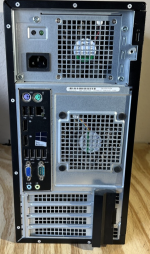
Another possible culprit is the Video Card if it has one. Is the back similar to this or if you can take a photo then we can have a better idea what components you might have.
 

Attachments

  • Screenshot_20250825-194910_(1).png
    Screenshot_20250825-194910_(1).png
    1.6 MB · Views: 64
Upvote 0
First remove every non necessary items that are not required to get a post, if it doesn't post, start from the the first thing, power supply, Check the SMPS using a SMPS tester , make sure it functions for 12v, 5v and 3v rails. Green light on SMPS is not a sign of correct working od SMPS. Most led works fine if the 5V rail is functioning even if 3v rail fails. You can test SMPS either using a multimeter or cheap SMPS testers from Amazon. If possible check it using a borrowed SMPS. If SMPS is working correctly, and if it doesn't post, remove the motherboard from the cabinet, test it on a bench, just to make sure that there is no shorts with the metal parts of cabinet. Try with single ram stick. Try re-seating the cpu, cleaning of ram sticks etc.
 
  • Like
Reactions: JakeXPMan
Upvote 0
Another possible culprit is the Video Card if it has one. Is the back similar to this or if you can take a photo then we can have a better idea what components you might have.
No video card, I got PC with integrated graphics (to start out with) so I would be able to choose wisely, rather then paying so much for a video card to be on the PC already.
 
  • Like
Reactions: stonjean633
Upvote 0
No video card, I got PC with integrated graphics (to start out with) so I would be able to choose wisely, rather then paying so much for a video card to be on the PC already.
Gotcha! Then all you need to do is reseat every components that you can,isolate and see. If really no POST, then likely something needs replacement.
 
Upvote 0
Gotcha! Then all you need to do is reseat every components that you can,isolate and see. If really no POST, then likely something needs replacement.
The RAM, I took all of them out, tried one at a time, no post or sign of power. :\ I noticed on one RAM stick (with the heatsink on it) by pushing the PSU test button, it was a much weaker (blinking) green light, and the fan wasn't going full speed either. Could it be this PSU after all this ? Plugging in the PC onto a new spot just killed what was left of a ''GENERIC'' PSU? I tried again, and it didn't have a problem with that green test light, or the fan.

Before this PC went silent... the Dell diagnostics gave a green pass to the RAM, FAN, MOTHERBOARD, stress test all passed... but these tests do NOT have a way to test an actual power supply, PSU right ?

I checked a YouTube video and the guy mentioned a good stock version of a PSU has an (80+) plus on its sticker, and a throw out one does NOT. Is there truth to this claim? Mine doesn't have an 80+ on the side, it says Dell on it, but... anyway,

The original fan, and power switch seems "awful" for example. I managed to get the wire off the fan, to change it out, and the power switch, the plastic came off the wires. :o Both stock items are like way too small for the pins!

I took the battery out, and wait 30 mins, put it back in... I will try one more time to power the thing on. If it can't it must be the PSU, or by horrible luck the motherboard somehow damaged by plugging PC in (seems highly unlikely).
 
Upvote 0