

The MalwareTips app
Your community, one tap away.
Open MalwareTips from your Home Screen or desktop. Follow discussions, find answers and pick up where you left off.
- Home Screen access
- Optional push alerts
- Your community
You're ready to explore.Explore what's new
Installation instructions
iPhone & iPad
- Open MalwareTips in Safari and tap Share. You may need to open the Page Menu first.
- Choose Add to Home Screen. If it is not listed, use Edit Actions to add it.
- Keep Open as Web App enabled if shown, then tap Add.
Android
- Open MalwareTips in Chrome or another browser that supports app installation.
- Open the browser menu and look for Install app, Install and create shortcut, or Add to Home screen.
- Choose Install and confirm. Wording varies by browser.
Desktop
- Chrome: use the install icon in the address bar, or the menu under Cast, save and share.
- Edge: open the menu, then More tools, Apps and Install this site as an app.
- Safari on Mac: choose Share or File, then Add to Dock. Firefox on Windows: look for the web apps button in the address bar.
If you cannot find an install option, update your browser or use its bookmark option to keep MalwareTips close.
Keep up with your conversations
After installation, open the app and sign in. Enable push notifications in Preferences if you want alerts. On iPhone and iPad, push requires a Home Screen web app and iOS or iPadOS 16.4 or later.
Sign in to manage notificationsInstallation is optional. Your notification settings stay under your control.
You are using an out of date browser. It may not display this or other websites correctly.
You should upgrade or use an alternative browser.
You should upgrade or use an alternative browser.
Serious Discussion Did Microsoft Defender change the way it responds to file downloads?
- Thread starter nickstar1
- Start date
Microsoft Defender
87 Replies
5,522 Views


Yep, I think you nailed it. Thank you

Not a dedicated quarantine section like all the peers (Kaspersky, Bitdefender, Avast); a hybrid history/quarantine (no other AV has this brilliant design).
When history is full with entries, I may need to clear as it is becoming confusing.
So, how can I manually clear the deck of my history, without waiting 15-30 days? I agree with @Parkinsond. These were the EICAR test files and a couple of HP driver updates Controlled Folder Access flagged (I turned that off, I'm not downloading and running the WWW on my device in need of being prompted like that). The image has a couple more events below the image cut off.
And I know that I don't have to open that Protection history window and wring my hands over it, but, I'm so used to being able to clear events easily as with F-Secure. As I mentioned before, that is where 3rd party AV's have the edge, in some of their additional settings and options.
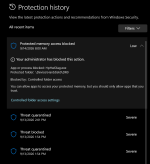

I'm not sure if this topic is helpful, but you can try it yourself.So, how can I manually clear the deck of my history, without waiting 15-30 days? I agree with @Parkinsond. These were the EICAR test files and a couple of HP driver updates Controlled Folder Access flagged (I turned that off, I'm not downloading and running the WWW on my device in need of being prompted like that). The image has a couple more events below the image cut off.
And I know that I don't have to open that Protection history window and wring my hands over it, but, I'm so used to being able to clear events easily as with F-Secure. As I mentioned before, that is where 3rd party AV's have the edge, in some of their additional settings and options.
View attachment 300047


Windows Security deletes threat protection history automatically, but it didn't delete protected folders access history, is there a way to delete it manually?

- lokamoka820
- Replies: 3
- Forum: Microsoft Defender

I'm not sure if this topic is helpful, but you can try it yourself.
Windows Security deletes threat protection history automatically, but it didn't delete protected folders access history, is there a way to delete it manually?
- lokamoka820
- Replies: 3
- Forum: Microsoft Defender
Thanks, but I couldn't find that file path, and neither could Google or Gemini. So I'll go into safe mode and clear it that way
That path you found is incorrect—Windows Activity History has nothing to do with Microsoft Defender's Protection history. There is no clear button inside the Windows Security UI, so clearing these logs requires manually deleting the Defender History\Service folder content.
edit: so on my Surface 5 laptop I was able to totally clean the history, but on my other HP laptop, there are four that will need to be deleted on their own.
Last edited:
Have you tried DefenderUI? It worked well in cleaning the scan log and the contents of the vault for me.Thanks, but I couldn't find that file path, and neither could Google or Gemini. So I'll go into safe mode and clear it that way
edit: so on my Surface 5 laptop I was able to totally clean the history, but on my other HP laptop, there are four that will need to be deleted on their own.
Have you tried DefenderUI? It worked well in cleaning the scan log and the contents of the vault for me.
I saw that, but didn't want to install it just to do that clean up. What I did do, is on my HP Envy, reinstalled F-Secure I.S. just to use something I know how it works, what it does, and can do easily. I'll leave MD running on my Surface 5, as F-Secure was a little laggy at times when loading apps. And this is what MD Protection history now looks like on that laptop. So now I don't mind working with a clean slate, knowing more about how MD works and handles things
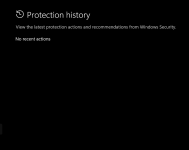
Last edited:

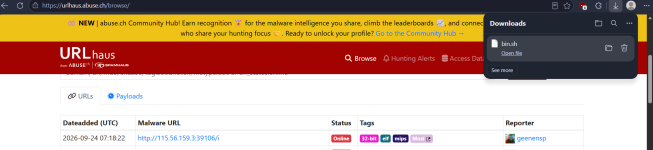
It appears that uninstalling the third-party antivirus software is somehow affecting Microsoft Defender’s ability to detect and scan files when they are accessed. The issue was initially believed to be related to corruption of my USB drive; however, further investigation indicates that the USB drive itself was not corrupted. This suggests that uninstalling the antivirus software may have disrupted or altered Microsoft Defender’s real-time file-scanning functionality, potentially preventing Defender from properly inspecting files when they are accessed.
It is also important to note that issues of this nature can take time to reproduce and isolate. Troubleshooting a security-related problem requires evaluating and eliminating multiple potential causes, including the storage device, file system, operating system components, security software, drivers, services, and interactions between security products. Simply reproducing the behavior once does not necessarily identify the underlying cause; each possible variable needs to be evaluated to determine what is actually responsible for the failure. In this case, the evidence increasingly points toward an interaction between the uninstallation of the third-party antivirus software and Microsoft Defender’s file-access scanning functionality, rather than corruption of the USB drive itself.
This is a significant issue that should be investigated and addressed. Removing third-party antivirus software should not leave Microsoft Defender in a state where its real-time protection or file-access scanning capabilities are impaired. If the uninstallation process can interfere with Defender’s ability to inspect files, this could potentially create a security gap that may not be immediately apparent to the user. so in essence what annaegorov said about defender being broken by other products appears to be true.
The issue is back after uninstalling and re-installing some security software applications i believe it's Avast that's doing it.
It is also important to note that issues of this nature can take time to reproduce and isolate. Troubleshooting a security-related problem requires evaluating and eliminating multiple potential causes, including the storage device, file system, operating system components, security software, drivers, services, and interactions between security products. Simply reproducing the behavior once does not necessarily identify the underlying cause; each possible variable needs to be evaluated to determine what is actually responsible for the failure. In this case, the evidence increasingly points toward an interaction between the uninstallation of the third-party antivirus software and Microsoft Defender’s file-access scanning functionality, rather than corruption of the USB drive itself.
This is a significant issue that should be investigated and addressed. Removing third-party antivirus software should not leave Microsoft Defender in a state where its real-time protection or file-access scanning capabilities are impaired. If the uninstallation process can interfere with Defender’s ability to inspect files, this could potentially create a security gap that may not be immediately apparent to the user. so in essence what annaegorov said about defender being broken by other products appears to be true.
The issue is back after uninstalling and re-installing some security software applications i believe it's Avast that's doing it.
Last edited:
Recently browsing
Members who viewed this thread in the last 5 minutes


