Advanced Plus Security Divine_Barakah's PC Security Config

Original forum configuration · expand details
Last updated
Aug 23, 2026
Main use of this computer
For work or educational use
Operating system
Windows 11
OS version and support details
Windows 11 Enterprise IOT LTSC
On-device encryption
Cryptomator (file vaults, not full-disk encryption)
Device sign-in security
    • Windows Hello PIN or biometric sign-in (face / fingerprint / Touch ID)
Security updates
Allow security updates
Update channels
Allow stable updates only
User Account Control (UAC)
Always notify
Smart App Control
Evaluation mode
Network firewall
Enabled
Router and network details
ISP-provided router.
Real-time protection
MD (default settings)
NVT OSArmor Personal
Adguard for Windows
Device firewall
Microsoft Defender Firewall
Custom security settings
*OSArmor
- added my rules
Periodic malware scanners
EEK
Malware sample testing
I do not participate in malware testing
Environment for malware testing
I don't do malware testing.
Browsers and extensions
Browsers
1- Vivaldi with multiple profile
2- Waterfox

Extensions
Webroot
Secure DNS
Adguard Windows with my personal Adguard DNS
Desktop VPN
Adguard VPN
Password and passkey manager
Sticky Password
Maintenance tools
Uninstalr
Kerish Doctor
Dell Command Update Universal

Hard Disk Sentinel Pro Portable
Bleachbit
Hibit Uninstaller
File and photo backups
Koofr (Cryptomator)
Filejump (Cryptomator)
Cyberduck
Subscriptions
    • Google AI Pro (formerly Google One AI Premium)
System recovery
O&o Diskimage 21 Premium
Usage and exposure
    • Visiting familiar websites
    • Visiting unknown or untrusted websites
    • Working from home
    • Making audio/video calls
    • Opening email attachments
    • Online shopping and card payments
    • Logging into my bank account
    • Downloading software and files from reputable sites
Computer specs
Dell Latitude 7450
Ultra 7 155U
16 GB DDR5 Ram 6400
1TB Micron nVMe Gen4
Notable changes
The inclusion of OSArmor.
Changed main password manager
Ditched Kerish Doctor
Managing Windows updates through GP.
Feedback preference

Detailed suggestions and alternatives welcome

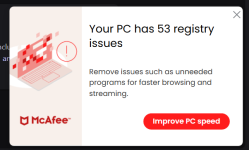
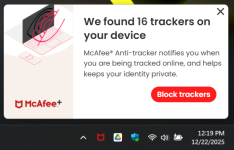
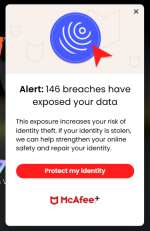
McAffee does show many pop us. After each system restart, it ask you to run a "Smart Scan" which asks you to get Mcafee Optimiser. Moreover, when you open the GUI, it keeps asking you to enable the bundled sh*t.

This reminds me very much of Avast.
A handful of us were getting misc. pop ups, notifications, with McAfee after ~3-4weeks. I and a lot of us, uninstalled it for that reason.
With blocking the Avast UI.exe. in the firewall and disabling notifications/Privacy Preferences, its a clean UI without notifications...for now :)

Screenshot 2025-12-19 170258.png Screenshot 2025-12-22 121907.png Screenshot 2025-12-26 071613.png
 
A handful of us were getting misc. pop ups, notifications, with McAfee after ~3-4weeks. I and a lot of us, uninstalled it for that reason.
With blocking the Avast UI.exe. in the firewall and disabling notifications/Privacy Preferences, its a clean UI without notifications...for now :)

View attachment 299532 View attachment 299533 View attachment 299534
Mcafee did not want me to wait, it seems. I believe using the Antivirus version wouldn't show as much notifications, but I am not willing to try it.
 
Mcafee did not want me to wait, it seems. I believe using the Antivirus version wouldn't show as much notifications, but I am not willing to try it.
I use antivirus and don't receive any messages or notifications from McAfee.

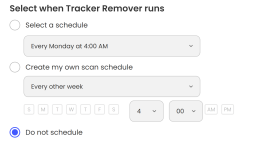
Only unneeded component in AV is tracker remover and I have it's schedule disabled. I believe some notifications are from that component. Others might be from other components that are not included in AV. For me McAfee is quiet as a mouse.

1787247641187.png
 
I use antivirus and don't receive any messages or notifications from McAfee.

Only unneeded component in AV is tracker remover and I have it's schedule disabled. I believe some notifications are from that component. Others might be from other components that are not included in AV. For me McAfee is quiet as a mouse.

View attachment 299535
Thanks for confirming it. Does the Antivirus version come with Firewall component too?
 
McAffee does show many pop us. After each system restart, it ask you to run a "Smart Scan" which asks you to get Mcafee Optimiser. Moreover, when you open the GUI, it keeps asking you to enable the bundled sh*t.

This reminds me very much of Avast.
I have never had a single popup with McAfee in a couple of years, thats with Total or Internet Security McAfee is not on this PC but was up to a week ago, but several other PC's I care for have it on only one had a popup, I'm coming to the conclusion it might be geographic? I have never delved into the protection score myself, if you do that it may be a cause of issues. 😀😀
 

Recently browsing

Members who viewed this thread in the last 5 minutes

You may also like...

Continue exploring the conversation.

Back
Top