dllhost.exe com surrogate - unsure if virus?

Status
Not open for further replies.

teacup

New Member
(Hello, new to the forum.)

I'm very unsure on whether this is a virus or not, could somebody please help me identify if I am safe, and if not how to get rid of this virus?

I was on youtube and a message urged me to close down chrome to save memory (something like that) and then I couldn't open chrome without that happening. My computer went very slow. I clicked to play a video and it worked for a while but then I realised I only had 1gb space left on my main harddrive (It was usually around 10gb and working fine.) I then couldn't open anything but task manager, and then my computer crashed. This all happened in a short amount of time. I'm not sure how long. Maybe within 5 minutes.

I read through some posts on this website about dllhost being a virus but also an important file in system 32.
I only ever saw 1 dllhost in the task manager. This was not dllhost *32, just dllhost.exe.
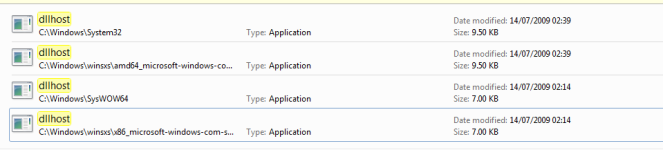
I searched my computer for dllhost files and found 4, as shown in the image.

Was this just a case of genuinely having low memory or is this a virus? Are all 4 of these legit or are some viruses?

Thank you.
 

Attachments

  • dddwas.png
    dddwas.png
    16.8 KB · Views: 32
Hello,


They call me TwinHeadedEagle around here, and I'll be working with you.


Before we start please read and note the following:
  • At the top of your post, please click on the "Watch thread" button and make sure to check Watch this thread...and receive email notifications. This will send an email to you as soon as I reply to your topic, allowing me to solve your problem faster.
  • Please do not install any new software during the cleaning process other than the tools I provide for you. This can hinder the cleaning process. Please do not perform System Restore or any other restore.
  • Instructions I give to you are very simple and made for complete beginner to follow. That's why you need to read through my instructions carefully and completely before executing them.
  • Please do not run any tools other than the ones I ask you to, when I ask you to. Some of these tools can be very dangerous if used improperly. Also, if you use a tool that I have not requested you use, it can cause false positives, thereby delaying the complete cleaning of your machine.
  • All tools we use here are completely clean and do not contain any malware. If your antivirus detects them as malicious, please disable your antivirus and then continue.
  • If during the process you run across anything that is not in my instructions, please stop and ask. If any tool is running too much time (few hours), please stop and inform me.
  • I visit forum several times at day, making sure to respond to everyone's topic as fast as possible. But bear in mind that I have private life like everyone and I cannot be here 24/7. So please be patient with me. Also, some infections require less, and some more time to be removed completely, so bear this in mind and be patient.
  • Please stay with me until the end of all steps and procedures and I declare your system clean. Just because there is a lack of symptoms does not indicate a clean machine. If you solved your problem yourself, set aside two minutes to let me know.
  • Please attach all report using
    fjqb1h.png
    button below. Doing this, you make it easier for me to analyze and fix your problem.

  • Do not ask for help for your business PC. Companies are making revenue via computers, so it is good thing to pay for the repair.
  • If I don't hear from you within 3 days from this initial or any subsequent post, then this thread will be closed.


warning.gif
Rules and policies

We won't support any piracy.
That being told, if any evidence of illegal OS, software, cracks/keygens or any other will be revealed, any further assistance will be suspended. If you are aware that there is this kind of stuff on your machine, remove it before proceeding!
The same applies to any use of P2P software: uTorrent, BitTorrent, Vuze, Kazaa, Ares... We don't provide any help for P2P, except for their removal. All P2P software has to be uninstalled or at least fully disabled before proceeding!

Failure to follow these guidelines will result with closing your topic and withdrawning any assistance.


FRST.gif
Scan with Farbar Recovery Scan Tool

Please download Farbar Recovery Scan Tool and save it to your desktop.

Note: You need to run the version compatibale with your system. If you are not sure which version applies to your system download both of them and try to run them.
Only one of them will run on your system, that will be the right version.


  • Double-click to run it. When the tool opens click Yes to disclaimer.
  • Press Scan button.
  • It will make a log (FRST.txt) in the same directory the tool is run. Please attach it to your reply.
  • The first time the tool is run, it makes also another log (Addition.txt). Please attach it to your reply.
 
It's pretty late here so it won't be long until I'm in bed - Is there any problem with shutting down the computer before we're done with all the steps required? If so I'll do it all earlier tomorrow (if you're on.) If there is no problem I'll do some tonight (or all if it doesn't take too long.)

"Please do not perform System Restore or any other restore." Is this just for during the cleaning process or once it's done am I free to do system restore at any time to any point in the past?


Thank you for your reply (very fast reply, too!)
 
"The same applies to any use of P2P software: uTorrent...All P2P software has to be uninstalled or at least fully disabled before proceeding!"

I had deleted uTorrent sometime ago but after running this scan the log included something in appdata\roaming\utorrent. I suppose I have to do a full uninstallation or something? (I'm unsure.) Very sorry about this. Should I try to completely uninstall this then redo the scan, post the logs then uninstall, or what? I hope this doesn't close the topic, I have no idea what I'm doing here!

Also am I to attach the logs as .txt documents or just copy paste them here?

Thank you.
 
MGADiag.png
Scan with MGADiag

Need to check one more thing.
  • Please download MGADiag by Microsoft and save it to your desktop.
  • Double-click on
    MGADiag.png
    icon to start the tool.
  • PressContinuewhen prompted.
  • When it has finished, press Copy.
  • Press the
    WindowsKey.png
    + R on your keyboard at the same time. Type Notepad and click OK.
  • Paste (Ctrl+V) this into notepad and save to your desktop.
Include that report in your reply.
 
It's not letting me save this to the desktop for some reason. I click save but nothing happens, the window which has me choose where to save the file is unchanged and my desktop has nothing new on it. What should I do?
 
Sorry I wrote that badly. It's the notepad file I can't save. I have it up but when I click to save it to desktop it just doesn't happen.
 
Diagnostic Report (1.9.0027.0):
-----------------------------------------
Windows Validation Data-->

Validation Code: 0
Cached Online Validation Code: N/A, hr = 0xc004f012
Windows Product Key: *****-*****-Q6MMK-KYK6X-VKM6G
Windows Product Key Hash: 289NoAWl2ZoVfuieux/315WkDIc=
Windows Product ID: 00426-OEM-8992662-00173
Windows Product ID Type: 2
Windows License Type: OEM SLP
Windows OS version: 6.1.7601.2.00010100.1.0.001
ID: {ACF7C77A-2DF4-4273-9859-6FD103E2D514}(1)
Is Admin: Yes
TestCab: 0x0
LegitcheckControl ActiveX: N/A, hr = 0x80070002
Signed By: N/A, hr = 0x80070002
Product Name: Windows 7 Ultimate
Architecture: 0x00000009
Build lab: 7601.win7sp1_gdr.140303-2144
TTS Error:
Validation Diagnostic:
Resolution Status: N/A

Vista WgaER Data-->
ThreatID(s): N/A, hr = 0x80070002
Version: N/A, hr = 0x80070002

Windows XP Notifications Data-->
Cached Result: N/A, hr = 0x80070002
File Exists: No
Version: N/A, hr = 0x80070002
WgaTray.exe Signed By: N/A, hr = 0x80070002
WgaLogon.dll Signed By: N/A, hr = 0x80070002

OGA Notifications Data-->
Cached Result: N/A, hr = 0x80070002
Version: N/A, hr = 0x80070002
OGAExec.exe Signed By: N/A, hr = 0x80070002
OGAAddin.dll Signed By: N/A, hr = 0x80070002

OGA Data-->
Office Status: 103 Blocked VLK
Microsoft Office Enterprise 2007 - 103 Blocked VLK
OGA Version: N/A, 0x80070002
Signed By: N/A, hr = 0x80070002
Office Diagnostics: 025D1FF3-364-80041010_025D1FF3-229-80041010_025D1FF3-230-1_025D1FF3-517-80040154_025D1FF3-237-80040154_025D1FF3-238-2_025D1FF3-244-80070002_025D1FF3-258-3

Browser Data-->
Proxy settings: N/A
User Agent: Mozilla/4.0 (compatible; MSIE 8.0; Win32)
Default Browser: C:\Program Files (x86)\Google\Chrome\Application\chrome.exe
Download signed ActiveX controls: Prompt
Download unsigned ActiveX controls: Disabled
Run ActiveX controls and plug-ins: Allowed
Initialize and script ActiveX controls not marked as safe: Disabled
Allow scripting of Internet Explorer Webbrowser control: Disabled
Active scripting: Allowed
Script ActiveX controls marked as safe for scripting: Allowed

File Scan Data-->
File Mismatch: C:\Windows\system32\systemcpl.dll[6.1.7600.16385], Hr = 0x800b0100
File Mismatch: C:\Windows\system32\user32.dll[6.1.7600.16385], Hr = 0x800b0100

Other data-->
Office Details: <GenuineResults><MachineData><UGUID>{ACF7C77A-2DF4-4273-9859-6FD103E2D514}</UGUID><Version>1.9.0027.0</Version><OS>6.1.7601.2.00010100.1.0.001</OS><Architecture>x64</Architecture><PKey>*****-*****-*****-*****-VKM6G</PKey><PID>00426-OEM-8992662-00173</PID><PIDType>2</PIDType><SID>S-1-5-21-3568957677-143987248-2158607831</SID><SYSTEM><Manufacturer>System manufacturer</Manufacturer><Model>P5QL PRO</Model></SYSTEM><BIOS><Manufacturer>American Megatrends Inc.</Manufacturer><Version>0414 </Version><SMBIOSVersion major="2" minor="5"/><Date>20080725000000.000000+000</Date></BIOS><HWID>543F3007018400F8</HWID><UserLCID>0809</UserLCID><SystemLCID>0409</SystemLCID><TimeZone>GMT Standard Time(GMT+00:00)</TimeZone><iJoin>0</iJoin><SBID><stat>3</stat><msppid></msppid><name></name><model></model></SBID><OEM/><GANotification/></MachineData><Software><Office><Result>103</Result><Products><Product GUID="{90120000-0030-0000-0000-0000000FF1CE}"><LegitResult>103</LegitResult><Name>Microsoft Office Enterprise 2007</Name><Ver>12</Ver><Val>ACD7202654E586</Val><Hash>fFic3JgCreGGRxyF8uMWB4R4Jcg=</Hash><Pid>89388-707-1528066-65254</Pid><PidType>14</PidType></Product></Products><Applications><App Id="15" Version="12" Result="103"/><App Id="16" Version="12" Result="103"/><App Id="18" Version="12" Result="103"/><App Id="19" Version="12" Result="103"/><App Id="1A" Version="12" Result="103"/><App Id="1B" Version="12" Result="103"/><App Id="44" Version="12" Result="103"/><App Id="A1" Version="12" Result="103"/><App Id="BA" Version="12" Result="103"/></Applications></Office></Software></GenuineResults>

Spsys.log Content: 0x80070002

Licensing Data-->
Input Error: Can not find script file "C:\Windows\system32\slmgr.vbs".

Windows Activation Technologies-->
HrOffline: 0x00000000
HrOnline: N/A
HealthStatus: 0x0000000000000000
Event Time Stamp: N/A
ActiveX: Registered, Version: 7.1.7600.16395
Admin Service: Not Registered - 0x80070005
HealthStatus Bitmask Output:


HWID Data-->
HWID Hash Current: NgAAAAEABgABAAEAAAACAAAAAQABAAEAln0ykmwjxpj8JEa8jCaENGhl4N26TkxY0JeQoUxY

OEM Activation 1.0 Data-->
N/A

OEM Activation 2.0 Data-->
BIOS valid for OA 2.0: yes, but no SLIC table
Windows marker version: N/A
OEMID and OEMTableID Consistent: N/A
BIOS Information:
ACPI Table Name OEMID Value OEMTableID Value
APIC A_M_I_ OEMAPIC
FACP A_M_I_ OEMFACP
HPET A_M_I_ OEMHPET
MCFG A_M_I_ OEMMCFG
OEMB A_M_I_ AMI_OEM
OSFR A_M_I_ OEMOSFR
SSDT DpgPmm CpuPm
 
Status
Not open for further replies.

Recently browsing

Members who viewed this thread in the last 5 minutes

Back
Top