Serious Discussion DNS Providers for Home Users – Still Cloudflare/Quad9, or Did NextDNS/Control D Finally Win?

What DNS provider(s) do you force on your home network / PC?

  • Cloudflare 1.1.1.1 (or 1.1.1.2/3) – speed king

  • Quad9 – best free malware/phishing blocking

  • Google 8.8.8.8 – I don’t care, just works

  • NextDNS – worth the config time and (sometimes) the $20/year

  • Control D – NextDNS but better UI and free tier actually good

  • AdGuard DNS – most aggressive ad/tracker blocking for free

  • Mullvad DNS / DNSCrypt – paranoid zero-log gang

  • My ISP’s DNS – yes I’m that guy

  • Self-hosted (Pi-hole, AdGuard Home, Technitium, etc.)

  • Mix – different DNS per device/profile


Results are only viewable after voting.
My personal rules in the adblocks I use block malicious downloads instead.
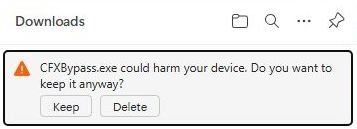
Browsers automatically block exe and a download manager can be setup for additional AV scanning like via virustotal.

capture_01112026_093549.jpg
 
Define complete protection.
DNS-level protection is always supplementary, never complete.

In fact, even your “complete” Cloudflare protection does not block this malware:

URLhaus | Checking your browser
Complete protection in comparison with NextDNS; not in comparison with traditional antivirus software. I never said Cloudflare is an antivirus company.
My personal rules in the adblocks I use block malicious downloads instead.

View attachment 294583

Even your estimated 300,000 rules in uBo will not be able to effectively block all third-party trackers/scripts/iframe without efficient dynamic filtering.
And Cloudflare DNS will not block any first-party scripts/trackers on all web pages (and there are many) that cannot be blocked for compatibility reasons.
Good for you!

DNS can only block domains, not specific resources and Cloudflare isn't willing to block entire github.com domain just for that one malicious .exe file hosted. In fact, I believe it's Microsoft's job (considering it's their platform) to scan and block malicious files from being uploaded.

I don't expect Cloudflare to block every single ad and tracker on it's own; it's impossible with DNS. This is why, I said multiple times, I use both Cloudflare and uBlock Origin in the browser.
Browsers automatically block exe and a download manager can be setup for additional AV scanning like via virustotal.

View attachment 294584
Exactly! Every unsigned file is treated like malware and being blocked from downloading by default.
 
Cloudflare Zero Trust is a particular implementation of Zero Trust technology. It is very different and much more advanced/complex/granular than NextDNS and other similar solutions.
The question is whether such a solution can be useful at home. I would not recommend it for most users due to its complexity. However, some advanced users can use it to protect home computers.
 
Cloudflare Zero Trust is a particular implementation of Zero Trust technology. It is very different and much more advanced/complex/granular than NextDNS and other similar solutions.
The question is whether such a solution can be useful at home. I would not recommend it for most users due to its complexity. However, some advanced users can use it to protect home computers.
Da. Cloudflare allows the use of Zero Trust at home (and even recommends it), but while it's not complicated for me as an advanced user, it is for average users. NextDNS might not provide the same level of protection, but it offers simple to use interface so anyone can use it. The only shame is it's limited to 300.000 queries which isn't a lot these days.
 
I gave a general example: a DNS never blocks a known website even if there is a malicious executable file, and it certainly won't block it if there are scripts/iframes/pixels... and anything else that violates your privacy/security... and you have all given specific examples that are not generally valid.

At a minimum, a wide-spectrum content blocker with general but very specific rules is necessary to achieve any benefit.

Blocking the sample executable even during download is not a general rule.
 
Thanks for the advice (y) Checking the ego at login is probably a good safe hex practice.
How often should we do this? What is your experience with it?
Safe hex?' Cute. I haven't heard that one since the dial-up days.

To answer the ticket, ego checks run as a background daemon, not a scheduled task, constant runtime monitoring is required. As for my experience? It consists mostly of cleaning up the wreckage left by 'advanced' users who thought witty comebacks were a substitute for structural discipline.

If you're done deflecting with puns, we can get back to the architecture. If not, I'm sure there's a subreddit that appreciates the humor.
 
Cloudflare Zero Trust is a particular implementation of Zero Trust technology. It is very different and much more advanced/complex/granular than NextDNS and other similar solutions.
The question is whether such a solution can be useful at home. I would not recommend it for most users due to its complexity. However, some advanced users can use it to protect home computers.
You call it 'granular'; I call it 'administrative debt.' For a residential threat model, that level of complexity is mostly performance theater. NextDNS secures the perimeter with the same effective kill-chain disruption but without the unnecessary friction.

A true 'advanced' architect understands that the best security stack is the one that works silently and reliably, not the one that requires constant policy tuning. If you’re spending your free time managing Zero Trust policies for a network of four devices, you haven't hardened your security, you’ve just gamified your chores.
 
  • Like
Reactions: TairikuOkami
A true 'advanced' architect understands that the best security stack is the one that works silently and reliably, not the one that requires constant policy tuning.

Why do you think that it is impossible with Cloudflare Zero Trust with proper settings?
As you were already informed by some MT members in this thread, they use it silently and reliably.
However, it is true that initially it requires more learning and tweaking.
 
Why do you think that it is impossible with Cloudflare Zero Trust with proper settings?
As you were already informed by some MT members in this thread, they use it silently and reliably.
However, it is true that initially it requires more learning and tweaking.
Since we’re measuring 'advanced' by how much administrative overhead we can introduce to a residential line, why stop at Cloudflare Zero Trust?

You guys might as well throw a dedicated Suricata IDS/IPS node in the rack. Go ahead, mirror the port, write your own custom Snort signatures, and spend your weekends analyzing PCAPs for false positives.

If you think you’re 'advanced' enough to manually tune WAF rules for a home network, surely you have the time for full packet inspection. Or, we could admit that for a home threat model, 'advanced' is often just a synonym for 'over-engineered.' NextDNS handles the actual threats without turning your living room into a SOC triage center.
 
  • Like
Reactions: Andy Ful
Since we’re measuring 'advanced' by how much administrative overhead we can introduce to a residential line, why stop at Cloudflare Zero Trust?

Is this forbidden on MT?
People here use many different solutions. Advanced users know what they are doing without your or my help.
However, such complex solutions should be flagged as ADVANCED, not recommended for most users.
This is what we did in this thread according to Cloudflare Zero Trust.
 
For me the DNS acts as the fence around my digital home. It is just the first layer where I want to block as much unwanted content as possible. Firewall is the second hurdle, my browser's sand box the third, Borwser's safe browsing mechanisme the third, Next the (build-in) adblocker or adbloc extensions optionally combined with an malware filtering extension. I am on Linux, so don't have an AV with download filtering, but Windows user can use Smartscreen or their AV webfilter additionally.

So the what is best discussions focuses on OR (DNS A versus DNS B or DNS versus browser extension), for me it is AND (use both). Depending on your situation you could block a lot at DNS and don't need extensions, but, when you are the house-admin it is probably easier to do mild (ad) blocking at DNS level and let the extenstions do the fine grained filtering.
 
Forbidden? No. But let’s stop confusing 'reading comprehension' with 'security engineering.'

Most of the 'advanced' crowd you’re referencing are just effectively parsing a community guide or an AI-generated script. That’s not expertise, that’s obedience.

Let’s pause and appreciate the irony here.

You argue that 'advanced users' don't need help and imply that the complexity of Cloudflare Zero Trust is a virtue. Yet, you are the developer of Hard_Configurator, a tool literally built to automate and simplify Windows hardening so users wouldn't have to manually wrestle with Software Restriction Policies and Registry edits.

Why did you write that tool? You wrote it because you understood that manual configuration is prone to entropy and human error, and that automation is the hallmark of a secure system. You didn't build it because 'advanced' users were incapable, you built it because manual labor isn't a skill flex, it's an inefficiency.

NextDNS is simply the 'Hard_Configurator' of the network layer, it automates the friction. Claiming that manual Cloudflare ZT configuration makes someone 'advanced' is like claiming that manually editing hex values in the Registry makes you a better admin than someone using your tools. It doesn't. It just means you enjoy wasting CPU cycles on problems that have already been solved.
 
Is not that what you do in the weekends on a Chromebook according to this (informative and very educational (y)) thread
Serious Discussion - Suricata for Beginners: Your First Step into Network Threat Detection (Linux, Windows, macOS)!
Let’s try reading the headers again.

My Suricata thread is titled 'For Beginners Your First Step into Network Threat Detection.' It is an educational resource designed to teach a skill. It is a classroom.

This thread is titled 'DNS Providers for Home Users.' It is a recommendation for practical residential deployment.

You are conflating learning a trade with configuring a daily driver. Just because I teach people how to inspect packets to understand network defense doesn't mean I recommend they run an enterprise IDS just to watch Netflix.

If you can't distinguish between a training exercise (Suricata) and a practical home configuration (NextDNS), you aren't pointing out a contradiction, you're just exposing your own inability to understand scope.
 
Divergent said:
If you can't distinguish between a training exercise (Suricata) and a practical home configuration (NextDNS), you aren't pointing out a contradiction, you're just exposing your own inability to understand scope.
So why did you mention it in this thread?
Divergent said:
You guys might as well throw a dedicated Suricata IDS/IPS node in the rack. Go ahead, mirror the port, write your own custom Snort signatures, and spend your weekends analyzing PCAPs for false positives.
What is the relevance for using Cloudflare Zero trust?
 
Last edited:
I don't know what he's talking about. Cloudflare Zero Trust once set up, doesn't need any constant fine tuning. It just works and after initial setup, you only need to set it up on your devices once. That is all.

If I do some tuning in Zero Trust, it's because I want to try some new features I didn't try before, or learn something. I could easily leave the current set up and it will work forever.

Seems to me like someone is trying to find any opportunity to argue.
 
I have triggered a Tribal Defense Response

@LinuxFan58 A Do you require a firmware update for your humor module, or are you willfully misparsing the input?

I mentioned Suricata as sarcasm, a rhetorical device used to highlight the absurdity of recommending enterprise-grade complexity for a Home Users thread. If you can't distinguish between a satirical comparison and a literal deployment order, it explains why you confuse "following a guide" with "engineering."

@Marko :) "It works on my machine" is the oldest fallacy in the book. If Cloudflare Zero Trust was genuinely "set and forget" for the average user, this thread wouldn't be littered with users asking how to set it up and others advising using AI ECT. Speaking of, do you not feel one thread for this topic is enough?
Thread 'Cloudflare Gateway Free Plan' Serious Discussion - Cloudflare Gateway Free Plan

You frame my criticism as "looking for an opportunity to argue." In the industry, its "Peer Review." I'm not here to debate your hobby, I'm here to flag bad architectural advice before it wastes someone else's weekend. If you mistake structural hygiene for hostility, that’s a Layer 8 issue.
 
@LinuxFan58 A Do you require a firmware update for your humor module, or are you willfully misparsing the input?

I mentioned Suricata as sarcasm, a rhetorical device used to highlight the absurdity of recommending enterprise-grade complexity for a Home Users thread. If you can't distinguish between a satirical comparison and a literal deployment order, it explains why you confuse "following a guide" with "engineering."
So the Suricata setup in a Linux VM on a Chromebook is a absurdism not for home use? Why did you label it a beginners guide?
