

Solved Edge start by itself in Task Managerwhen Windows bootup on Build 1803

Status
Not open for further replies.

SumTingWong

Level 28
Thread author
Verified
Top Poster
Well-known
Apr 2, 2018
1,753
1
5,845
2,668
FLorida
Briefly explain your current issue(s)
Edge running automatically when Windows bootup.
Steps taken to resolve, but have been unsuccessful
None
I just upgrade my Windows build 1709 to 1803 today, and one thing I notice right off the back is Edge running at the background immediately when Windows bootup. How I can fix this? Its using over 200MB of RAM.
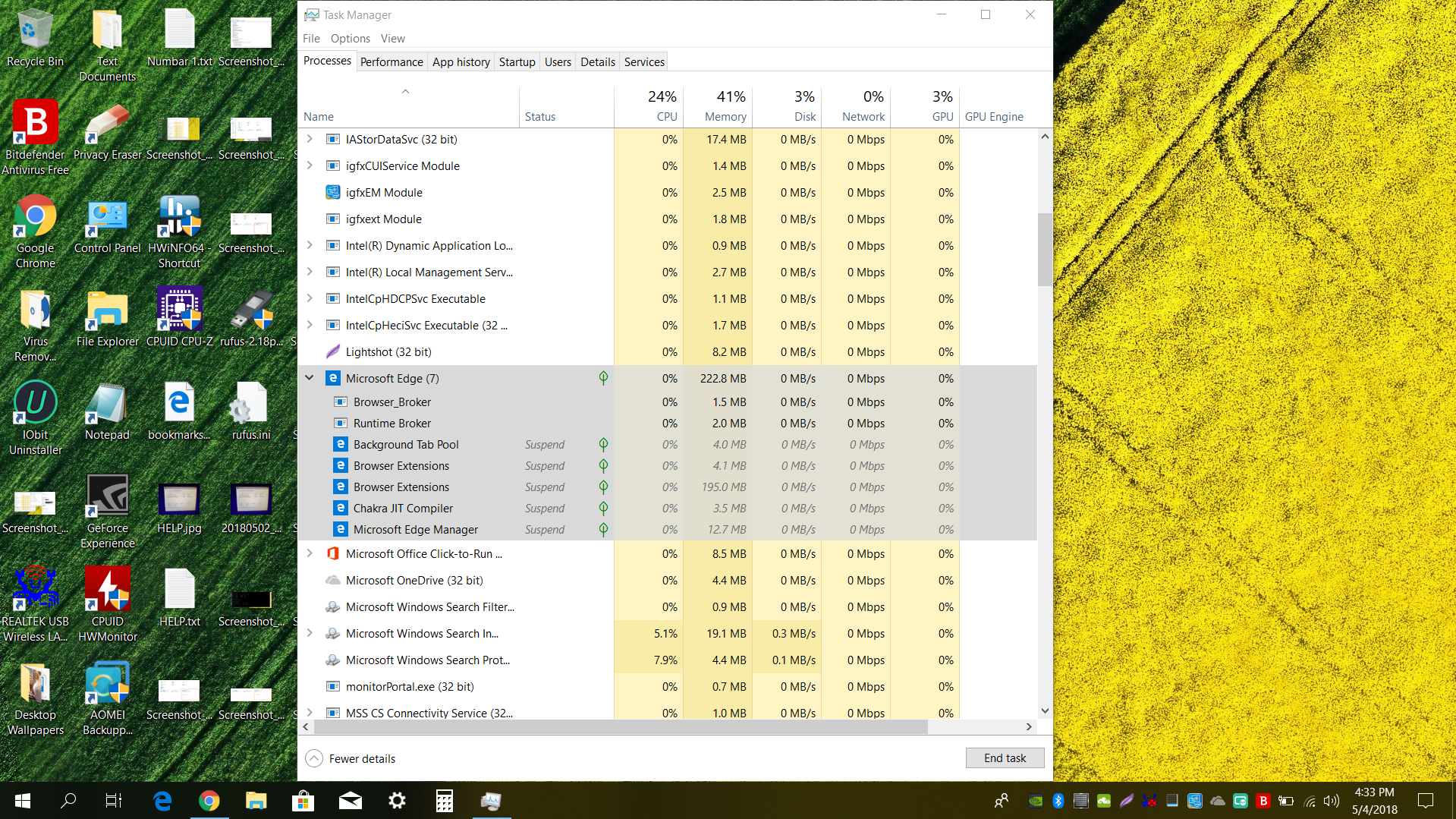
Screenshot_16.png
 
Windows Settings > Privacy > Background Apps > Toggle "Let apps run in the background", or set each app to On/Off.

Edit: This is optional, but might help close programs down completely when you switch off.
  • Control Panel > Power Options > Choose what closing the lid does (System Settings) > Click the Admin icon and un-check "Turn on fast start-up" to ensure everything closes down when you Shutdown your PC. Not just when you reboot your PC.
 
Last edited:
  • Like
Reactions: vtqhtr413
Upvote 0
Windows Settings > Privacy > Background Apps > Toggle "Let apps run in the background", or set each app to On/Off.

I turned off " Let apps run in the background " and Edge still start by itself automatically in the task manager when Windows Bootup. In the screeshot I uploaded on post #1, I don't have Edge open at all when Windows bootup. Edge is not in startup tab in Task Manager.
 
Upvote 0
See the additional info I added to my first post, then reboot your PC.

See if Edge loads on boot, again.
 
  • Like
Reactions: SumTingWong
Upvote 0
See the additional info I added to my first post, then reboot your PC.

See if Edge loads on boot, again.

Edge loads on boot again. It sucking 235MB RAM while I don't use Edge at all. I can't find Edge in startup folder nor startup tab in Task Manager at all. on Build 1709, it doesn't do this. This is happens on 1803 Build.
 
Upvote 0
In Task Manager, can you right-click and End Task? And does it re-load immediately?

Once I end Edge in Task Manager, it will not reload again. But it will reload if I restart my PC or shutdown my laptop. I don't see Edge app open at all when my laptop restart nor shutdown. However, when I open my task manager, Edge automatically running in the background sucking over 200MB RAM.
 
Upvote 0
Edge launched itself in the task manager after I log in to my laptop, but it does not open any page at all nor the app.
 
Upvote 0
I currently have no solution for your Edge issue, but I just looked at Browser Extensions process.. 195 MB. According to this, you use Adguard. Try disabling the Extensions in Edge settings, and you may notice a significant drop in RAM usage.

Example:
  • Ghostery for Edge ~150 to 220 MB
  • uBlock Origin for Edge ~ 50 to 100 MB
 
Upvote 0
I currently have no solution for your Edge issue, but I just looked at Browser Extensions process.. 195 MB. According to this, you use Adguard. Try disabling the Extensions in Edge settings, and you may notice a significant drop in RAM usage.

Example:
  • Ghostery for Edge ~150 to 220 MB
  • uBlock Origin for Edge ~ 50 to 100 MB

I use Adblock plus for my Edge. Does your Edge start automatically in the background when you log on to your computer?
 
Upvote 0
This Edge browser running in the background without any page or app open at all. It sucking over 200MB of RAM while I don't use Edge at all. On 1709, this does not happened at all, but it begins when I upgraded to 1803.
 
  • Like
Reactions: frogboy
Upvote 0
I use Adblock plus for my Edge. Does your Edge start automatically in the background when you log on to your computer?
No.

Did you disable the Edge Extensions??

Also consider replacing AdBlock Plus with uBlock Origin, it's a lot less resource intensive.

I found this, but proceed with caution and use at your own risk
Script Stop Microsoft Edge Processes
 
Upvote 0
No.

Did you disable the Edge Extensions??

Also consider replacing AdBlock Plus with uBlock Origin, it's a lot less resource intensive.

I found this, but proceed with caution and use at your own risk
Script Stop Microsoft Edge Processes

I just disable the Edge extensions and is no go. It does lower the RAM usage from over 200MB to 30ish MB.
 
Upvote 0
No.

Did you disable the Edge Extensions??

Also consider replacing AdBlock Plus with uBlock Origin, it's a lot less resource intensive.

I found this, but proceed with caution and use at your own risk
Script Stop Microsoft Edge Processes

I did a clean installation of Windows 10 Build 1803 on my desktop, and it does show Edge start immediately in Task Manager when I log on to Windows. What the hell is going on? Is this a bug? On Build 1709 this never happened. I don't want a 200MB app running in the background when I don't use it at all.
 
Upvote 0
Edge does not start automatically here on 4 machines.

The app itself did not open, but when I open up task manager after I log on, I see Edge running in there. Edge runs in the Task Manager immediately when I log on to my laptop. I just did a clean install Build 1803 on my desktop too, and it does show the same issue as my laptop. I don't know how your 4 machines don't show it, but on my end with my laptop and a clean installation on my desktop show Edge runs in the background in Task Manager when I log on.
 
Upvote 0
The same issue is mentioned here.
Windows 10 Announced - Released 29-Jul-2015

A solution provided by user Krusty is to change your default browser.

"After a brief experiment it seems that Edge only starts after Windows boots when it is the default browser. I changed the default to Firefox and Edge no longer starts after Windows boots (and neither does FF). Changed back to Edge as default and it starts after Windows boots again."
 
Upvote 0
The same issue is mentioned here.
Windows 10 Announced - Released 29-Jul-2015

A solution provided by user Krusty is to change your default browser.

"After a brief experiment it seems that Edge only starts after Windows boots when it is the default browser. I changed the default to Firefox and Edge no longer starts after Windows boots (and neither does FF). Changed back to Edge as default and it starts after Windows boots again."

Oh woah, this is never happened to me on Build 1709. Edge is my default browser on Build 1709.
 
Upvote 0
The same issue is mentioned here.
Windows 10 Announced - Released 29-Jul-2015

A solution provided by user Krusty is to change your default browser.

"After a brief experiment it seems that Edge only starts after Windows boots when it is the default browser. I changed the default to Firefox and Edge no longer starts after Windows boots (and neither does FF). Changed back to Edge as default and it starts after Windows boots again."
Solution found.

OP confirmed in another thread post.

Thread Closed.
 
Upvote 0
Status
Not open for further replies.