

The MalwareTips app
Your community, one tap away.
Open MalwareTips from your Home Screen or desktop. Follow discussions, find answers and pick up where you left off.
- Home Screen access
- Optional push alerts
- Your community
You're ready to explore.Explore what's new
Installation instructions
iPhone & iPad
- Open MalwareTips in Safari and tap Share. You may need to open the Page Menu first.
- Choose Add to Home Screen. If it is not listed, use Edit Actions to add it.
- Keep Open as Web App enabled if shown, then tap Add.
Android
- Open MalwareTips in Chrome or another browser that supports app installation.
- Open the browser menu and look for Install app, Install and create shortcut, or Add to Home screen.
- Choose Install and confirm. Wording varies by browser.
Desktop
- Chrome: use the install icon in the address bar, or the menu under Cast, save and share.
- Edge: open the menu, then More tools, Apps and Install this site as an app.
- Safari on Mac: choose Share or File, then Add to Dock. Firefox on Windows: look for the web apps button in the address bar.
If you cannot find an install option, update your browser or use its bookmark option to keep MalwareTips close.
Keep up with your conversations
After installation, open the app and sign in. Enable push notifications in Preferences if you want alerts. On iPhone and iPad, push requires a Home Screen web app and iOS or iPadOS 16.4 or later.
Sign in to manage notificationsInstallation is optional. Your notification settings stay under your control.
You are using an out of date browser. It may not display this or other websites correctly.
You should upgrade or use an alternative browser.
You should upgrade or use an alternative browser.
Advanced Plus Security ErzCrz's PC Security Config
-
 Thread starter
ErzCrz
Thread starter
ErzCrz
- Start date
- 424 Replies
- 130,346 Views
Archived configuration (not current) · expand details
Thread details
- Last updated
- Mar 15, 2026
- Main use of this computer
- For home and private use
- Operating system
- Windows 11
- OS version and support details
- N/A
- On-device encryption
- Windows BitLocker / Device Encryption
- Device sign-in security
- Windows Hello PIN or biometric sign-in (face / fingerprint / Touch ID)
- Security updates
- Allow security updates and latest features
- Update channels
- Allow stable updates only
- User Account Control (UAC)
- Always notify
- Smart App Control
- Off
- Network firewall
- Enabled
- Router and network details
- Sky Router with built-in IPV4/IPv6 Firewall
- Real-time protection
- Comodo Internet Security 2027
CyberLock
- Device firewall
- Other - Internet Security (3rd-party)
- Custom security settings
- Comodo Internet Security 2027 - Proactive, autocontainment to Untrusted
Cyberlock - ON - Firewall Rules for Unsafe Items. SmartFirewall Recommended, Require Captcha to exit.
RansomwareGuard
- Periodic malware scanners
- Malwarebytes
Emsisoft
- Malware sample testing
- I do not participate in malware testing
- Environment for malware testing
- N/A
- Browsers and extensions
- Primary: Edge with Osprey, uBlock Origin Lite & ESET
Secondary: Firefox with uBlock Origin & Osprey Browser Extension & ESET
- Secure DNS
- Quad9 DNS over HTTP
- Desktop VPN
- Firefox Free Built-In.
- Password and passkey manager
- Keepass 2.x
- Maintenance tools
- Windows built-in Disk Clean-up and Storage Sense.
- File and photo backups
- AOMEI Backupper Pro - Monthly Full Backups & Weekly Differential Backups
- Subscriptions
- None
- System recovery
- Lenovo Built in Recovery, AOMEI Backupper Pro Recovering Environment & Bootable USB. Weekly differential and essentials backup
- Usage and exposure
- Visiting familiar websites
- Working from home
- Making audio/video calls
- Opening email attachments
- Online shopping and card payments
- Downloading software and files from reputable sites
- Gaming
- Streaming audio/video content from trusted sites or paid subscriptions
- Computer specs
- Notable changes
- 08.02.2026 - 2026 setup - ESET Security Essentials, CyberLock, RansomwareGuardSee First Post Spoilers
11.03.2026 - Just minor tweak to DNS to DNS4EU servers.
15.03.2026 - Upgraded ESET to Premium
24.06.2026 - Switched DNS back to Sky DNS (Sky Shield)
23.07.2026 - Switched to Comodo Internet Security 2027
26.09.2026 - Changed DNS to Quad9
----------------------------------------
Disclaimer we use date format DD/MM/YYYY here in the UK
- Feedback preference
Showcase only - no advice requested

My suggestion is that you should be taking more frequent backups with MR. I always do before changing security suites etc. That way if something goes wrong or you simply do not like, it, restore back and done. Back up and running in minutes vs. hours.
System restore can't be relied upon full stop. Sometimes it will do the trick yes, but for the most part, backups are what is key here. Sorry you have to re-install everything now.
System restore can't be relied upon full stop. Sometimes it will do the trick yes, but for the most part, backups are what is key here. Sorry you have to re-install everything now.

Reverted back to H_C FWH CD setup. Disk image monthly planned but investigating space require as C drive is 500gb and D is 500gb though C only needs backing up.
There has been a Comodo update but again just focused on Pro at at this moment I could do with just a simpler strong protection that won't cause system errors though it could have just been a failed update.
Windows does have built-in disc imaging so I'll try both out and see what works best but jeez, 5 hours + I won't get back. That'll teach me.
There has been a Comodo update but again just focused on Pro at at this moment I could do with just a simpler strong protection that won't cause system errors though it could have just been a failed update.
Windows does have built-in disc imaging so I'll try both out and see what works best but jeez, 5 hours + I won't get back. That'll teach me.
Reverted back to H_C FWH CD setup. Disk image monthly planned but investigating space require as C drive is 500gb and D is 500gb though C only needs backing up.
There has been a Comodo update but again just focused on Pro at at this moment I could do with just a simpler strong protection that won't cause system errors though it could have just been a failed update.
Windows does have built-in disc imaging so I'll try both out and see what works best but jeez, 5 hours + I won't get back. That'll teach me.
Backups backups, backups. Even if you are using the free version of MR, it is better than nothing. Even if you get yourself an external USB drive and back up to that, it would suit your needs.
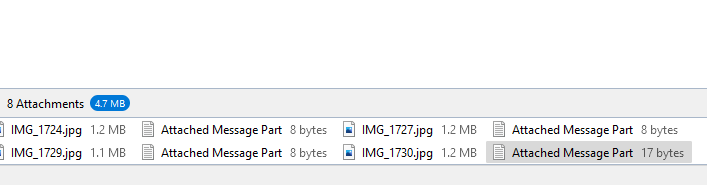
So I use Thunderbird which is fine on he whole but when i forward emails it's forwarded with the header and then a load of attachments rather than the actual message as one. Is there a fix for this??
E.g. this is an email with 4 images which I'm forwarding but there are message parts attached??
Sorry I don't know how to do the Spoiler thing
E.g. this is an email with 4 images which I'm forwarding but there are message parts attached??
Sorry I don't know how to do the Spoiler thing
Last edited:
Just removing those attachments work but reverted to Windows Mail and built-in calendar for now.
On a different note, should I be using CFA with my config? I have onedrive but I don't use it much and lot running at startup as it started uploading gigs of photos I already have backed up with Macrium Reflect.
On a different note, should I be using CFA with my config? I have onedrive but I don't use it much and lot running at startup as it started uploading gigs of photos I already have backed up with Macrium Reflect.

With all of the OS hardening I wouldn't bother with CFA...On a different note, should I be using CFA with my config?
... otherwise it's quite handy as a form of hardening if you add these folders:
Code:
- C:\Program Data\Microsoft\Windows\Start Menu
- C:\Users\xxxxx\AppData\Roaming\Microsoft\Internet Explorer\Quick Launch
- C:\Users\xxxxx\AppData\Roaming\Microsoft\Windows\Start Menu\ProgramsThanksWith all of the OS hardening I wouldn't bother with CFA...
... otherwise it's quite handy as a form of hardening if you add these folders:
Code:- C:\Program Data\Microsoft\Windows\Start Menu - C:\Users\xxxxx\AppData\Roaming\Microsoft\Internet Explorer\Quick Launch - C:\Users\xxxxx\AppData\Roaming\Microsoft\Windows\Start Menu\Programs

Did some experimenting with Comodo a bit but swapped back.
Oddly I saw some DNS errors in the Windows Logs for a beta.phonewagon.com which I never visited. I'll have to keep an eye out for this.
Otherwise, nothing exciting happening. Macrium Reflect backups working well though I think I may get a dedicated external drive for that.
Oddly I saw some DNS errors in the Windows Logs for a beta.phonewagon.com which I never visited. I'll have to keep an eye out for this.
Otherwise, nothing exciting happening. Macrium Reflect backups working well though I think I may get a dedicated external drive for that.
Last edited:
Just a random. Swapped Microsoft Photos for opening photos for IrfanView. The web version rather than MS store as store app not updated in years but website version updated in March this year. Just very fast and easy to use and includes editing
That is very strange. Are you sure it's Edge and not the OS? Have you checked all settings?It's frustrating when this happens with Edge. If I wait 2 minutes it eventually connects. I'm going back to FF or a different browser I think if this keeps up. Pages just don't load at all sometimes.
View attachment 268936
I'm not sure to be 100% honest though I don't seem to have the same issue with Firefox.
Just reset both Edge and Network Adapters and reset data on Edge. So far it's working fine, we'll see how it holds out. Thanks for teh different persepective @oldschool
Just reset both Edge and Network Adapters and reset data on Edge. So far it's working fine, we'll see how it holds out. Thanks for teh different persepective @oldschool
Definitely need to think about upgrading this thing. Laptop did it's no longer charging thing, last happened 5 weeks ago. Unplug - Force Shutdown - Take out battery and do hard reset, re-insert battery and re-instert power cable and back running again. A month and a day until my b-day. Lets see if it's feasible. Saw a few from 3 different places that would be good and around the £500 budget.

Definitely need to think about upgrading this thing.
This is a good value and it comes with a 1 year warranty.

This is a good value and it comes with a 1 year warranty.
Refurbished & Overstock Laptops, PCs, Monitors: Dell Outlet | Dell USA
Refurbished laptops, desktop gaming computers, monitors, docks & servers for cheap affordable prices from Dell Outlet. READY TO SHIP laptops for sale. Up to 30% savings.
outlet.us.dell.com
Recently browsing
Members who viewed this thread in the last 5 minutes
You may also like...
-
Advanced Plus Security ErzCrz config 2021
-

-
4
Reverse Engineering Rogue Kaspersky browser extension
- Malware Analysis
- 436880927
- · 12
- S
-
