

The MalwareTips app
Your community, one tap away.
Open MalwareTips from your Home Screen or desktop. Follow discussions, find answers and pick up where you left off.
- Home Screen access
- Optional push alerts
- Your community
You're ready to explore.Explore what's new
Installation instructions
iPhone & iPad
- Open MalwareTips in Safari and tap Share. You may need to open the Page Menu first.
- Choose Add to Home Screen. If it is not listed, use Edit Actions to add it.
- Keep Open as Web App enabled if shown, then tap Add.
Android
- Open MalwareTips in Chrome or another browser that supports app installation.
- Open the browser menu and look for Install app, Install and create shortcut, or Add to Home screen.
- Choose Install and confirm. Wording varies by browser.
Desktop
- Chrome: use the install icon in the address bar, or the menu under Cast, save and share.
- Edge: open the menu, then More tools, Apps and Install this site as an app.
- Safari on Mac: choose Share or File, then Add to Dock. Firefox on Windows: look for the web apps button in the address bar.
If you cannot find an install option, update your browser or use its bookmark option to keep MalwareTips close.
Keep up with your conversations
After installation, open the app and sign in. Enable push notifications in Preferences if you want alerts. On iPhone and iPad, push requires a Home Screen web app and iOS or iPadOS 16.4 or later.
Sign in to manage notificationsInstallation is optional. Your notification settings stay under your control.
You are using an out of date browser. It may not display this or other websites correctly.
You should upgrade or use an alternative browser.
You should upgrade or use an alternative browser.
fake police virus removal has left PC unable to reboot or use safe mode
- Status
- Not open for further replies.

kuttus said:Ooops. Sorry Pepper1, I miss your Post...
Please try this steps...
Stage -1
- Download Norton Bootable Recovery Tool from this link.
- Save the Norton Bootable Recovery Tool on your computer Desktop.
- After completing the Download Open the File that you saved on the Desktop. It will start the Norton Download Manager as shown below.
http://123pcworld.com/MalwareTips/DownloadManager.PNG
- When the download finishes, the Norton Bootable Recovery Tool Wizard starts automatically.
- In the Norton Bootable Recovery Tool Wizard, click Agree & Install to accept the User License Agreement.
If you want to change the default install location, click Install Options, and then click Browse to locate the new install location.
- Follow the on-screen instructions to create the Norton Bootable Recovery Tool on a CD/DVD media or USB key.
http://123pcworld.com/MalwareTips/NBRT.PNG
- It will by Default Select your CD/DVD Writer , if it is not select your CD/DVD Writer and click on Next...
http://123pcworld.com/MalwareTips/NBRT-2.PNG
- Now you have to Insert a Blank CD/DVD into your CD/DVD Writer and press on Ok. It will take some time to complete the Bootable Recovery Drive Creation.
http://123pcworld.com/MalwareTips/NBRT-3.PNG
Stage -2
- Insert the recovery media in the infected computer and start your computer from the recovery media. The recovery media can be a Norton Bootable Recovery Tool CD, DVD, USB key.
Note : If you do not know how to set your computer to boot from CD follow the steps here- Read the License Agreement, type your product key, and then click I Agree. (I will send you product key in PM )
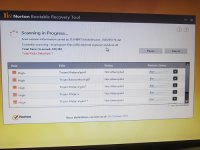
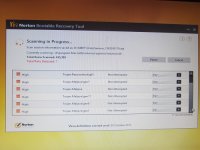
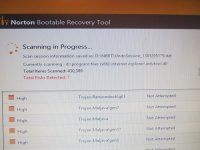
- In the Norton Bootable Recovery Tool window, click Norton Advanced Recovery Scan.
- Click Start Scan.
- When the scan finishes, remove the recovery media from the drive or USB port, and restart your computer.
<hr />
Hello, it does open up, but I need a product key. Thanks, Pepper1
pepper1 said:kuttus said:Ooops. Sorry Pepper1, I miss your Post...
Please try this steps...
Stage -1
- Download Norton Bootable Recovery Tool from this link.
- Save the Norton Bootable Recovery Tool on your computer Desktop.
- After completing the Download Open the File that you saved on the Desktop. It will start the Norton Download Manager as shown below.
http://123pcworld.com/MalwareTips/DownloadManager.PNG
- When the download finishes, the Norton Bootable Recovery Tool Wizard starts automatically.
- In the Norton Bootable Recovery Tool Wizard, click Agree & Install to accept the User License Agreement.
If you want to change the default install location, click Install Options, and then click Browse to locate the new install location.
- Follow the on-screen instructions to create the Norton Bootable Recovery Tool on a CD/DVD media or USB key.
http://123pcworld.com/MalwareTips/NBRT.PNG
- It will by Default Select your CD/DVD Writer , if it is not select your CD/DVD Writer and click on Next...
http://123pcworld.com/MalwareTips/NBRT-2.PNG
- Now you have to Insert a Blank CD/DVD into your CD/DVD Writer and press on Ok. It will take some time to complete the Bootable Recovery Drive Creation.
http://123pcworld.com/MalwareTips/NBRT-3.PNG
Stage -2
- Insert the recovery media in the infected computer and start your computer from the recovery media. The recovery media can be a Norton Bootable Recovery Tool CD, DVD, USB key.
Note : If you do not know how to set your computer to boot from CD follow the steps here- Read the License Agreement, type your product key, and then click I Agree. (I will send you product key in PM )
- In the Norton Bootable Recovery Tool window, click Norton Advanced Recovery Scan.
- Click Start Scan.
- When the scan finishes, remove the recovery media from the drive or USB port, and restart your computer.
<hr />
Hello, it does open up, but I need a product key. Thanks, Pepper1
Ha ha sorry I found the message with the key!
- Status
- Not open for further replies.
Recently browsing
Members who viewed this thread in the last 5 minutes
You may also like...
-
 Setup Idea Pretty Good PC Security Regimen
 -

-

- J
- A