Battle Firefox vs. Brave vs. Vivaldi

Which browser—Firefox, Brave, or Vivaldi—is your favorite?

  • Firefox

    Votes: 32 43.8%
  • Brave

    Votes: 32 43.8%
  • Vivaldi

    Votes: 9 12.3%

  • Total voters
    73
Compare list
Firefox vs. Brave vs. Vivaldi
Platform(s)
  1. Any platform
I prefer Vivaldi for its customization and overall feel. I use some of its unique features, like the auto-hide side and status panels, and remove the address bar, i.e., tabs next to it.
This is how I'm interested in it right now; it's better than Zen Browser.

2026-05-24 02_41_47-Greenshot.png
 
I ran a test on my PC.
Brave + uBlock Origin is 20.66% slower in the Speedometer 3.1 test compared to Chrome + AdGuard Browser Extension.
This is unacceptable to me, so I will continue to use Chrome.
Brave uninstalled.
Is the issue with Brave browser or with uBlock Origin extension?
 
But Brave with native ad blocker is faster than Chrome with AG.

That may be true, but I haven’t tried this combination because it doesn’t meet my needs.;)
Brave’s built-in ad blocker doesn’t have a log.

For most of you who browse the web using only filter lists and probably don’t manually eliminate all the web’s annoyances the way I do, this might be enough.

For me, considering that I also have to evaluate potential dynamic filter blocks and create exception rules if necessary, it’s not a practical or high-performance choice.(y):)
 
Brave will also be slower because it uses custom code.
With uBo, it should be faster.
If I had compared it to AG, it would have been even slower.
Early days when Mv2 was still allowed, adding uBo to Brave caused a significant drop in Speedometer 3.1. It somehow clearly had something to do with uBo and Brane not working nicely together.

On Linux with AMD CPU+GPU Brave's Rust based adblocker was in the beginning a bit slower than running without Brave Shield and adding AdGuard Mv3. In early days when uBol was a minimal adblocker using only build-in DNR it resulted in highest Speedometer benchmarks.

Have you tried Brave + AG (using as TLD firewall or only for your special rules)?


EDIT: In Brave I get the highest Speedometer score en combination of best compatibility and ad-free browsing with this (complex) setup (when using 1 browser profile)
- Brave Shields normally disabled with only 5 filterlist enabled: Brave default adblock and tracking, cookie notice blocker and Fan Boy's annoyances, AG URL parameter remove
- uBol in basic mode with Kees1958 list for uBol as only with custom cosmetic rules and custom DNR rules
- AdGuard enabled (by reversing allow list) only for Google.com (block cookie consent), Nu.nl (unlock NU+ content), CNN (hide invideo ads) and Youtube (hide in video ads)
- Adhoc enable Brave Shields (in Aggressive mode) for badly behaving websites (my nuke them option).

I switched a lot from using 1 browser profile and 2 browser profiles
 
Last edited:
@LinuxFan58

As I mentioned, I haven’t tried Brave + AG.
That’s because AG in Chrome slows down the Speedometer 3.1 test compared to uBo.
It’s likely that the same thing happens in Brave, which is already slower than Chrome in the test.
Every extension that does something to a website will slow down every web browser in these useless tests. They are modifying network requests and how the website looks, and that takes away something on the test.

I tested on Firefox AdGuard and then uBO. Result I got was exactly the same.

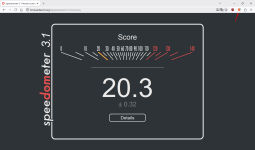
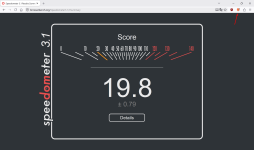
Btw another reason why I don't trust Speedometer 3.1 results are valid. With Chrome Mask enabled, result is slightly higher than with it being disabled. Not by a lot, but results are consistent every time I tested.

Chrome Mask enabled:
Screenshot_1.png

Chrome Mask disabled:
Screenshot_2.png
 
Last edited:
Every extension that does something to a website will slow down every web browser in these useless tests. They are modifying network requests and how the website looks, and that takes away something on the test.

I tested on Firefox AdGuard and then uBO. Result I got was exactly the same.

Btw another reason why I don't trust Speedometer 3.1 results are valid. With Chrome Mask enabled, result is slightly higher than with it being disabled. Not by a lot, but results are consistent every time I tested.

Chrome Mask enabled:
View attachment 297987

Chrome Mask disabled:
View attachment 297988
While I agree that the results are very strange indeed (I assume you run this in Firefox, so logic would say that Chrome mask extension adds processing time, meaning the lower result when disabled is nuts and hard to explain), but the Speedometer 3.1 is a recognized industry standard!
1780815812165.png
 
While I agree that the results are very strange indeed (I assume you run this in Firefox, so logic would say that Chrome mask extension adds processing time, meaning the lower result when disabled is nuts and hard to explain), but the Speedometer 3.1 is a recognized industry standard!View attachment 297990
It is, but as I already said many times, this tools isn't meant for us end users; it's made for developers to test their browsers.

Screenshot_3.png
 
  • Like
Reactions: lokamoka820
Have you tried writing your own scriptlets in Brave?
View attachment 297989

No.
I find FOUCs (Flash of Unblocked Content) very annoying; I assume they’re visible in every Chromium-based browser with MV3 ad blockers, including uBoL.

So if I have to use a browser that performs worse than Chrome on the Speedometer 3.1 test, I might as well switch to my primary browser, Firefox, and reserve Chrome for heavily loaded websites where this difference is more noticeable.

I need to make a final decision in the next few days.

P.S.

Although I suppose I'll stick with Chrome.
Very brief FOUC < slowness with Firefox
 
Last edited:
It is, but as I already said many times, this tools isn't meant for us end users; it's made for developers to test their browsers.
Our street cable/coax/fiber (small grey) distribution box is at my front yard and the neighbourhood distribution shed is 500 meters away and my City is on the fiber (internet) back bone of the Netherlands. That is why (I think), I get 100% scores with 4 different DNS services in the DNS speed test in another thread at MT and I get WIfi downloads speeds always at least 1% higher than my ISP advertises, so disturbances in the chain are neglectable.

I know Speedometer tends to magnify small differences (which can hardly noticed during speed load time tests), but that is exactly the reason why it is a nice tool to test whether my optimizations work (see part of the picture you included :-) )
1780820762839.png
 
Last edited:
Our street cable/coax/fiber (small grey) distribution box is at my front yard and the neighbourhood distribution shed is 500 meters away and my City is on the fiber (internet) back bone of the Netherlands. That is why (I think), I get 100% scores with 4 different DNS services in the DNS speed test in another thread at MT and I get WIfi downloads speeds always at least 1% higher than my ISP advertises, so disturbances in the chain are neglectable.
No need to think, that's a fact. Even if you were in far away city, but still in the Netherlands and using fiber, you'd still have max. 10 ms latency towards all major web services. France, Germany, Ireland, Netherlands and UK are major tech hubs in Europe and pretty much all foreign services have their servers there. Meanwhile, in the South, you'll barely find any global network provider with their servers here. Because of huge capacity and large number of data centers in the Netherlands, it's cheaper for foreign companies to get their servers there. Meanwhile, Croatia has around 18 data centers so it's much more expensive for companies to connect here.
I know Speedometer tends to magnify small differences (which can hardly noticed during speed load time tests), but that is exactly the reason why it is a nice tool to test whether my optimizations work (see part of the picture you included :-) )
View attachment 297993
I agree to that.
 
  • Like
Reactions: lokamoka820