


The MalwareTips app
Your community, one tap away.
Open MalwareTips from your Home Screen or desktop. Follow discussions, find answers and pick up where you left off.
- Home Screen access
- Optional push alerts
- Your community
You're ready to explore.Explore what's new
Installation instructions
iPhone & iPad
- Open MalwareTips in Safari and tap Share. You may need to open the Page Menu first.
- Choose Add to Home Screen. If it is not listed, use Edit Actions to add it.
- Keep Open as Web App enabled if shown, then tap Add.
Android
- Open MalwareTips in Chrome or another browser that supports app installation.
- Open the browser menu and look for Install app, Install and create shortcut, or Add to Home screen.
- Choose Install and confirm. Wording varies by browser.
Desktop
- Chrome: use the install icon in the address bar, or the menu under Cast, save and share.
- Edge: open the menu, then More tools, Apps and Install this site as an app.
- Safari on Mac: choose Share or File, then Add to Dock. Firefox on Windows: look for the web apps button in the address bar.
If you cannot find an install option, update your browser or use its bookmark option to keep MalwareTips close.
Keep up with your conversations
After installation, open the app and sign in. Enable push notifications in Preferences if you want alerts. On iPhone and iPad, push requires a Home Screen web app and iOS or iPadOS 16.4 or later.
Sign in to manage notificationsInstallation is optional. Your notification settings stay under your control.
You are using an out of date browser. It may not display this or other websites correctly.
You should upgrade or use an alternative browser.
You should upgrade or use an alternative browser.
Serious Discussion Fort Firewall
-
 Thread starter
tnodir
- Start date
- 517 Replies
- 112,625 Views

This is one nice firewall love it,

Fort Firewall v3.8.14
- UI: Options: Statistics: Add "Alerted only" flag (to collect only alerted blocked connections).
- Driver: Clear IRP's cancel routine before completion.
Hi Have not tried this again yet ,is all good with the driver and bsod problem? Thks
@blueblackwow65 Hi. BSOD still can occur. Let me fix it in 3.8.*
@blueblackwow65 BSOD should be fixed in 3.8.16

Setup PCPC setup
This looks interesting, might try it out next time I'm in between configuration changes.
Fort Firewall v3.9.0
- UI: Programs: Add "Kill Process" option.
- UI: Fix "Collect Blocked Connections" functioning when "Collect Traffic Statistics" is turned off.
Fort Firewall v3.9.1
- UI: Add "My Fort" window.
- UI: Options: Tray: Add "Show Icon" flag.
- UI: Options: Hot Keys: Add "Global" flag.
- UI: Show Traffic Graph when "Collect Traffic Statistics" is turned off.
@ tnodir Nice thank you , its working perfect.
Fort Firewall v3.9.2
- UI: Activate already running instance, don't show a warning.
- UI: My Fort: Show menu on activation.
- UI: Update main icon.
- UI: Add ability to use custom icons/ folder from current working dir.
- UI: Programs: Rename "Purge All" to "Purge Obsolete".
the Purge Obsolete is working well , I also like the new icon.
Thanks to @Dashke for working on the icons.I also like the new icon.
Hello. I used Malwarebytes WFC before but it has provblems with "connect to service". I installed Fort Firewall instead on my Windows 7 machine, to try it, but I have no alerts. "Ask to connect" option is grey.
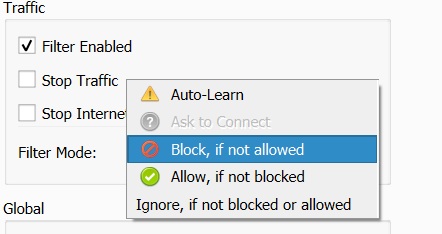
Btw. I heard that it's recommender to block incoming connections for security reasons. Does Fort firewall block incoming because I don't see anything about incoming / outgoing in settings.
Btw. I heard that it's recommender to block incoming connections for security reasons. Does Fort firewall block incoming because I don't see anything about incoming / outgoing in settings.
Hello. It's under development right now, sorry."Ask to connect" option is grey.
It blocks all connections (incoming / outgoing).Does Fort firewall block incoming because I don't see anything about incoming / outgoing in settings.
Granular rules per program is under development too.


MalwareTips community
Join the discussion
Create a free account to reply to this thread, ask your own questions and get help from the community.
- Reply and ask questions
- Get alerts when someone answers
- Free malware removal help
Join 75,697 members who help each other for free, since 2010.
Recently browsing
Members and guests who viewed this thread in the last 5 minutes
You may also like...
-
 New Update Sandboxie-Plus v1.18.2 / 5.73.2 Latest
-

-

-
 Serious Discussion Orion Malware Cleaner (OMC) - By Trident
-
 New Update Technitium DNS Server