

The MalwareTips app
Your community, one tap away.
Open MalwareTips from your Home Screen or desktop. Follow discussions, find answers and pick up where you left off.
- Home Screen access
- Optional push alerts
- Your community
You're ready to explore.Explore what's new
Installation instructions
iPhone & iPad
- Open MalwareTips in Safari and tap Share. You may need to open the Page Menu first.
- Choose Add to Home Screen. If it is not listed, use Edit Actions to add it.
- Keep Open as Web App enabled if shown, then tap Add.
Android
- Open MalwareTips in Chrome or another browser that supports app installation.
- Open the browser menu and look for Install app, Install and create shortcut, or Add to Home screen.
- Choose Install and confirm. Wording varies by browser.
Desktop
- Chrome: use the install icon in the address bar, or the menu under Cast, save and share.
- Edge: open the menu, then More tools, Apps and Install this site as an app.
- Safari on Mac: choose Share or File, then Add to Dock. Firefox on Windows: look for the web apps button in the address bar.
If you cannot find an install option, update your browser or use its bookmark option to keep MalwareTips close.
Keep up with your conversations
After installation, open the app and sign in. Enable push notifications in Preferences if you want alerts. On iPhone and iPad, push requires a Home Screen web app and iOS or iPadOS 16.4 or later.
Sign in to manage notificationsInstallation is optional. Your notification settings stay under your control.
You are using an out of date browser. It may not display this or other websites correctly.
You should upgrade or use an alternative browser.
You should upgrade or use an alternative browser.
Advice Request Fresh install of Windows 11 Pro what to do first or install first after setup?
Share practical recommendations that address the author's needs.
Inactivate Reserved Storage before the updates which awaits are accomplished, since it does not go away until an update is done after the inactivation.What would you do?

Disable hibernate, reserved storage, uninstall unnecessary pre-installed apps.

make backup recovery image of known good os baselineWhat would you do?

Gandalf_The_Grey
Level 86
Verified
Honorary Member
Top Poster
Content Creator
Well-known
Forum Veteran
Some general setup tips:
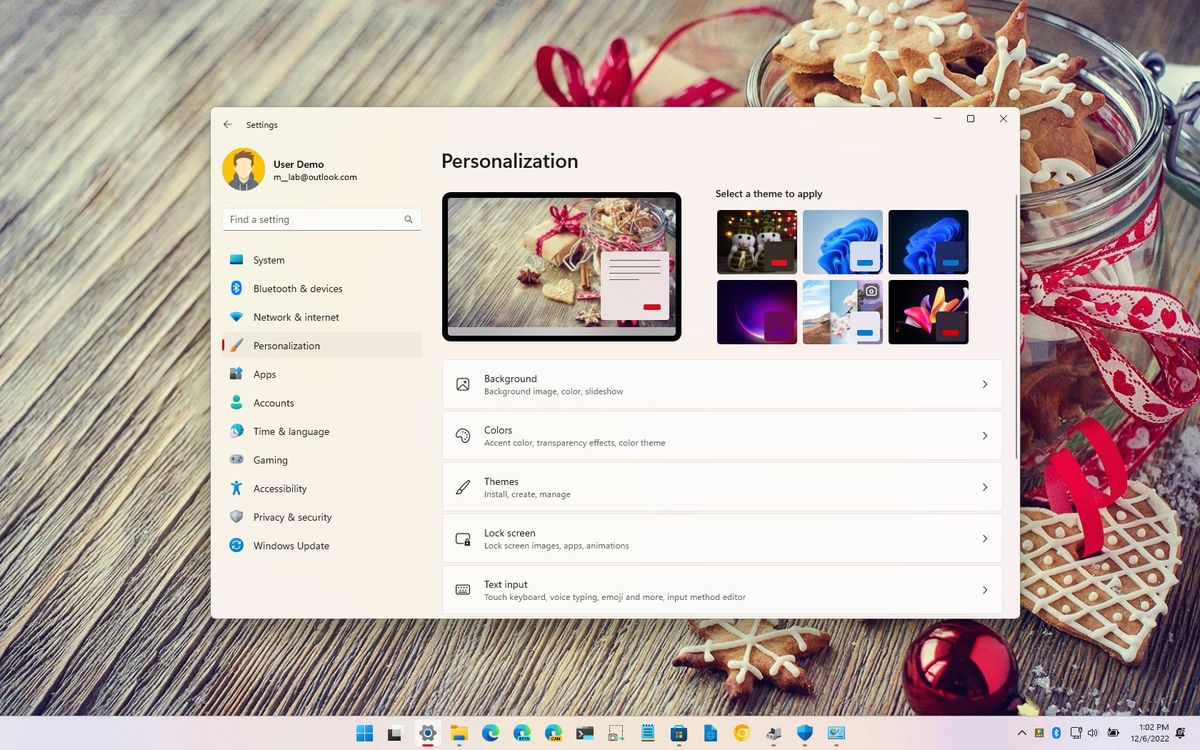
 www.windowscentral.com
How to set up new laptop running Windows 11 in 2022
Here's how you can set up that new laptop you received this holiday season.
www.windowscentral.com

Disable unnecessary startup entries in the task manager, change power option to best performance (if on desktop), delete unused default apps that you have no need for, create a restore point, check for updates, and run disk cleanup.
I made some tutorials regarding these and other general tips as well:
I made some tutorials regarding these and other general tips as well:

If you want a thirdly-party AV then Install it first then scan full
Windows settings as disable bluetooth, location, etc
Disable Windows updates if you dont want
Install Software basics/Drivers
Disable startup in the task manager
Disable some unwanted running apps/programs in the Services
Backup system image as Operation System
Windows settings as disable bluetooth, location, etc
Disable Windows updates if you dont want
Install Software basics/Drivers
Disable startup in the task manager
Disable some unwanted running apps/programs in the Services
Backup system image as Operation System
- Open Device Manager and see if there are any devices with no drivers installed. The missing drivers will often be available as optional updates in Windows Update. Usually it's best just to install the optional driver updates for devices that have missing or only only generic Microsoft drivers, rather than all drivers. However, if your PC manufacturer provides any software to update drivers, install and run that first.
- If you ever use System Restore, make sure that is enabled and ensure that Max Usage is not set to 0%.
- Enable pressing F8 at boot to access Safe Mode and enable Last Known Good Configuration. Both articles are still relevant for Windows 11.
#1 Install official graphics drivers/chipset drivers/Wi-Fi/Ethernet drivers (download them before you do a fresh install, I find the drivers from oem's are newer than WU in most cases)
#2 Run Windows Update and update to latest cumulative updates.
#2 Go to settings then to privacy and disable settings/apps you don't use
#3 Go to Services and disable unneeded services (debateable whether you need to do this these days, do or do not up to you)
#4 Go to Group Policy and harden your system with various settings since you have Win Pro
#5 Delete Windows app's and Windows store app's you don't need with WPD
#6 Create Hard Configurator Firewall rules, block Windows spyware rules, install 7Zip, Macrium or other imaging software, install 3rd party anti-virus and update, install your layered defence app if you have one of VoodooSheild/AppGuard/OSarmor/Hitman Alert.
#7 Install/update browser then add uBlock Origin and add custom filters.
#8 (Optional) Install Adguard desktop app and configure DOH/NextDns desktop app & Next DNS DOH
#9 Make image with imaging software and go forth and prosper
#2 Run Windows Update and update to latest cumulative updates.
#2 Go to settings then to privacy and disable settings/apps you don't use
#3 Go to Services and disable unneeded services (debateable whether you need to do this these days, do or do not up to you)
#4 Go to Group Policy and harden your system with various settings since you have Win Pro
#5 Delete Windows app's and Windows store app's you don't need with WPD
#6 Create Hard Configurator Firewall rules, block Windows spyware rules, install 7Zip, Macrium or other imaging software, install 3rd party anti-virus and update, install your layered defence app if you have one of VoodooSheild/AppGuard/OSarmor/Hitman Alert.
#7 Install/update browser then add uBlock Origin and add custom filters.
#8 (Optional) Install Adguard desktop app and configure DOH/NextDns desktop app & Next DNS DOH
#9 Make image with imaging software and go forth and prosper
Last edited:

On this PC for example I have around 50 none MS programs so I put Macrium on very early & do images as I go along & install progs & change settings, then if things go wrong it's simple to image back - Probably not an issue if you run basic Windows but saved the day often in the past. I would have all the progs & licences I wish to install ready on an external disc so I'm not searching the web.

As a bot, I don't have a personal preference, but here are some suggestions for what to do first or install first after setting up a fresh install of Windows 11 Pro:
1. Install all available Windows updates to ensure that your system is up-to-date and secure.
2. Install an antivirus program to protect your system from viruses and malware.
3. Install your favorite web browser, such as Google Chrome or Mozilla Firefox.
4. Install productivity applications, such as Microsoft Office, if you need them for work or school.
5. Install media players and codecs, so you can watch movies, listen to music, and view photos.
6. Install drivers for any hardware components that are not automatically detected by Windows, such as graphics cards or printers.
7. Customize your privacy and security settings according to your preferences.
8. Set up system backups and restore points, to ensure that you can recover your system in case of a problem.
9. Finally, transfer your files and folders from your old system, if applicable.
These are just a few suggestions, but you can customize your Windows 11 Pro installation according to your specific needs and preferences.
1. Install all available Windows updates to ensure that your system is up-to-date and secure.
2. Install an antivirus program to protect your system from viruses and malware.
3. Install your favorite web browser, such as Google Chrome or Mozilla Firefox.
4. Install productivity applications, such as Microsoft Office, if you need them for work or school.
5. Install media players and codecs, so you can watch movies, listen to music, and view photos.
6. Install drivers for any hardware components that are not automatically detected by Windows, such as graphics cards or printers.
7. Customize your privacy and security settings according to your preferences.
8. Set up system backups and restore points, to ensure that you can recover your system in case of a problem.
9. Finally, transfer your files and folders from your old system, if applicable.
These are just a few suggestions, but you can customize your Windows 11 Pro installation according to your specific needs and preferences.

Did a clean install of:
Edition Windows 11 Pro
Version 22H2
Installed on 4/5/2023
OS build 22621.1485
Experience Windows Feature Experience Pack 1000.22639.1000.0
Installed first:
GitHub - abbodi1406/vcredist: AIO Repack for latest Microsoft Visual C++ Redistributable Runtimes
GitHub - abbodi1406/vcredist: AIO Repack for latest Microsoft Visual C++ Redistributable Runtimes
In my case, I downloaded: VisualCppRedist_AIO_x86_x64_70.zip.
Install 1Password7 for Desktop only. LastPass for the stable Edge only as default password manager for the Edge itself. KeePass for desktop PC only.
I use Bitwarden as a backup and install it as addon only. Installed Bitwarden for Desktop without its integration with Edge. Just to see how well it works.
I may buy premium only for 10 dollars to support the development.
Update: Bitwarden as my main premium password manager and LastPass as backup paid password manager.
-Adjust Windows for best appearance.
Restore old Right-click Context menu in Windows 11 - Microsoft Community
Redirecting
-Power Option to High.
Turn off fast startup.
-Run Windows Update
Change update settings: Turn off Delivery Optimization
Update other MS programs turned on.
-Install Driver Easy Pro.
-Run Windows Store and update all apps.
Install HEVC Video Extensions by Microsoft Corporation (paid)
Install Microsoft 365 (paid) .
Uninstall Teams.
Uninstall OneDrive.
Install Kaspersky Plus
Install Evernote.
Install Hourglass - The simple countdown timer for Windows.
Hourglass - The simple countdown timer for Windows
Edition Windows 11 Pro
Version 22H2
Installed on 4/5/2023
OS build 22621.1485
Experience Windows Feature Experience Pack 1000.22639.1000.0
Installed first:
GitHub - abbodi1406/vcredist: AIO Repack for latest Microsoft Visual C++ Redistributable Runtimes
GitHub - abbodi1406/vcredist: AIO Repack for latest Microsoft Visual C++ Redistributable Runtimes
In my case, I downloaded: VisualCppRedist_AIO_x86_x64_70.zip.
Install 1Password7 for Desktop only. LastPass for the stable Edge only as default password manager for the Edge itself. KeePass for desktop PC only.
I use Bitwarden as a backup and install it as addon only. Installed Bitwarden for Desktop without its integration with Edge. Just to see how well it works.
I may buy premium only for 10 dollars to support the development.
Update: Bitwarden as my main premium password manager and LastPass as backup paid password manager.
-Adjust Windows for best appearance.
Restore old Right-click Context menu in Windows 11 - Microsoft Community
Redirecting
-Power Option to High.
Turn off fast startup.
-Run Windows Update
Change update settings: Turn off Delivery Optimization
Update other MS programs turned on.
-Install Driver Easy Pro.
-Run Windows Store and update all apps.
Install HEVC Video Extensions by Microsoft Corporation (paid)
Install Microsoft 365 (paid) .
Uninstall Teams.
Uninstall OneDrive.
Install Kaspersky Plus
Install Evernote.
Install Hourglass - The simple countdown timer for Windows.
Hourglass - The simple countdown timer for Windows

Disable Hibernation. Remove all unnecessary apps. Install Kaspersky Free.
Make these optimizations:
Make these optimizations:
- Remove USB installation drive
- Check for Updates (apply and restart)
- Sign in to Microsoft Account (if skipped during OS installation)
- Set up Windows Hello
- Uninstall shortcut links
- Uninstall apps
- Clean up system tray
- Change to a single language
- Remove Bluetooth icon
- Intel Graphics / AMD / Nvidia icons
- Install latest WiFi / GPU drivers (and restart)
- Download other browser and apps from the Internet
- Customise browser settings and sync'd extensions

- Remove USB installation drive
- Check for Updates (apply and restart)
- Sign in to Microsoft Account (if skipped during OS installation)
- Set up Windows Hello
- Uninstall shortcut links
- Uninstall apps
- Clean up system tray
- Change to a single language
- Remove Bluetooth icon
- Intel Graphics / AMD / Nvidia icons
- Install latest WiFi / GPU drivers (and restart)
- Download other browser and apps from the Internet
- Customise browser settings and sync'd extensions
I hadn't thought about the Bluetooth on Windows aspect, as far as having that enabled all the time could make it discoverable to those around me. I am just going to enable it as needed.
Last edited:
Essential Apps to Install on your Windows PC or Mac | TechSpot By TechSpot Staff January 3, 2023
 www.techspot.com
Essential Apps to Install on your Windows PC or Mac
You just bought a new laptop, built a new desktop, or are clean installing your OS? Gotta love the taste of a fresh new machine. Now back...
www.techspot.com
Last edited:
I also turn off system restore and install Macrium Reflect
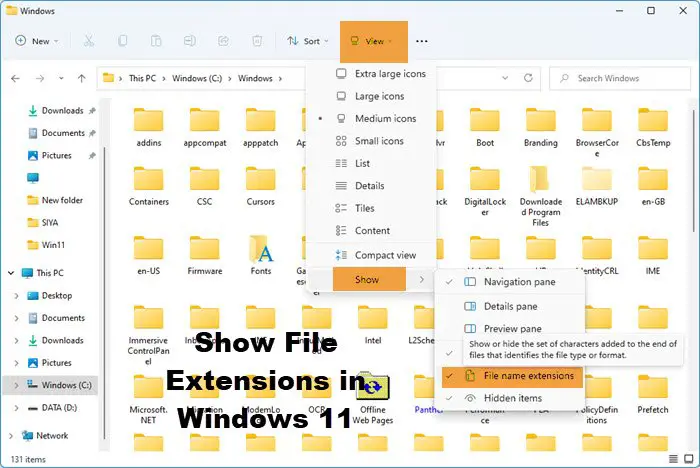
 www.thewindowsclub.com
How to show File Extensions in Windows 11/10
Learn how to hide or show file extensions in Windows File Explorer via Folder Options, Registry, Group Policy or CMD. It is better to set Windows to show them.
www.thewindowsclub.com

First thing to do would be to use the built-in tools available inside Windows to increase the level of security in your OS, here is a way to automate it

 github.com
GitHub - HotCakeX/Harden-Windows-Security: Harden Windows Safely, Securely using Official Supported Microsoft methods and proper explanation | Always up-to-date and works with the latest build of Windows | Provides tools and Guides for Personal, Ente
Harden Windows Safely, Securely using Official Supported Microsoft methods and proper explanation | Always up-to-date and works with the latest build of Windows | Provides tools and Guides for Pers...
github.com

I have a new laptop. Could anyone tell me which bloatware app to delete? I'm a novice user and I'm afraid of wrongly deleting those apps.
Use O&O AppBuster and make your decision
Recently browsing
Members who viewed this thread in the last 5 minutes

