

The MalwareTips app
Your community, one tap away.
Open MalwareTips from your Home Screen or desktop. Follow discussions, find answers and pick up where you left off.
- Home Screen access
- Optional push alerts
- Your community
You're ready to explore.Explore what's new
Installation instructions
iPhone & iPad
- Open MalwareTips in Safari and tap Share. You may need to open the Page Menu first.
- Choose Add to Home Screen. If it is not listed, use Edit Actions to add it.
- Keep Open as Web App enabled if shown, then tap Add.
Android
- Open MalwareTips in Chrome or another browser that supports app installation.
- Open the browser menu and look for Install app, Install and create shortcut, or Add to Home screen.
- Choose Install and confirm. Wording varies by browser.
Desktop
- Chrome: use the install icon in the address bar, or the menu under Cast, save and share.
- Edge: open the menu, then More tools, Apps and Install this site as an app.
- Safari on Mac: choose Share or File, then Add to Dock. Firefox on Windows: look for the web apps button in the address bar.
If you cannot find an install option, update your browser or use its bookmark option to keep MalwareTips close.
Keep up with your conversations
After installation, open the app and sign in. Enable push notifications in Preferences if you want alerts. On iPhone and iPad, push requires a Home Screen web app and iOS or iPadOS 16.4 or later.
Sign in to manage notificationsInstallation is optional. Your notification settings stay under your control.
You are using an out of date browser. It may not display this or other websites correctly.
You should upgrade or use an alternative browser.
You should upgrade or use an alternative browser.
Advice Request Guys is iolo System mechanic good or safe to use?
-
 Thread starter
peter1111
Thread starter
peter1111
- Start date
- 10 Replies
- 2,932 Views
Share practical recommendations that address the author's needs.

@peterfat111 Where did you hear about IOLO?
Before buying commercial products, have you looked at either Freeware or FOSS, to see if they actually meet your requirements and work as intended?
Links:
CCleaner Slim build - CCleaner - Download Builds
Wise Disk Cleaner Portable version - WiseCleaner Downloads - Download Free Disk Cleaner
BleachBit with Winapp2.ini - Clean Your System and Free Disk Space | BleachBit and BleachBit Documentation : Winapp2.ini
@pablozi That's a very good question, once I answered that question for myself, I stopped using all these junk and registry cleaner software.
Before buying commercial products, have you looked at either Freeware or FOSS, to see if they actually meet your requirements and work as intended?
Links:
CCleaner Slim build - CCleaner - Download Builds
Wise Disk Cleaner Portable version - WiseCleaner Downloads - Download Free Disk Cleaner
BleachBit with Winapp2.ini - Clean Your System and Free Disk Space | BleachBit and BleachBit Documentation : Winapp2.ini
@pablozi That's a very good question, once I answered that question for myself, I stopped using all these junk and registry cleaner software.

Be carefull with it,it has borked systems!Hi guys. I am looking for a pc cleaning software. I heard wise care, ASC, and iolo sm is not bad. I know wise care and ASC, but I don't know about iolo sm so can anyone tell me is iolo sm safe and ok to use?

ok thanks for the advice, I will avoid it then.Be carefull with it,it has borked systems!


Be carefull with it,it has borked systems!
Agreed, IMHO it's probably not worth purchasing. PC cleaning software is something I avoid like the plague. Many years ago, maybe 2005, I tried it and found it not worth purchasing, and not even worth it for free. Maybe it's better now, but you can clean your PC for free with built-in Windows cleaner as mentioned by @gery79

I don't think it's bad. However, my impression is that it is not something that you pay for and spend.
Cleaning software is similar to cleaning earwax. It may have some effect, but it doesn't make a dramatic difference.
I use it when I want to change my mood.
What I find most inconsistent is that the cleaning software itself creates things like backups and log files.
Cleaning software is similar to cleaning earwax. It may have some effect, but it doesn't make a dramatic difference.
I use it when I want to change my mood.
What I find most inconsistent is that the cleaning software itself creates things like backups and log files.
Guys, is wise care 356 free worth getting? It doesn't seems to have any "black history" like iobit and iolo.
IDK if its good? The internet says its not bad but I am not sure.
Whether this is a spice of junk or something.
(it also got some other features, like ram cleaner, and startup, and a tray, and a system boost..........

 malwaretips.com

 www.techspot.com
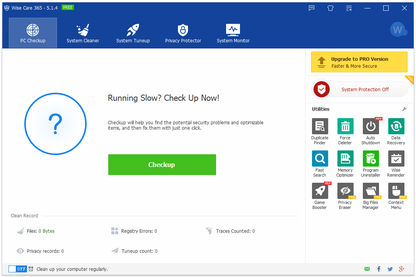
IDK if its good? The internet says its not bad but I am not sure.
Whether this is a spice of junk or something.
(it also got some other features, like ram cleaner, and startup, and a tray, and a system boost..........
Wise Care 365 Pro - Do you use it? Is it trustworthy? | MalwareTips
Hello everyone What do you think of Wise Care 365 Pro, I have used it on my Acer Notebook, and no problems have occurred.
malwaretips.com
Wise Care 365
Wise Care 365 is an all-in-one PC tune-up utility. It will keep your Windows secure, clean and fast.
www.techspot.com
Last edited by a moderator:
System Mechanic is safe to use and shouldn't cause any problems, but its publisher Iolo has used questionable marketing tactics in the past, as I detail in the following post. As a result, I don't recommend buying it.
malwaretips.com
If you just want to clean junk files, Wise Disk Cleaner is free and works very well. An excellent paid option is Kerish Doctor.
System mechanic VS Kerish doctor 2019 | MalwareTips
Please help me to choose between system mechanic or kerish doctor
malwaretips.com
Ok thanks for giving me the article( iolo sounds horrible) , I think I will just use wise careSystem Mechanic is safe to use and shouldn't cause any problems, but its publisher Iolo has used questionable marketing tactics in the past, as I detail in the following post. As a result, I don't recommend buying it.
If you just want to clean junk files, Wise Disk Cleaner is free and works very well. An excellent paid option is Kerish Doctor.System mechanic VS Kerish doctor 2019 | MalwareTips
Please help me to choose between system mechanic or kerish doctor

Recently browsing
Members who viewed this thread in the last 5 minutes
You may also like...
-

-
 Comparison Best computer maintenance tools
 - T
-

-