

The MalwareTips app
Your community, one tap away.
Open MalwareTips from your Home Screen or desktop. Follow discussions, find answers and pick up where you left off.
- Home Screen access
- Optional push alerts
- Your community
You're ready to explore.Explore what's new
Installation instructions
iPhone & iPad
- Open MalwareTips in Safari and tap Share. You may need to open the Page Menu first.
- Choose Add to Home Screen. If it is not listed, use Edit Actions to add it.
- Keep Open as Web App enabled if shown, then tap Add.
Android
- Open MalwareTips in Chrome or another browser that supports app installation.
- Open the browser menu and look for Install app, Install and create shortcut, or Add to Home screen.
- Choose Install and confirm. Wording varies by browser.
Desktop
- Chrome: use the install icon in the address bar, or the menu under Cast, save and share.
- Edge: open the menu, then More tools, Apps and Install this site as an app.
- Safari on Mac: choose Share or File, then Add to Dock. Firefox on Windows: look for the web apps button in the address bar.
If you cannot find an install option, update your browser or use its bookmark option to keep MalwareTips close.
Keep up with your conversations
After installation, open the app and sign in. Enable push notifications in Preferences if you want alerts. On iPhone and iPad, push requires a Home Screen web app and iOS or iPadOS 16.4 or later.
Sign in to manage notificationsInstallation is optional. Your notification settings stay under your control.
You are using an out of date browser. It may not display this or other websites correctly.
You should upgrade or use an alternative browser.
You should upgrade or use an alternative browser.
Hard_Configurator - Windows Hardening Configurator
-
 Thread starter
Andy Ful
Thread starter
Andy Ful
- Start date
- 4,521 Replies
- 1,195,375 Views

Just checking logs after a week of H_C Beta3. Getting the following block on Win11
Access to C:\Program Files\WindowsApps\Microsoft.DesktopAppInstaller_1.19.10173.0_x64__8wekyb3d8bbwe\WindowsPackageManagerServer.exe has been restricted by your Administrator by location with policy rule {1016bbe0-a716-428b-822e-5e544b6a3300} placed on path C:\Program Files\WindowsApps\Microsoft.DesktopAppInstaller*.
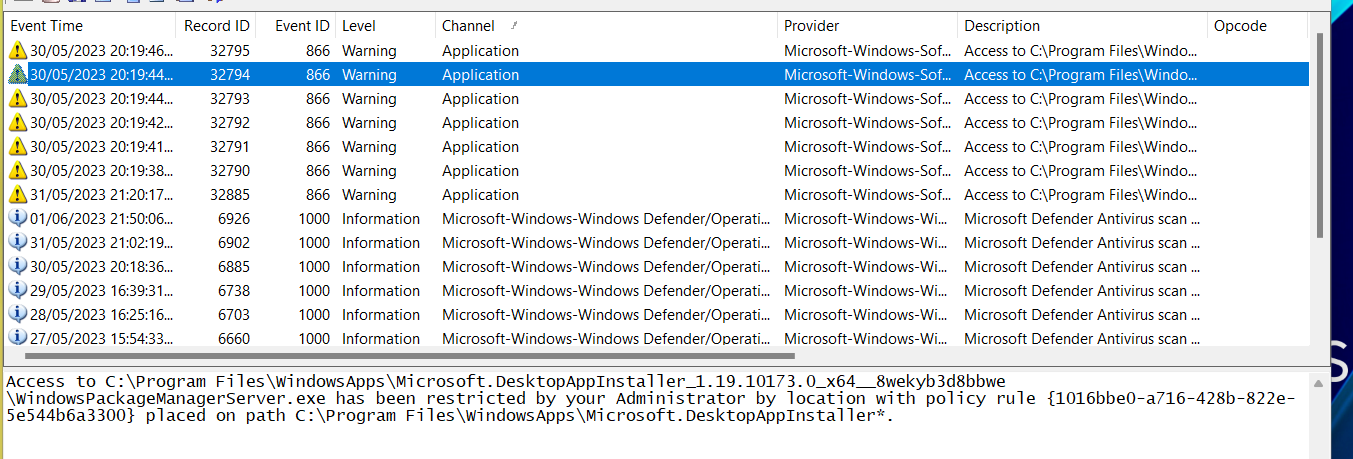
Not really tested the previous betas so not sure if same block on those.
Anyway, best way to whitelist this? Seems to be a legitimate Microsoft Installer.
Access to C:\Program Files\WindowsApps\Microsoft.DesktopAppInstaller_1.19.10173.0_x64__8wekyb3d8bbwe\WindowsPackageManagerServer.exe has been restricted by your Administrator by location with policy rule {1016bbe0-a716-428b-822e-5e544b6a3300} placed on path C:\Program Files\WindowsApps\Microsoft.DesktopAppInstaller*.
Not really tested the previous betas so not sure if same block on those.
Anyway, best way to whitelist this? Seems to be a legitimate Microsoft Installer.

Attempted Path = C:\Program Files\WindowsApps\Microsoft.DesktopAppInstaller_1.19.10173.0_x64__8wekyb3d8bbwe\WindowsPackageManagerServer.exe
SRP Rule GUID = {1016bbe0-a716-428b-822e-5e544b6a3300}
Description: File blocked via SRP Rule GUID for Disallowed rule C:\Program Files\WindowsApps\Microsoft.DesktopAppInstaller*
Here is mine from Simple Windows Hardening, I get a lot of these DesktopAppInstaller blocks with SWH, if I remember correctly Andy said its not an issue, I don't remember why he said these blocks occur though.
SRP Rule GUID = {1016bbe0-a716-428b-822e-5e544b6a3300}
Description: File blocked via SRP Rule GUID for Disallowed rule C:\Program Files\WindowsApps\Microsoft.DesktopAppInstaller*
Here is mine from Simple Windows Hardening, I get a lot of these DesktopAppInstaller blocks with SWH, if I remember correctly Andy said its not an issue, I don't remember why he said these blocks occur though.
ThanksAttempted Path = C:\Program Files\WindowsApps\Microsoft.DesktopAppInstaller_1.19.10173.0_x64__8wekyb3d8bbwe\WindowsPackageManagerServer.exe
SRP Rule GUID = {1016bbe0-a716-428b-822e-5e544b6a3300}
Description: File blocked via SRP Rule GUID for Disallowed rule C:\Program Files\WindowsApps\Microsoft.DesktopAppInstaller*
Here is mine from Simple Windows Hardening, I get a lot of these DesktopAppInstaller blocks with SWH, if I remember correctly Andy said its not an issue, I don't remember why he said these blocks occur though.


Andy Ful
From Hard_Configurator Tools
Verified
Honorary Member
Top Poster
Developer
Well-known
Forum Veteran
It is related to the option :Access to C:\Program Files\WindowsApps\Microsoft.DesktopAppInstaller_1.19.10173.0_x64__8wekyb3d8bbwe\WindowsPackageManagerServer.exe has been restricted by your Administrator by location with policy rule {1016bbe0-a716-428b-822e-5e544b6a3300} placed on path C:\Program Files\WindowsApps\Microsoft.DesktopAppInstaller*.
<MORE SRP ...> <Block AppInstaller> = ON
When you open Microsoft Store, it tries to execute WindowsPackageManagerServer.exe. This is probably related to the management (by developers) of applications distributed via Microsoft Store.
If you only want to install/update the applications via Microsoft Store, then you can ignore the blocks of WindowsPackageManagerServer.exe.

Thanks Andy, explains it perfectly.It is related to the option :
<MORE SRP ...> <Block AppInstaller> = ON
When you open Microsoft Store, it tries to execute WindowsPackageManagerServer.exe. This is probably related to the management (by developers) of applications distributed via Microsoft Store.
If you only want to install/update the applications via Microsoft Store, then you can ignore the blocks of WindowsPackageManagerServer.exe.
Thank you!It is related to the option :
<MORE SRP ...> <Block AppInstaller> = ON
When you open Microsoft Store, it tries to execute WindowsPackageManagerServer.exe. This is probably related to the management (by developers) of applications distributed via Microsoft Store.
If you only want to install/update the applications via Microsoft Store, then you can ignore the blocks of WindowsPackageManagerServer.exe.
F
ForgottenSeer 97327
@Andy Ful
Am I correct that Microsoft store apps can be installed and updated withOUT elevation?
I am asking because I got a laptop for an older relative and was thinking about installing H_C and running the relative user account in Standard User rights with UAC set to silently deny elevation. I have found the programs they use in MS Store, so that would be a nice benefit (using hard rights separation through standard user in stead of UAC).
Am I correct that Microsoft store apps can be installed and updated withOUT elevation?
I am asking because I got a laptop for an older relative and was thinking about installing H_C and running the relative user account in Standard User rights with UAC set to silently deny elevation. I have found the programs they use in MS Store, so that would be a nice benefit (using hard rights separation through standard user in stead of UAC).
Last edited by a moderator:
Andy Ful
From Hard_Configurator Tools
Verified
Honorary Member
Top Poster
Developer
Well-known
Forum Veteran
Mostly, Yes (with some exceptions).
If this is the UWP app, it is updated via service with high privileges (no UAC prompt). It can be automatically updated also on SUA without prompts. Any UWP app is installed in the directory:
c:\Program Files\WindowsApps\
The already installed UWP apps are also visible in the Microsoft Store user's Library.
Some applications distributed via MS Store are not UWP apps, but desktop applications. They are installed in %ProgramFiles% or in the %UserProfile%. Also, they are not updated via Microsoft Store. Such applications can trigger UAC prompts.
If you want to avoid UAC prompts, you have to check that installed applications are UWP apps.
Some desktop (non-UWP) applications can also auto-update without the UAC prompt:
- The update is done via scheduled tasks with high privileges (Edge, Google Chrome, Firefox, etc.).
- The update is done fully in ProgramData or user AppData folders (no elevation, locations whitelisted in the H_C Recommended Settings).
Last edited:
F
ForgottenSeer 93786
A couple things about FirewallHardening
1. You should have the ability to select multiplie executables at once (Assuming it's something that actually can be implemented?)
2. When scrolling trough any.run and JOESandbox, I noticed that the LOLbin's that FirewallHardening block does not cover all the LOLbin's in the .NET Framework folders that are abused by malware, which I had to manually add, one by one, which happens to be exactly why I asked about the ability to add several files at once. Similarly, something to note is that I see some cryptominers use Console Window Host (aka conhost.exe) to evade detection (Refrence), and blocking it does not seem to cause any issues (atleast on my end), so it's something that should be added to the blocked LOLbin's.
1. You should have the ability to select multiplie executables at once (Assuming it's something that actually can be implemented?)
2. When scrolling trough any.run and JOESandbox, I noticed that the LOLbin's that FirewallHardening block does not cover all the LOLbin's in the .NET Framework folders that are abused by malware, which I had to manually add, one by one, which happens to be exactly why I asked about the ability to add several files at once. Similarly, something to note is that I see some cryptominers use Console Window Host (aka conhost.exe) to evade detection (Refrence), and blocking it does not seem to cause any issues (atleast on my end), so it's something that should be added to the blocked LOLbin's.
Andy Ful
From Hard_Configurator Tools
Verified
Honorary Member
Top Poster
Developer
Well-known
Forum Veteran
1. You should have the ability to select multiplie executables at once (Assuming it's something that actually can be implemented?)
2. When scrolling trough any.run and JOESandbox, I noticed that the LOLbin's that FirewallHardening block does not cover all the LOLbin's in the .NET Framework folders that are abused by malware, which I had to manually add, one by one, which happens to be exactly why I asked about the ability to add several files at once.
I do not plan to add the ability to select multiple executables. FirewallHardening is intended to block the often abused LOLBins, especially those that can run DLLs. The problem with blocking outbound connections is that no one knows the side effects for most LOLBins, so I am very conservative when adding new LOLBins.
Similarly, something to note is that I see some cryptominers use Console Window Host (aka conhost.exe) to evade detection (Refrence), and blocking it does not seem to cause any issues (atleast on my end), so it's something that should be added to the blocked LOLbin's.
I think that I should add conhost.exe and RunScriptHelper.exe to the FH BlockList. They are abused in the wild and there is no reason to make outbound connections via conhost.exe or RunScriptHelper.exe.
Last edited:
A
Azazel
One idea is to monitor what IPs are blocked for one week and instead of blocking all connections have a whitelist of microsoft official IP addresses.The problem with blocking outbound connections is that no one knows the side effects for most LOLBins, so I am very conservative when adding new LOLBins.
Andy Ful
From Hard_Configurator Tools
Verified
Honorary Member
Top Poster
Developer
Well-known
Forum Veteran
One idea is to monitor what IPs are blocked for one week and instead of blocking all connections have a whitelist of microsoft official IP addresses.
On most computers, the FirewallHardening blocks are related to Microsoft telemetry (can be ignored).
The IP whitelist is a kind of solution but it will be different on different computers - the whitelist must be created individually by the user. Some applications can use rundll32.exe or inject the DLLs into explorer.exe to make outbound connections. In such cases, the whitelist (created by the user) would be a good solution. But, FirewallHardening is not this kind of software. There are known (more complex) applications for that. It is also possible to manually configure Windows Firewall.
A
Azazel
Are these the correct hardening registry keys use by hard configurator when they turned on:
Windows Registry Editor Version 5.00
[HKLM\SOFTWARE\Policies\Microsoft\Windows NT\Terminal Services]
"fAllowUnsolicited"=dword:00000000
"fAllowToGetHelp"=dword:00000000
"fDenyTSConnections"=dword:00000001

[HKLM\SOFTWARE\Policies\Microsoft\Windows\WinRM\Service\WinRS]
"AllowRemoteShellAccess"=dword:00000000

[HKLM\SYSTEM\CurrentControlSet\Services\RemoteRegistry]
"Start"=dword:00000004
Code:
Windows Registry Editor Version 5.00
[HKEY_LOCAL_MACHINE\Software\Policies\Microsoft\Windows\AppCompat]
"VDMDisallowed"=dword:00000001
Code:
Windows Registry Editor Version 5.00
[HKEY_LOCAL_MACHINE\SOFTWARE\Microsoft\Windows NT\CurrentVersion\Winlogon]
"CachedLogonsCount"="0"Yes, see program description list of things blocked:Are these the correct hardening registry keys use by hard configurator when they turned on:
Windows Registry Editor Version 5.00
[HKLM\SOFTWARE\Policies\Microsoft\Windows NT\Terminal Services]
"fAllowUnsolicited"=dword:00000000
"fAllowToGetHelp"=dword:00000000
"fDenyTSConnections"=dword:00000001

[HKLM\SOFTWARE\Policies\Microsoft\Windows\WinRM\Service\WinRS]
"AllowRemoteShellAccess"=dword:00000000

[HKLM\SYSTEM\CurrentControlSet\Services\RemoteRegistry]
"Start"=dword:00000004
Code:Windows Registry Editor Version 5.00 [HKEY_LOCAL_MACHINE\Software\Policies\Microsoft\Windows\AppCompat] "VDMDisallowed"=dword:00000001
Code:Windows Registry Editor Version 5.00 [HKEY_LOCAL_MACHINE\SOFTWARE\Microsoft\Windows NT\CurrentVersion\Winlogon] "CachedLogonsCount"="0"
Github AndyFul/Hard_Configurator as well as the very detailed manual available from that page.
Andy Ful
From Hard_Configurator Tools
Verified
Honorary Member
Top Poster
Developer
Well-known
Forum Veteran
Are these the correct hardening registry keys use by hard configurator when they turned on:
Windows Registry Editor Version 5.00
[HKLM\SOFTWARE\Policies\Microsoft\Windows NT\Terminal Services]
"fAllowUnsolicited"=dword:00000000
"fAllowToGetHelp"=dword:00000000
"fDenyTSConnections"=dword:00000001

[HKLM\SOFTWARE\Policies\Microsoft\Windows\WinRM\Service\WinRS]
"AllowRemoteShellAccess"=dword:00000000

[HKLM\SYSTEM\CurrentControlSet\Services\RemoteRegistry]
"Start"=dword:00000004
Yes and No.
In the H_C manual, I do not use the registry keys in the form that could be directly imported via the *.reg file. So, I often skip the brackets [ ] and use HKLM instead of the full Hive name HKEY_LOCAL_MACHINE. This information is not for users who want to tweak the Windows Registry via *.reg files.
These are OK (can be used via the *.reg file).Code:Windows Registry Editor Version 5.00 [HKEY_LOCAL_MACHINE\Software\Policies\Microsoft\Windows\AppCompat] "VDMDisallowed"=dword:00000001
Code:Windows Registry Editor Version 5.00 [HKEY_LOCAL_MACHINE\SOFTWARE\Microsoft\Windows NT\CurrentVersion\Winlogon] "CachedLogonsCount"="0"
Last edited:
A
Azazel
so if i replace HKLM with HKEY_LOCAL_MACHINE then the above scripts will work?Yes and No.
In the H_C manual, I do not use the registry keys in the form that could be directly imported via the *.reg file. So, I often skip the brackets [ ] and use HKLM instead of the full Hive name HKEY_LOCAL_MACHINE. This information is not for users who want to tweak the Windows Registry via *.reg files.
These are OK (can be used via the *.reg file).
Andy Ful
From Hard_Configurator Tools
Verified
Honorary Member
Top Poster
Developer
Well-known
Forum Veteran
so if i replace HKLM with HKEY_LOCAL_MACHINE then the above scripts will work?
Make the *.reg file and post here its content. Do not forget to make another one, to apply the Windows default settings.
A
Azazel
Code:
Windows Registry Editor Version 5.00
[HKEY_LOCAL_MACHINE\SOFTWARE\Policies\Microsoft\Windows NT\Terminal Services]
"fAllowUnsolicited"=dword:00000000
"fAllowToGetHelp"=dword:00000000
"fDenyTSConnections"=dword:00000001

[HKEY_LOCAL_MACHINE\SOFTWARE\Policies\Microsoft\Windows\WinRM\Service\WinRS]
"AllowRemoteShellAccess"=dword:00000000

[HKEY_LOCAL_MACHINE\SYSTEM\CurrentControlSet\Services\RemoteRegistry]
"Start"=dword:00000004
What are the Defaults?
Recently browsing
Members who viewed this thread in the last 5 minutes


