Hard_Configurator - Windows Hardening Configurator


Code:
Windows Registry Editor Version 5.00
[HKEY_LOCAL_MACHINE\SOFTWARE\Policies\Microsoft\Windows NT\Terminal Services]
"fAllowUnsolicited"=dword:00000000
"fAllowToGetHelp"=dword:00000000
"fDenyTSConnections"=dword:00000001

[HKEY_LOCAL_MACHINE\SOFTWARE\Policies\Microsoft\Windows\WinRM\Service\WinRS]
"AllowRemoteShellAccess"=dword:00000000

[HKEY_LOCAL_MACHINE\SYSTEM\CurrentControlSet\Services\RemoteRegistry]
"Start"=dword:00000004

What are the Defaults?

https://malwaretips.com/threads/har...urn-back-windows-defaults.123957/post-1045583
 
I have a question that might seem childish, but is there any benefit for a home user if they apply Microsoft Security Baseline and Update Baseline in addition to Hard_Configurator tweaked recommended settings?

I discussed this with a colleague at work and he is very convinced that it can be useful, I told him that as long as he has an operating system with up to date updates, Hard_Configurator installed, an AV that he likes and doesn't click on all the crap when surfing the web it's good enough and he doesn't have to become paranoid......but.....

I know that Security Baseline is for business environment but some settings I think can be useful to for a home user, so I don't know whether to agree with him or not.
 
Last edited:
I have a question that might seem childish, but is there any benefit for a home user if they apply Microsoft Security Baseline and Update Baseline in addition to Hard_Configurator tweaked recommended settings?
I know that Security Baseline is for business environment but some settings I think can be useful for a home user.

When using Hard_Configurator you have Security Baseline + SRP adjusted to the home environment. You can also use several predefined configurations with a few mouse clicks and easily inspect the blocked events. Hard_Configurator includes the collective knowledge of many members on MalwareTips and some from Wilders Security forums.(y)

Some hardening tweaks from Security Baseline can be useful at home, but some can decrease the default security on Windows Home. So, advanced knowledge is required when applying such hardening at home. Several tweaks are not necessary, because they are applied by default on Windows Home.
The problem is that Security Baseline is for Administrators who should understand the consequences of such hardening and can adjust the configuration to their needs. It is usually applied on computers with a static setup of installed applications.
Security Baseline requires inspecting Windows Event Logs to adjust the configuration and solve possible problems when something is silently blocked.
Generally, such hardening can be too complex for most users at home and often will produce more trouble than it's worth.

Some advanced users could use the adjusted Security Baseline + Hard_Configurator, but this can significantly increase the time needed to maintain such complex hardening. I do not recommend doing it. :)
 
Last edited:
Some hardening tweaks from Security Baseline can be useful at home, but some can decrease the default security on Windows Home.
It's about Windows Pro, but I think being the Pro version it has more settings enabled than Windows Home and using Security Baseline overlaps more with H_C.
I'll ask him to come here to join and ask questions if he wants more details.
 
Feature Request: Auto-update
  • Configure Defender
  • Document's Anti Exploit
  • Simple Windows Hardening
  • Firewall Hardening
either by schedule task or add them to Winget Repository.
 
  • Like
Reactions: Andy Ful
Feature Request: Auto-update
  • Configure Defender
  • Document's Anti Exploit
  • Simple Windows Hardening
  • Firewall Hardening
either by schedule task or add them to Winget Repository.

Such updating would be necessary if H_C would start with the system and could work in the background. I was thinking about it a few years ago, but I do not like such auto-features. The difference between auto-update and the current updating method in H_C is only one mouse click. So, I do not plan to include in the H_C the auto-update feature.
I plan to add in SimpleWindowsHardening the update button similar to that used in H_C.
 
is it possible to have a script running everyday by schedule task and only notify us if there is an update for a specific potable application like SWH and even more give us the option to click update, then remove the previous version and download the new one.
 
  • Like
Reactions: Andy Ful
is it possible to have a script running everyday by schedule task and only notify us if there is an update for a specific potable application like SWH and even more give us the option to click update, then remove the previous version and download the new one.
I do not like auto-notify features too. :)
Such applications as DocumentsAntiExploit and FirewallHardening are parts of bigger projects, so they are not updated individually. You cannot use the simple script, because the links to these executables do not exist. They are embedded in the H_C or SWH installation files. It could be possible if I would create another website for standalone versions of DocumentsAntiExploit and FirewallHardening (maybe I will someday), but for now, I am too busy to create and maintain several websites.
 
Hard_Configurator ver. 6.1.1.1 Stable - support for Windows 22H2.

The ver. 6.0.1.1 Can be updated via the <Update> button on the H_C main window.
No functional changes from the last beta (some code improvements).
Added new digital certificate.

Edit.
The beta version must be updated manually by using the installer of the stable version. No need to uninstall the previous version.
 
Last edited:
are there any plans to add ALL windows LOLBins available in firewall hardening.?
There is no need to do so. Some LOLBins (like Bitsadmin) are used only to download files, so blocking them via FirewallHardening is optimal. Some others can be safely blocked by FirewallHardening, but blocking them via H_C would be probably too restrictive (with unpredictable consequences).
 
There is no need to do so. Some LOLBins (like Bitsadmin) are used only to download files, so blocking them via FirewallHardening is optimal. Some others can be safely blocked by FirewallHardening, but blocking them via H_C would be probably too restrictive (with unpredictable consequences).
i meant if firewall hardening contains all LOLBins, and not to be added to H_C.
 
  • Like
Reactions: cryogent
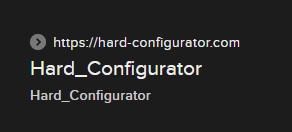
@Andy Ful --just wanted to let you know that suspicious site is still up. This one here:

fake hc.PNG
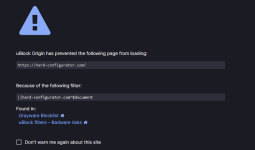
Fortunately it's still blocked by @South Park's Grayware Blocklist, as well as uBO's Badware Risks. Has anyone w/VM tried to see what happens if one actually lands on that site. Is something downloaded in the background?
ubo harc block.PNG
(y)
 
@Andy Ful --just wanted to let you know that suspicious site is still up.
Yes, although it can be found when searching the "Hard_Configurator" phrase only via Google (Yandex and Bing do not show this malvertising website). Bing can show it when searching "Hard Configurator". SmartScreen and the AdBlock extension in Edge do not block this website.
I tried to open this website - it redirected me to random shopping websites completely unrelated to Hard_Configurator. Some of them are legal (like allegro), but I cannot exclude the possibility that some others can be related to phishing.
Unfortunately, I cannot do anything to get rid of it. :confused:
 
Yes, although it can be found when searching the "Hard_Configurator" phrase only via Google (Yandex and Bing do not show this malvertising website). Bing can show it when searching "Hard Configurator". SmartScreen and the AdBlock extension in Edge do not block this website.
I tried to open this website - it redirected me to random shopping websites completely unrelated to Hard_Configurator. Some of them are legal (like allegro), but I cannot exclude the possibility that some others can be related to phishing.
Unfortunately, I cannot do anything to get rid of it. :confused:
Blocked by uBO default Badware risk filter ;)
1689801177143.png
 
Yes, although it can be found when searching the "Hard_Configurator" phrase only via Google (Yandex and Bing do not show this malvertising website). Bing can show it when searching "Hard Configurator". SmartScreen and the AdBlock extension in Edge do not block this website.
I did a test Bitdefender TrafficLight blocked it as Dangerous Page and it was blocked for your protection. Andy don't worry about this, we know you, and you are a professional and trustworthy person, I hope I don't post more about this.:)
1689808621603.png

1689808306801.png
 
I never suspected that the website about H_C would gain enough popularity, to be abused in this way. When @askalan decided to create this website, we talked about such a possibility. He is a trustworthy person and I do not know why he disappeared suddenly from MT. I lost contact with him during the COVID-19 period (it would be sad if he was a victim of COVID).
I checked the online portals that promote legal software (Softpedia, MajorGeeks, etc.), but currently, they do not include this abused link. Unfortunately, the link is present on several forums (in old posts). :confused:

Please post here, If someone knows what can be done to prevent abusing this domain. It was "Expired" for several months (the paid subscription expired). Currently, it is legally taken by the firm that promotes ADs.
 
Last edited: