Hard_Configurator - Windows Hardening Configurator

Sources (e.g. Microsoft Learn, others) that you used to determine the "What & How" to harden Windows and make Hard_Configurator make those hardening steps. (Not source code.)

Unfortunately, all official resources are related to SRP configuration via GPO.
H_C does not use GPO to apply SRP, so it is documented only in the H_C manual (based on my research).
The initial idea was mentioned on Wilderssecurity forum many years ago (on Windows XP).
Some SRP configurations are specific only to H_C.
That is why H_C will never be listed on the internal US DoD. :)
 
Last edited:
H_C does not use GPO to apply SRP, so it is documented only in the H_C manual (based on my research).

Some SRP configurations are specific only to H_C.

That is why H_C will never be listed on the internal US DoD. :)
The DoD and other agencies do not have a 100% official Microsoft documented method requirement to obtain approval for use. They all use undocumented methods.

It is possible to obtain approval by supplying the infos of how something was achieved by either adapting official, documented methods or via discovery that it works (e.g. research).

Never say "Never."
 
Reinstalling Windows is the last thing to do. Please do as follows:
  • Run the UserDiag and remember the time. Restart the Windows. Run FirewallHardening and inspect the <Blocked events>. Deactivate the block rules for LOLBins blocked at that time.
or
  • Deactivate all rules in FirewallHardening. Restart Windows.

If UserDiag is still offline, then the issue is unrelated to FirewallHardening.

explorer.exe in LOLBins rules was the problem, I think.
I removed the rule, and now all I have to do is restart the computer and make sure that's what it is.

Many thanks again!

I'm starting to understand this tool a little bit thanks to you here...

paintdotnet_fTK8qDPm0o.png
 
If Office is on block with LOLBins or H_C Recommended, Excel or Word works fine or not?

It should work well, except if you use documents that want to auto-update the content using resources from the Internet or local Network.
Microsoft Office updates are not blocked.

Did you notice any issues?
 
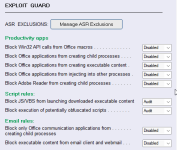
Office doesn't seem to update with this:
To see which LOLBin is the issue you must use <Blocked Events> and see which LOLBins are in the LOG. Usually, there can be many events related to Explorer.exe and a few events of rundll32.exe (mainly Windows telemetry).

What exactly is the purpose of this Office block (I don't quite understand).

MS Office applications can be exploited and serve as a trojan. But, if you use Microsoft Office 365, such outbound connections are normal. You can use the the DestAdress from the FirewallHardening Logto see where the outbound traffic goes:

Event[1]:
Local Time: 2024/10/04 11:36:45
ProcessID: 14868
Application: C:\windows\system32\rundll32.exe
Direction: Outbound
SourceAddress: 192.168.0.165
SourcePort: 54672
DestAddress: 51.124.78.146
DestPort: 443
Protocol: 6
.....

IP Whois Online, Whois Lookup Online | IPVoid

1728035409317.png


In this case the DestAddress is related to Microsoft.
 
Last edited:
To see which LOLBin is the issue you must use <Blocked Events> and see which LOLBins are in the LOG. Usually, there can be many events related to Explorer.exe and a few events of rundll32.exe (mainly Windows telemetry).


MS Office applications can be exploited and serve as a trojan. But, if you use Microsoft Office 365, such outbound connections are normal. You can use the the DestAdress from the FirewallHardening Logto see where the outbound traffic goes:

Event[1]:
Local Time: 2024/10/04 11:36:45
ProcessID: 14868
Application: C:\windows\system32\rundll32.exe
Direction: Outbound
SourceAddress: 192.168.0.165
SourcePort: 54672
DestAddress: 51.124.78.146
DestPort: 443
Protocol: 6
.....

IP Whois Online, Whois Lookup Online | IPVoid

View attachment 285684

In this case the DestAddress is related to Microsoft.

To sum up, I can block Office telemetry without any problem ?

Thanks again !
 
  • Like
Reactions: simmerskool
View attachment 285686
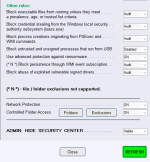
ConfigureDefender like this, is OK for home usage ?

I am not sure. You disabled the protection for MS Office. Many settings are set to Audit.
Audit will show an alert but will not stop the infection. The details are included in the help.
 
Last edited: