
Download Hard_Configurator 5.0.0.0
Download Hard_Configurator - Manage the Software Restriction Policies more efficiently and make sure that the system is protected against all sorts of threats via this tool


Open MalwareTips from your Home Screen or desktop. Follow discussions, find answers and pick up where you left off.
If you cannot find an install option, update your browser or use its bookmark option to keep MalwareTips close.
After installation, open the app and sign in. Enable push notifications in Preferences if you want alerts. On iPhone and iPad, push requires a Home Screen web app and iOS or iPadOS 16.4 or later.
Sign in to manage notificationsInstallation is optional. Your notification settings stay under your control.
 Thread starter
Andy Ful
Thread starter
Andy Ful

Download Hard_Configurator 5.0.0.0
Download Hard_Configurator - Manage the Software Restriction Policies more efficiently and make sure that the system is protected against all sorts of threats via this toolwww.softpedia.com

Hard_Configurator_setup_7.0.1.0.exe -Try to refresh the page. The links in my posts are OK.
Hello, Andy. I have been using your tool for a long time now, with different Avs without a problem. But now I installed ESET (on Windows 11 25H2) and when SRP is active, the ESET context menu disappears on right click. When I disable SRP - it appears again. I whitelisted the whole folders of ESET in Program data and in the User directories AppData/Local but the problem still remains. Could you help when you have time to spare.
Yes, I did but there was nothing related to ESET there.
I checked on purpose as I didn't see any other reason for the right-click context menu to disappear. SwitchDeafultDeny - ON - restart - no context menu. SwitchDeafultDeny - OFF - restart - context menu appears.
I saw on the ESET forum that on WIN11 EsetContextMenu.msix has to be registered. Perhaps I should exclude that but don't know how.

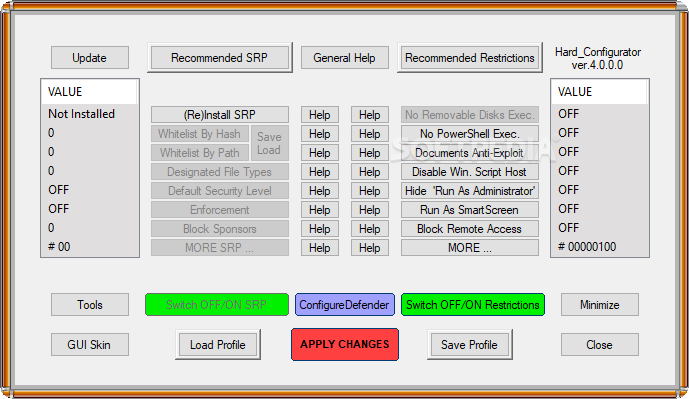
OK. Can you post (or PM) the screenshot with the H_C main window?I'm sorry, no, no time related events coinciding with the right click. But the logging is standard, I have not activated advanced SRP logging.
Members who viewed this thread in the last 5 minutes


