Troubleshooting (Help) How do i permanently delete my browsing history ?

dragonmew

Level 3
Verified
how do i delete web history with like the super secure wiping for example ( US department of defense enhanced 7 passes) so that nothing can be detected, cos deleting web history alone in a browser isnt good enough im looking for secure deletion where nobody can find what sites ive visited or recover them with forensic stuff.
 
If you have either a Google or Microsoft account and logged whilst using Google Search or Bing.com, your Web Searches may have been saved.
To clear recent searches and Turn off web history:
> https://www.bing.com/profile/history
> https://history.google.com/history/
For Yahoo, see here: https://uk.help.yahoo.com/kb/search/search-history-internet-explorer-sln2203.html

Also you may want to consider using an alternate engine,

IMO, a secure wipe with CCleaner or PrivaZer should be sufficient to wipe your local tracks.
 
Last edited:
Upvote 0
whats the best thing i can do on my pc anyways

After deleting browsing history, set to never remember history (in Firefox)
  1. Open menu (the box with 3 stripes)
  2. Choose Preferences
  3. Choose Security (from above)
  4. Under History select "Never remember history"
  • Additionally, always browse in New Private Window
Chrome & Chromium store history except when you..
  • Browse using "Incognito"
  1. Activate the built-in third party cookie blocker
  2. Update >>> Choose "Customize and control Google Chrome" It's the button all the way to the right with 3 stripes (beneath the "x")
  3. Go to settings
  4. Scroll down & <click> on "Advanced settings"
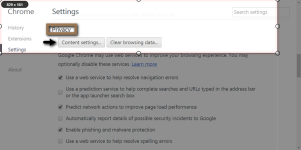
  5. Under "Privacy" choose "content setting" button
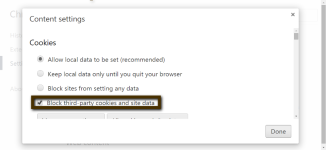
  6. Check the box beside "Block third-party cookies and site data"
Update: Also in Firefox (under options) <click> Advanced then, from the row of tabs, "Data Choices".
  • Disable (by un-checking) Telemetry, Firefox Health Report, and Crash Reporter.
Update: #2 > ^
 
Last edited:
Upvote 0
If you have either a Google or Microsoft account and logged whilst using Google Search or Bing.com, your Web Searches may have been saved.
To clear recent searches and Turn off web history:
> https://www.bing.com/profile/history
> https://history.google.com/history/
For Yahoo, see here: https://uk.help.yahoo.com/kb/search/search-history-internet-explorer-sln2203.html

Also you may want to consider using an alternate engine,

IMO, a secure wipe with CCleaner or PrivaZer should be sufficient to wipe your local tracks.

There is a even better way just write a email to Google and if you are a EU civilian by law they have to literally forget you.
However this only applies for data older then 3 months as the EU court and the EU parliament has ordered Google to do so.
Its called the right to be forgotten.

That being said CCleaner is nice yet Privazer is truly amazing in cleaning local tracks.
In regards to the links you have provided they do not remove anything as by law all 3 engines will keep your tracks for at least 3 months.
Cheers
 
Upvote 0
After deleting browsing history, set to never remember history (in Firefox)
  1. Open menu (the box with 3 stripes)
  2. Choose Preferences
  3. Choose Security (from above)
  4. Under History select "Never remember history"
  • Additionally, always browse in New Private Window
Chrome & Chromium store history except when you..
  • Browse using "Incognito"
  1. Activate the built-in third party cookie blocker
  2. ..choosing "Customize" (similar button with 3 stripes)
  3. Go to settings
  4. Scroll down & <click> on "Advanced settings"
  5. Under "Privacy" choose "content setting" button
  6. Check the box beside "Block third-party cookies and site data"
Update: Also in Firefox (under options) <click> Advanced then, from the row of tabs, "Data Choices".
  • Disable (by un-checking) Telemetry, Firefox Health Report, and Crash Reporter.

i dunno how to do the chrome one can u post images it makes it easier for me
 
Upvote 0
As i understand you want to know what happens to those files locally. Don't know if this helps but you can also right-click recycle bin and chose the option "don't move files to recycle bin. remove files immediately when deleted". I think it wont store information in the recycle bin of files being deleted. Not sure though so take this advice with a grain of salt. :)

Edit: Example when you delete stuff with ccleaner or privazer or manually, it wont go through the recycle bin.
 
Last edited:
Upvote 0
i dunno how to do the chrome one can u post images it makes it easier for me
@dragonx1983 ,
in my search for an extension to capture Chrome images I chose qSnap. I hope you can see them!:rolleyes: Chrome content settings.png Chrome - Block cookies & site data.png
 
Upvote 0
Upvote 0

Recently browsing

Members who viewed this thread in the last 5 minutes

Back
Top