Troubleshoot High CPU usage

JB007

Level 26
Thread author
Verified
Top Poster
Well-known
Forum Veteran
May 19, 2016
1,567
1
6,553
2,469
France
Briefly explain your current issue(s)
High CPU usage because of BACKGROUND TASKS OF MICROSOFT WINDOWS SYSTEM PROTECTION
Steps taken to resolve, but have been unsuccessful
Nothing because I did not know what I can do...
Hello,
Since 3 weeks I hear my PC fan running very fast, only Saturday morning. It is my work PC, so I'm doing the same tasks every day.
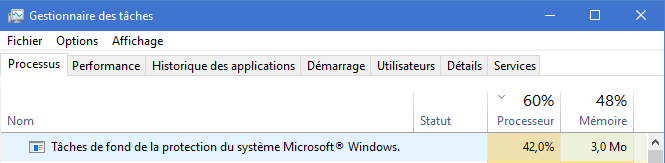
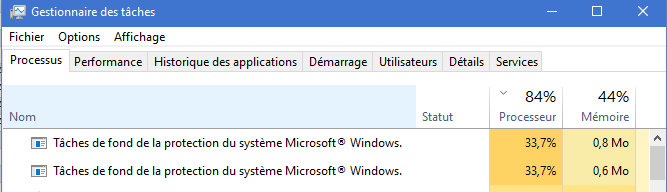
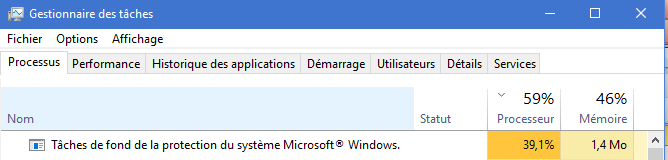
When I go to the task manager I can see that the problem is "BACKGROUND TASKS OF MICROSOFT WINDOWS SYSTEM PROTECTION".
These "Background tasks" are using the processor between 35 and 40% :unsure:
This issue persists about 4 hours and then my PC works again normally.
Can you help me to solve this issue ?
Thanks
CPU.PNG
CPU1.PNG
CPU3.PNG
 

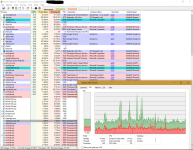
Thanks @venustus , do you think Process Hacker is better then Process explorer ?:unsure:

May be kaspersky was scanning every step of srtask during that time. I can't ensure it as you said this continued to happen for 4 long hours. If high cpu usage problem limited to srtask, then you may try to disable it's scheduled task (obviously if you don't need it).
More info would be helpful. Are you facing this problem every now & then or was that the first time?

Thanks @yitworths , this problem occurs at least 3 times, the last 3 Saturday. But before this period I was not at office every weekend...

Select this to display running tasks.

Thanks @TairikuOkami , done but the result seems mediocre:unsure:
CPU7.PNG

Autoruns will show scheduled tasks also

Thanks @ticklemefeet , If I install and run Autoruns for Windows - Windows Sysinternals , what should I look for ?

Agree, but sometimes there are some scheduled tasks not shown in AutoRuns, I've found this cases many times testing malware at MWHub, and I had to use Comodo AutoRuns, and even that, sometimes also neither in Comodo AutoRuns are shown, so finally I had to use and find the malicious task with Nirsoft TaskSchedulerView tool...

Thanks @harlan4096 , does it mean that my PC could be infected ?:eek:
 
Upvote 0
Thanks @yitworths , this problem occurs at least 3 times, the last 3 Saturday. But before this period I was not at office every weekend...

If it occurs after certain span of time, probably it's related to some scheduled task. As I asked you to disable scheduled srtask. If still this problem happens,then may be there is something fishy. btw, when this problem occured what was kaspersky's resource usage? can you recall?

does it mean that my PC could be infected ?

you may run some 2nd opinion scanners to check it.
 
  • Like
Reactions: Weebarra and JB007
Upvote 0
If it occurs after certain span of time, probably it's related to some scheduled task. As I asked you to disable scheduled srtask. If still this problem happens,then may be there is something fishy. btw, when this problem occured what was kaspersky's resource usage? can you recall?


you may run some 2nd opinion scanners to check it.

Thanks @yitworths :)
I have run HitmanPro, is it enough ?
If my memory is good, when this problem occurs, Kaspersky's resource usage was around 5-6%.
Not sure to know how I can disable scheduled srtask :unsure: Can you help me ? And if I disable srtask what will be the consequences for my PC ?
 
Upvote 0
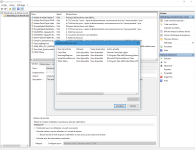
srtasks:
Folder: \Microsoft\Windows\SystemRestore
EXE file: C:\WINDOWS\system32\srtasks.exe
Discription: This task creates regular system protection points.

If this is the culprit , just run Autoruns. It is a portable and does not install. Then click on sch. tasks. Might have to do this while the task is running.
 
Upvote 0
Thanks @yitworths :)
I have run HitmanPro, is it enough ?
If my memory is good, when this problem occurs, Kaspersky's resource usage was around 5-6%.
Not sure to know how I can disable scheduled srtask :unsure: Can you help me ? And if I disable srtask what will be the consequences for my PC ?

Hmmm...ok. Lets see what hitman pro finds. If it doesn't find anything then you may try opswat metadefender or herdprotect.Although I'm not sure about their practices regarding privacy issues, but they will provide much clearer picture for sure. Now, it's your call to take.

& regarding srtask, ticklemefeet has already made it clear.
 
Last edited:
  • Like
Reactions: Weebarra and JB007
Upvote 0
srtasks:
Folder: \Microsoft\Windows\SystemRestore
EXE file: C:\WINDOWS\system32\srtasks.exe
Discription: This task creates regular system protection points.
If this is the culprit , just run Autoruns. It is a portable and does not install. Then click on sch. tasks. Might have to do this while the task is running.

Thanks @ticklemefeet:)
Hum if I kill srtasks, then I cannot have restoration points ? :unsure:

Hmmm...ok. Lets see what hitman pro finds. If it doesn't find anything then you may try opswat metadefender or herdprotect.Although I'm not sure about their practices regarding privacy issues, but they will provide much clearer picture for sure. Now, it's your call to take.
& regarding srtask, ticklemefeet has already made it clear.

Thanks @yitworths :)
HitmanPro detects nothing.

I don't mean anything, just pointing that AutoRuns does not shown ALL the scheduled tasks ;)

Oups @harlan4096 , when I read your post #20 for the first time I did not take care of this subtility:confused:

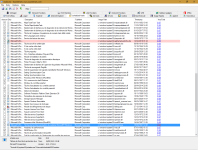
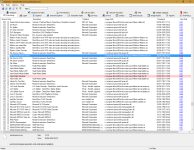
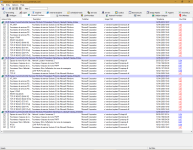
I have run "Autorun" and "Process Explorer". I am afraid because some files are flaged by Virus Total as unsafe, but on the other hand I saw that some Kaspersky files are also flaged... I think that the most important is that "srtasks.exe" is also flaged by VT !
autorun1.PNGautorun2.PNGautorun3.PNG
process1.PNG
 
Last edited:
Upvote 0
Agree, but sometimes there are some scheduled tasks not shown in AutoRuns, I've found this cases many times testing malware at MWHub, and I had to use Comodo AutoRuns, and even that, sometimes also neither in Comodo AutoRuns are shown, so finally I had to use and find the malicious task with Nirsoft TaskSchedulerView tool...
@harlan4096 you seriously rock! :love: Big thanks for the information.
 
Upvote 0
Just 1 av product detected those as threat/suspicious.Consider these detections as FP. Try to disable any schedule task of srtask.exe & wait for another weekend. Till now, it seems the culprit is srtask.exe.

Thanks @yitworths :)

Do you use another img restore program such as Marcrium FREE? If so you don't need restore points. I turned off system restore along time ago.

Thanks @ticklemefeet :)
I do not use Macrium yet, but I think I will install it soon if that can solve my problem !
However I do not understand why this problem occurs only with one of my PCs ?
 
Upvote 0