



- Describe the problem
- Pop-up on startup
- What have you tried?
- Tried to manually remove the entry via command line. Following the instructions on this site:
http://www.website-go.com/artikel/regsvr32.php
Hi all,
I'm not sure if this is the right place for this question (still new to the forum and need to find what is where exactly).
Anyway I had some issues with virus / trojan and after I was able to remove them I now get the following pop-up message:
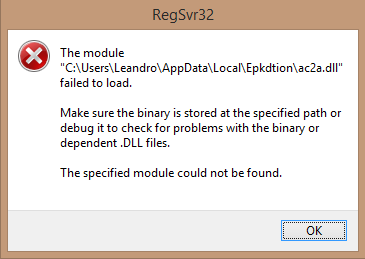
According to my own investigation the ac2a.dll is a trojan:
https://www.reasoncoresecurity.com/ac2a.dll-a5b52136f052f19bc890897c0c2eed52c361f28a.aspx
Unfortunately trying to remove it via the instruction in the link posted above (in the section "Steps taken in order to fix the machine:") didn't work.
Can any of you guys advise me on how I can remove this program from my registry so that it doesn't try to load it anymore. It doesn't seem malicious or dangerous but it is really annoying x)
Thanks and cheers
T3chnopsycho
I'm not sure if this is the right place for this question (still new to the forum and need to find what is where exactly).
Anyway I had some issues with virus / trojan and after I was able to remove them I now get the following pop-up message:
According to my own investigation the ac2a.dll is a trojan:
https://www.reasoncoresecurity.com/ac2a.dll-a5b52136f052f19bc890897c0c2eed52c361f28a.aspx
Unfortunately trying to remove it via the instruction in the link posted above (in the section "Steps taken in order to fix the machine:") didn't work.
Can any of you guys advise me on how I can remove this program from my registry so that it doesn't try to load it anymore. It doesn't seem malicious or dangerous but it is really annoying x)
Thanks and cheers
T3chnopsycho


