Poll How many extensions have you installed in your browsers, but above all, how many are usually enabled?

How many extensions have you installed in your browsers, but above all, how many are usually enabled

  • 0-3 installed

    Votes: 26 41.3%
  • 3-5 installed

    Votes: 20 31.7%
  • 5-10 installed

    Votes: 10 15.9%
  • +10 installed

    Votes: 4 6.3%
  • 0-3 enabled

    Votes: 5 7.9%
  • 3-5 enabled

    Votes: 8 12.7%
  • 5-10 enabled

    Votes: 5 7.9%
  • +10 enabled

    Votes: 6 9.5%

  • Total voters
    63
This one is intriguing VPN totally not private disabled :unsure:
Let me explain.

Internet in my country isn't censored or being tracked by ISPs or some kind of agencies, and the law regarding personal data is really good so there's no need to cover your tracks by using VPN. The only reason why I sometimes use Urban VPN (which isn't private at all) is because I only need VPN for unblocking geoblocked content—nothing else. Might not be the most private VPN, but it certainly offers unlimited traffic and way more locations for free than any other VPN service.

Before every single one of you starts throwing pitchforks at me, I'm not using Urban VPN all alone. I'm using it in combination with Cloudflare WARP, which is completely free and encrypted VPN. The way it works is, I connect to Cloudflare WARP on system-level and then I enable and connect to Urban VPN in Firefox. This way my IP address is hidden and safe from prying eyes of anyone going through Urban VPN logs.

It's free, the speed is alright for my use and it simply works. The plan is to get real VPN at some point, but it's very low on my priority lists considering my use.
 
Didn't put the extensions I use: Firefox/wolf - McAfee/Ublock - On Brave - Now just McAfee & use built in Ad-blocker/Aggressive usually.

In the UK, Internet Service Providers (ISPs) are required to retain certain connection data, which includes the websites visited, but not the specific pages. This data can be stored for up to 12 months and may be shared with government authorities upon request, which is why I use a VPN - (the rotters) :mad:
 
In the UK, Internet Service Providers (ISPs) are required to retain certain connection data, which includes the websites visited, but not the specific pages. This data can be stored for up to 12 months and may be shared with government authorities upon request, which is why I use a VPN - (the rotters) :mad:
Yeah, no such things here. Obviously ISPs have to keep some data in order to provide users service (such as to whom they leased what IP address, data usage,...), but they aren't obliged to nor track what users visit. In order for government authorities want to get access user data, they need valid court order which is hard to obtain and only used in extreme cases. Just like it should be.

If I were in UK, I'd probably use 24/7 VPN set on the router so entire network is covered. If not for privacy reasons, then for that dumb age verification law. Are you connecting to UK VPN server, or you're connecting to some other country like Ireland?
 
At the moment VPN on almost all the time, so I use a decent pay one at moment, Mullvad, I'm considering running on my router but as I don't mind my ISP looking at Netflix/ITVX etc, I tend to connect to a UK server to get local content on BBC sites such as weather news etc, but most countries nearby (EU & Scandinavia) give almost the same speed.
 
At the moment VPN on almost all the time, so I use a decent pay one at moment, Mullvad, I'm considering running on my router but as I don't mind my ISP looking at Netflix/ITVX etc, I tend to connect to a UK server to get local content on BBC sites such as weather news etc, but most countries nearby (EU & Scandinavia) give almost the same speed.
I'm not sure about Mullvad, but some VPNs like ExpressVPN and NordVPN have split tunneling option. It allows you to choose which websites will go through VPN and which won't, so you won't need to constantly connect/disconnect VPN all the time.
 
Well, it is about a risk assessment, extensions are sandboxed and pretty restricted lately, so even a fully malicious extension does not have a full access to everything.
Risk assessment has nothing to do with it and malicious extensions don't need full access to everything to get what the criminals want and need.

Ask Harbor Front.
 
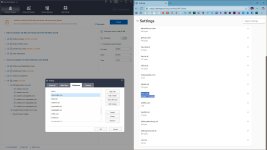
Anyone knows of a chrome extension that can prevent or get rid of zero-byte cookies? I'm using Cookie AutoDelete and browser settings to control cookies but those zero-byte cookies still appear. I can manually remove them from the browser but when I surf the site again they'll return

 
Anyone knows of a chrome extension that can prevent or get rid of zero-byte cookies?
Since Edge cleanup is broken, I use WDC. It somewhat works, not all cookies are removed and WDC has to be closed afterwards, it locks cookies, so they appear to be gone.

capture_12062025_113538.jpg
 
Let me explain.

Internet in my country isn't censored or being tracked by ISPs or some kind of agencies, and the law regarding personal data is really good so there's no need to cover your tracks by using VPN. The only reason why I sometimes use Urban VPN (which isn't private at all) is because I only need VPN for unblocking geoblocked content—nothing else. Might not be the most private VPN, but it certainly offers unlimited traffic and way more locations for free than any other VPN service.

Before every single one of you starts throwing pitchforks at me, I'm not using Urban VPN all alone. I'm using it in combination with Cloudflare WARP, which is completely free and encrypted VPN. The way it works is, I connect to Cloudflare WARP on system-level and then I enable and connect to Urban VPN in Firefox. This way my IP address is hidden and safe from prying eyes of anyone going through Urban VPN logs.

It's free, the speed is alright for my use and it simply works. The plan is to get real VPN at some point, but it's very low on my priority lists considering my use.
It seems the 3GB free from Adguard VPN suits your needs and certainly it is more private. Maybe you want to give it a try?
 
It seems the 3GB free from Adguard VPN suits your needs and certainly it is more private. Maybe you want to give it a try?
3 GB isn't enough for streaming content, just for visiting simple websites. I need something for streaming, that's why I opted for Urban VPN as it has unlimited traffic. 🙂
 
  1. AdGuard AdBlocker
  2. Checker Plus for Gmail
  3. HTTP Downloader (Extension for a tiny download manager by the same name)
  4. McAfee WebAdvisor
  5. Violentmonkey (For multiple YouTube related userscripts and few more for other purposes).

And, Proton Pass: Free Password Manager when I need to enable it. I do have few others also, but I rarely need them.
I have like 15-16 domains put into McAfee WebAdvisor's whitelist, so I don't remember the last time it blocked something. But I like how it can scan third-party connections as well as can pre-scan all links in popular social media sites + search engines with color-coded marks.
 
Since Edge cleanup is broken, I use WDC. It somewhat works, not all cookies are removed and WDC has to be closed afterwards, it locks cookies, so they appear to be gone.

View attachment 293503

Sometimes after you close and restart the browser those zero-byte cookies will gone then it's alright. But if they become persistent and require manual removal then it's no good
 
Anyone knows of a chrome extension that can prevent or get rid of zero-byte cookies? I'm using Cookie AutoDelete and browser settings to control cookies but those zero-byte cookies still appear. I can manually remove them from the browser but when I surf the site again they'll return


Do you also have this problem when closing/reopening Chrome?

I use a policy to delete as much as possible from Chrome, all data.
 
  • Like
Reactions: Sorrento
Sometimes after you close and restart the browser those zero-byte cookies will gone then it's alright. But if they become persistent and require manual removal then it's no good

Have you tried checking whether the website still works after manually deleting cookies set to 0 and setting a rule to block those specific cookies?

P.S.

Code:
chrome://settings/content/siteData
 
Last edited:
Anyone knows of a chrome extension that can prevent or get rid of zero-byte cookies? I'm using Cookie AutoDelete and browser settings to control cookies but those zero-byte cookies still appear. I can manually remove them from the browser but when I surf the site again they'll return

Before moving to Brave, I used an history auto delete extension (don't have the link), but I thought that all Chromium had gotten the Edge delete at exit function.
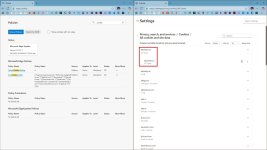
Go to site settings
Scroll down to additional content
Click additional content settings
Scroll to on-device data and click it
1765053650279.png
 
Before moving to Brave, I used an history auto delete extension (don't have the link), but I thought that all Chromium had gotten the Edge delete at exit function.
Go to site settings
Scroll down to additional content
Click additional content settings
Scroll to on-device data and click it
View attachment 293524

If use this feature all saved passwords are gone. Come to MalwareTips and other forums will need to re-sign in everytime
 
  • Like
Reactions: Sorrento