How to bypass this anti ad block on animedao.to site? Click one of the anime series then I got this message stated that I have to disable adblock or visit another site to play the media
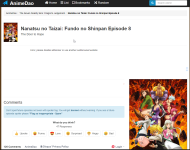
Last edited by a moderator:


Open MalwareTips from your Home Screen or desktop. Follow discussions, find answers and pick up where you left off.
If you cannot find an install option, update your browser or use its bookmark option to keep MalwareTips close.
After installation, open the app and sign in. Enable push notifications in Preferences if you want alerts. On iPhone and iPad, push requires a Home Screen web app and iOS or iPadOS 16.4 or later.
Sign in to manage notificationsInstallation is optional. Your notification settings stay under your control.
 Thread starter
SumTingWong
Thread starter
SumTingWong


This is Chrome, right? What kind of extensions are you using? I don't know what the rightmost 2 are, the monkey face and the one on its right.I don't have any issue playing the same video on this website
do you have any DNS- or router-level ad filter? -> if you do have, turn it off and try again
how many blocked items reported by your adblocker? What are your filter lists?
View attachment 254937
it's chromium by woolyss. I'm using ublock origin. The monkey one is Violentmonkey and the right one is Windows Defender browser protectionThis is Chrome, right? What kind of extensions are you using? I don't know what the rightmost 2 are, the monkey face and the one on its right.
Thanks. So windows defender + ublock + chromium by woolyss and I might be able to play the site.it's chromium by woolyss. I'm using ublock origin. The monkey one is Violentmonkey and the right one is Windows Defender browser protection
I turned off Violentmonkey to test the website.
I think the main player is ublock origin but with proper filtersThanks. So windows defender + ublock + chromium by woolyss and I might be able to play the site.
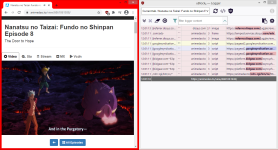
Disabling java stop the notification but also breaks the page... so i have no idea
Someone on r/ublock origin told me to purge all caches and update all filters again. I did that and it fixed. Weird why it is do that. Must be tech common malfunction out of nowhere.I think the main player is ublock origin but with proper filters
I will try to test the site with different set of filters and see which one blocks the anti-adblock script
EDIT: I used google chrome + ublock origin default settings. I was able to play the video flawlessly
View attachment 254938
You watch anime too?I don't have any issue playing the same video on this website
do you have any DNS- or router-level ad filter? -> if you do have, turn it off and try again
how many blocked items reported by your adblocker? What are your filter lists?
View attachment 254937

no I don't. Sometimes maybe but not on this websiteSomeone on r/ublock origin told me to purge all caches and update all filters again. I did that and it fixed. Weird why it is do that. Must be tech common malfunction out of nowhere.
You watch anime too?


Working fine with extensions Adguard + Bitdefender on Edge, also using NextDNS.

 github.com

 www.reddit.com

 www.wilderssecurity.com


Members who viewed this thread in the last 5 minutes