
I have a process using svchost. Is this a virus?

shedyk

New Member
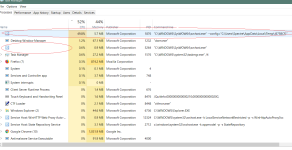
I have a process that runs high on cpu but has no name.
On checking further details the process is run by svchost.exe and ending the process shuts down my pc.
It started about 3 days ago, it does not run always but I have noticed it runs only when power is connected. It doesn't seem to run when I start my pc on battery only.

The tmp folder it shows on the screenshot is empty.

I have tried a couple of antivirus - anti malware deep scan but all come up clean.
 

Attachments

  • unamed svchost process.png
    unamed svchost process.png
    69.7 KB · Views: 74
It seems a normal instance of svchost.exe. Service Host hosts services that work in the background even when there are no logged users. But sometimes the problem is to understand which services are running within a given instance.

However if you suspect a malware infection, please follow @harlan4096 suggestion.
 
It seems a normal instance of svchost.exe. Service Host hosts services that work in the background even when there are no logged users. But sometimes the problem is to understand which services are running within a given instance.

However if you suspect a malware infection, please follow @harlan4096 suggestion.
svchost that has a temp folder file in the command line? that doesn't seem legit at all.
the 2nd one seems clean but the first isnt.
 
First one is suspected...believe me most of the av fail in process injections!!
Have a scan with rogue killer..most probably he should fix it
For instance the point is a hidden virus from that temp path executed itself in name of svchost to prevent detection.
Zemana is also very good in these instances.
 
First one is suspected...believe me most of the av fail in process injections!!
Have a scan with rogue killer..most probably he should fix it
For instance the point is a hidden virus from that temp path executed itself in name of svchost to prevent detection.
Zemana is also very good in these instances.
I think the issue might be related to SlimCleaner Plus. I have just seen your reply now and scanned PC with Rogue Killer and it marked lots of files and registry keys related to it as dangerous.

I had already stopped my PC from running the unnamed svchost processes by booting in safemode and emptying the Temp folder and uninstalling all programs I had install in the week before I noticed this issue.(Coincidentally one of them was SlimCleaner). Emptying Temp and uninstalling it seemed to have stopped the processes from loading but infections were still there. Rogue Killer hopefully delivered the final nail on it.
 
Last edited:

Recently browsing

Members who viewed this thread in the last 5 minutes

Back
Top