Troubleshoot I need help to Install Windows 10

SumTingWong

Level 28
Thread author
Verified
Top Poster
Well-known
Apr 2, 2018
1,753
1
5,845
2,668
FLorida
Briefly explain your current issue(s)
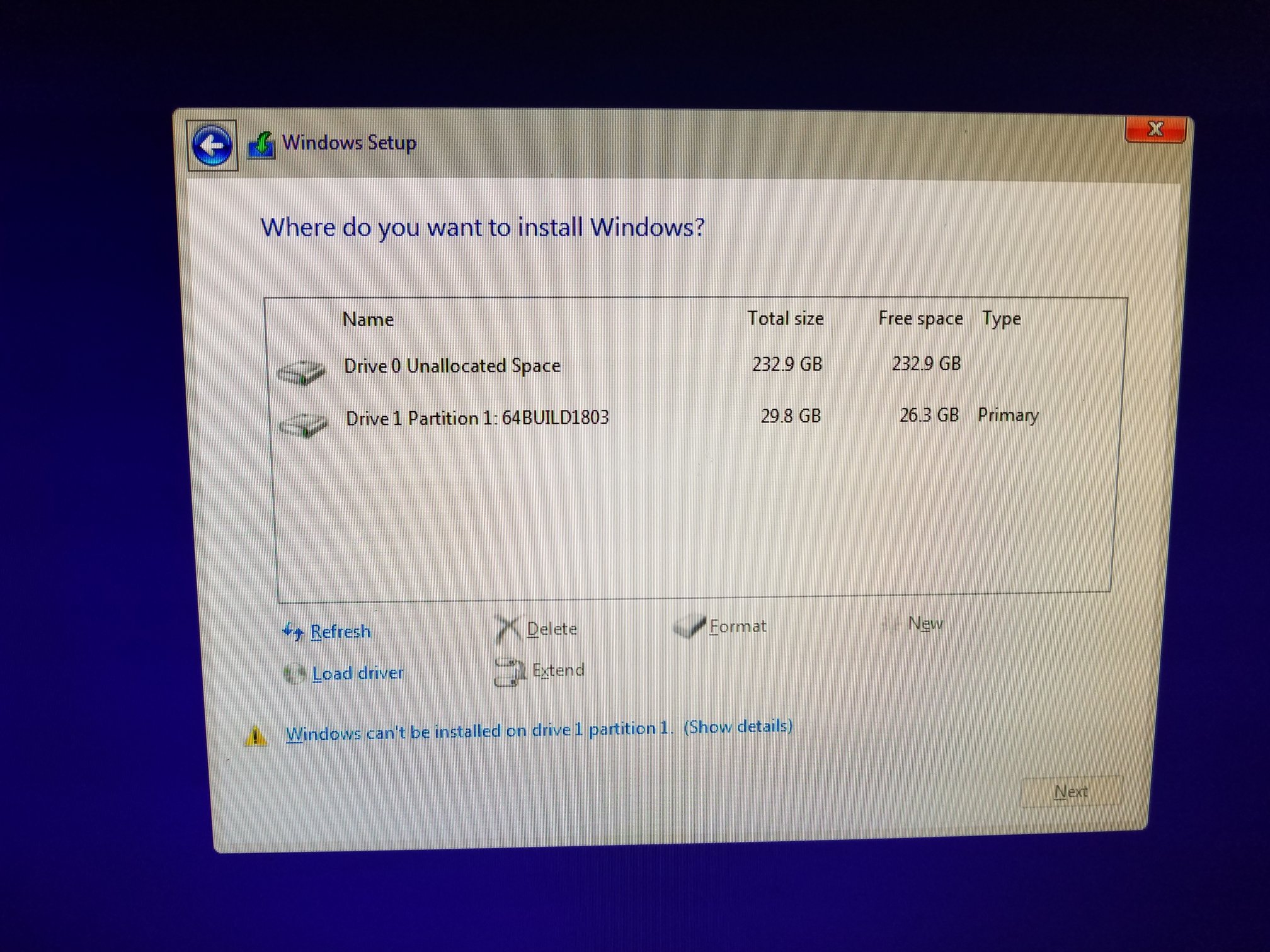
Why is my USB Flash Drive listed as a Drive 1 Partition 1?
Steps taken to resolve, but have been unsuccessful
None
Guys, I am seriously need help. Why is my UEFI GPT Bootable Windows 10 installation media USB listed on where do you want to install Windows? I try to install Windows 10 in UEFI. I download the Media Creation Tool and then choose ISO and then burn ISO to Rufus software to USB drive in UEFI that listed here: How to install Windows 10 from USB with UEFI support
USB Flash Drive was set to FAT32. Both Drive 0 and Drive 1 were GPT.
Drive 0 Unallocated Space : SSD
Drive 1 Partition 1: My UEFI USB Bootable Windows 10. Type is Primary as well.
HELP.jpg
 
Last edited:
Forget how WinRe or WinPE manages the disk's letters and numbers. Just click to install Windows on unallocated space and Windows will partition automatically and create EFI System Partition (no letter, hidden, FAT32), Recovery Partition (OEM, NTFS) and C Partition
 
Upvote 0
Picture link is broken, but I agree with @BoraMurdar. Don't pay attention to that. I've also encountered this case many times. You just need to select the correct target disk/partition. That's why I always put labels to my partitions. It makes them easier to identify.
Forget how WinRe or WinPE manages the disk's letters and numbers. Just click to install Windows on unallocated space and Windows will partition automatically and create EFI System Partition (no letter, hidden, FAT32), Recovery Partition (OEM, NTFS) and C Partition

Here is the picture. Why my USB flash drive labeled as Drive 1? Aren't it supposed to list only my SSD when it asks where do I want to install Windows?
Windows says it can't install onto Drive 1.
HELP.jpg
 
Upvote 0
Here is the picture. Why my USB flash drive labeled as Drive 1? Aren't it supposed to list only my SSD when it asks where do I want to install Windows?
Windows says it can't install onto Drive 1.
View attachment 187850
Is this a PC? How many drives attached?
You can't install to drive 1 because it's your USB drive. Try to click show details from the error message.
 
  • Like
Reactions: SumTingWong
Upvote 0
Here is the picture. Why my USB flash drive labeled as Drive 1? Aren't it supposed to list only my SSD when it asks where do I want to install Windows?
Windows says it can't install onto Drive 1.
View attachment 187850
Click on unallocated space to select it, then down at the bottom, "NEW" will be highlighted, click this and allow Microsoft to create the partitions for you. Then just follow the steps of setting up your new windows 10.
 
Upvote 0
Is this a PC? How many drives attached?
You can't install to drive 1 because it's your USB drive. Try to click show details from the error message.
Only 1 drive connected to the computer and that is Drive 0 aka SSD. The error says " Windows cannot be installed to this disk. Setup does not support configuration of or installation to disks connected through a USB or IEE 1934 port. Windows cannot be installed to this hard disk space. Windows must be installed to a partition formatted as NTFS."
Because drive (disk) leveling and numbering starts from 0
But why my USB shows up in the list as a Drive 1 Partition 1? I thought only my SSD show up in the list because that is the only drive connected to the computer during setup and installation.
Click on unallocated space to select it, then down at the bottom, "NEW" will be highlighted, click this and allow Microsoft to create the partitions for you. Then just follow the steps of setting up your new windows 10.
But I dont understand why my USB flash drive show up in the list. I dont want my OS to installed something onto another drive. Isnt it suppose my SSD to be in the list and not my USB flash drive as well? Can I just click onto Drive 0 and click Next for the installation?
 
Upvote 0
But I dont understand why my USB flash drive show up in the list. I dont want my OS to installed something onto another drive. Isnt it suppose my SSD to be in the list and not my USB flash drive as well? Can I just click onto Drive 0 and click Next for the installation?
Fair question SumTingWong, lets hope it doesn't install the system reserved partition on the usb.:mad:
 
Upvote 0
It always happens to me when I install Windows. I've never asked that before, and I don't have to. I think it happens to me when I install in UEFI.
When installing the GRUB bootloader on Linux systems, it often happens that the bootloader first asks where it should be installed. So it's not just Windows that's silly.

Fair question SumTingWong, lets hope it doesn't install the system reserved partition on the usb.:mad:
LOL :D The partitions are created on the selected hard disk. The computer thinks logically. It would be illogical for the computer not to create partitions on the selected disk.
 
  • Like
Reactions: vtqhtr413
Upvote 0
But why my USB shows up in the list as a Drive 1 Partition 1? I thought only my SSD show up in the list because that is the only drive connected to the computer during setup and installation.
I've said it before but I was a bit unclear on that. Sometimes it happens when you made bootable installation media using Rufus. I've yet found out what's the trigger. All you need to do just select the correct target drive/partition and your OS will be installed there just fine.
 
  • Like
Reactions: vtqhtr413
Upvote 0
It always happens to me when I install Windows. I've never asked that before, and I don't have to. I think it happens to me when I install in UEFI.
When installing the GRUB bootloader on Linux systems, it often happens that the bootloader first asks where it should be installed. So it's not just Windows that's silly.


LOL:D The partitions are created on the selected hard disk. The computer thinks logically. It would be illogical for the computer not to create partitions on the selected disk.

This was SumTingWongs system a few days ago. SOLVED - PC won't boot into OS with the OS installed on SSD connected to the motherboard.

Screenshot_3.png
 
Upvote 0
It always happens to me when I install Windows. I've never asked that before, and I don't have to. I think it happens to me when I install in UEFI.
When installing the GRUB bootloader on Linux systems, it often happens that the bootloader first asks where it should be installed. So it's not just Windows that's silly.


LOL :D The partitions are created on the selected hard disk. The computer thinks logically. It would be illogical for the computer not to create partitions on the selected disk.
I've said it before but I was a bit unclear on that. Sometimes it happens when you made bootable installation media using Rufus. I've yet found out what's the trigger. All you need to do just select the correct target drive/partition and your OS will be installed there just fine.
Click 0 Drive, then click "NEW", allow Microsoft to create the partitions, it will create them in the drive selected.

I dont think it is normal for my bootable USB flash drive to show up as a Drive 1 Partition 1 Type Ptimary in " Where do you want to install Windows" windows?
 
Upvote 0
After watch some video on Youtube, I find out it is not normal for my bootable USB drive to show up in " Where do you want to install Windows" windows. How I can fix this?
 
Upvote 0
I dont think it is normal for my bootable USB flash drive to show up as a Drive 1 Partition 1 Type Ptimary in " Where do you want to install Windows" windows?
Did you burn the ISO with a 3rd party application? Also, even if it is there, when you direct windows to make partitions in a drive, it will place them all in that drive selected.
 
Upvote 0
Did you burn the ISO with a 3rd party application? Also, even if it is there, when you direct windows to make partitions in a drive, it will place them all in that drive selected.

I use Rufus to burn ISO into my USB with these steps found here: Create UEFI Bootable USB Of Windows 10

This video here doesn't show Rufus USB Flash Drive in the " Where do you want to Install Windows".
0.28 is when he inserted the USB flash drive.
2.19 is when he is at " Where do you want to install Windows".

 
Upvote 0

You may also like...