


OK, considering that less than a day ago I mentioned in another thread that I use Dark Reader, this could be considered a bit strange? (Or not at all.  )
)
Dark Reader and extensions like it can be very useful, and I have used Dark Reader for a long time. (Due to chronic Migraines.) However, there was always one thing I did not like so much about extensions like that. They inverted the colours, and often pictures would be affected as well. That also happened for me when a Browser had/has an internal method of giving us dark-coloured websites. Now a friend of mine came by for a while this afternoon, and when he saw I was using Dark Reader and that I did not like that it inverts certain colours and pictures. (At times, not always.) He showed me one on Chrome store that I should try out then, namely this one. …

 chromewebstore.google.com
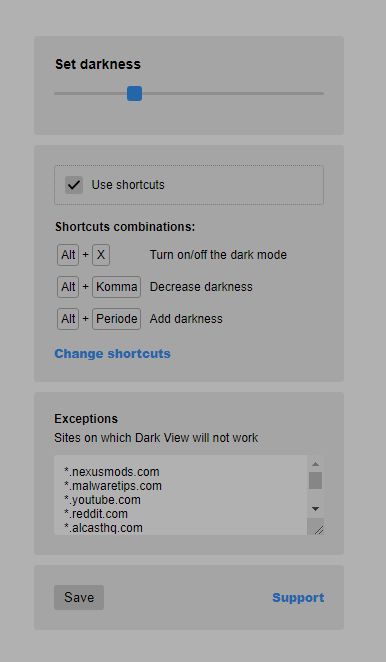
It does not work like Dark Reader and others like it work. It keeps the website's original colours but darkens the colours, makes it less bright. (Which you can already see on the picture below as well.) You can adjust it to a level that you like, and you can exclude websites by adding them to an exception list. All settings can be seen on the pictures below. Not a lot, but not everything needs to be complicated. (And no Dark Reader is also not complicated.) I will try it out for a while, and see if I keep liking it in the long run, or if I will return to Dark Reader. (Despite the inverted colour's thing.) And maybe other people here like to try it out as well.
)Dark Reader and extensions like it can be very useful, and I have used Dark Reader for a long time. (Due to chronic Migraines.) However, there was always one thing I did not like so much about extensions like that. They inverted the colours, and often pictures would be affected as well. That also happened for me when a Browser had/has an internal method of giving us dark-coloured websites. Now a friend of mine came by for a while this afternoon, and when he saw I was using Dark Reader and that I did not like that it inverts certain colours and pictures. (At times, not always.) He showed me one on Chrome store that I should try out then, namely this one. …
Dark View
Makes sites design dark. Night vision for all sites. Better than color inverters.
chromewebstore.google.com
It does not work like Dark Reader and others like it work. It keeps the website's original colours but darkens the colours, makes it less bright. (Which you can already see on the picture below as well.) You can adjust it to a level that you like, and you can exclude websites by adding them to an exception list. All settings can be seen on the pictures below. Not a lot, but not everything needs to be complicated. (And no Dark Reader is also not complicated.) I will try it out for a while, and see if I keep liking it in the long run, or if I will return to Dark Reader. (Despite the inverted colour's thing.) And maybe other people here like to try it out as well.


