Advanced Plus Security illumination's configuration

  • Thread starter Thread starter illumination
  • Start date Start date
Last updated
Jul 31, 2018
Windows Edition
Pro
Security updates
Allow security updates and latest features
User Access Control
Always notify
Real-time security
Windows Defender
Firewall security
Microsoft Defender Firewall
Periodic malware scanners
Portable tool set
Malware sample testing
I do not participate in malware testing
Browser(s) and extensions
Google Chrome: Ublock Origin, Ip and Domain
Maintenance tools
Analysis: Process Explorer, Autoruns, PeStudio
File and Photo backup
Backed up externally regularly
System recovery
I utilize a copy of Windows Media creation tool on a flash drive for "repairs" and "wipe/reformat's" when necessary.
Does it have web filtering? Symantec endpoint protection don't block the malicious websites!idk about the cloud version. whats the difference between SEP and SEPC?
Symantec firewall is like Eset firewall(but some features like anti-exploit(in the network level) and os/browser fingerprinting protection).
with Eset firewall, I have control over windows services.
Don't they want to redesign this ugly GUI? the graphical user interface is like windows millennium.
Yes, it has web/URL filtering.

This should help clear things up a little as well as if you read my configuration completely.
Norton/Symantec Versions Explained.
 
Windows backup & Restore for the win bro; it never failed me .
Clean, fresh installs have never failed me, especially when it comes to large cumulative upgrades/updates.

I do not run my machines like a normal person, i do not have many applications, matter of fact, down to 3 now, i do not store anything on the system, ever... So wiping my system is very straight forward and simple, and does not require much time and provides a stable install.

I have seen built in images become corrupted, i have seen the main system and restore corrupted, i have seen manual images become unstable, so i chose to bypass what i consider to be most likely wasted time, and wipe clean the drive and start fresh.
 
Clean, fresh installs have never failed me, especially when it comes to large cumulative upgrades/updates.

I do not run my machines like a normal person, i do not have many applications, matter of fact, down to 3 now, i do not store anything on the system, ever... So wiping my system is very straight forward and simple, and does not require much time and provides a stable install.

I have seen built in images become corrupted, i have seen the main system and restore corrupted, i have seen manual images become unstable, so i chose to bypass what i consider to be most likely wasted time, and wipe clean the drive and start fresh.

I agree!

If anything its your personal data (photos, music, personal docs, etc...) that matters the most when a HDD/SSD fails, or you get hit with malware (ie: Ransomware). When something happens no one (that I know of anyways) goes, oh crap I lost Windows, its more like OH CRAP I lost my wedding, vacation photos, etc.... and I don't have a backup. An image is nice and can save you a bit of time when reinstalling Windows, but In my experience, especially with SSDs, it far quicker now than it use to be, compared to previous versions of WIndows.

I'm actually very similar to you, I don't have many pieces of software installed (well maybe a few games, but those can always be re-downloaded off steam) and I don't have any personal data on any of my computers at all. Its all stored on an external device(s) and backed up to the cloud.
 
Last edited by a moderator:
Added: Appguard Solo

There are times in a mans life when he must eat his own words, and today is one of those for me. While i'm stubborn, especially with matters of principle, this is one time i must over look it. I have placed Appguard Solo into my configuration, simply because, as stated by several besides myself, AG is just good at what it does, there is not much out there that compares. I do still hope the company settles down on a payment/release schedule that does not leave users having to purchase every major upgrade/update especially with annual/subscription payments.
 
Last edited by a moderator:
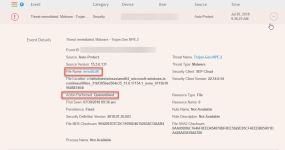
It seems i may have found my first FP with SEPC... Pretty serious one...

FP.png

What is iertutil.dll:
Beginning at Version 7 of Microsoft Internet Explorer, installation of IE on a Microsoft Windows system adds this Dynamic Link Library (DLL) executable file to the C:\Windows\system32 folder, where it becomes essential to the operation of the Windows Graphical Shell, including the Start Menu, Taskbar, Desktop and File Manager. If it disappears or fails to work there are at least sixteen other DLL files in the "system32" directory that are statically linked to it and the entire Windows Graphical Shell fails to function.
 
It seems i may have found my first FP with SEPC... Pretty serious one...

View attachment 193992

What is iertutil.dll:
Beginning at Version 7 of Microsoft Internet Explorer, installation of IE on a Microsoft Windows system adds this Dynamic Link Library (DLL) executable file to the C:\Windows\system32 folder, where it becomes essential to the operation of the Windows Graphical Shell, including the Start Menu, Taskbar, Desktop and File Manager. If it disappears or fails to work there are at least sixteen other DLL files in the "system32" directory that are statically linked to it and the entire Windows Graphical Shell fails to function.
Just wondering, is this one of those dlls that is "created on the fly?" These tend to produce a lot of FPs.
 
Possible... Just finished placing it back in and checking the system over. Thinking very seriously of washing my hands of suites/3rd party Av's, and sticking to windows defaults, SRP and GPE....
The problem is that even Windows Defender has been known to zap Windows dlls created on the fly. You will have to wash your hands of WD, too.