Advice Request Kaspersky Anti-spam module

Please provide comments and solutions that are helpful to the author of this topic.
Hello,
I'm not sure if this question was yet answered in another topic :unsure:
I'm wondering why Kaspersky Anti-spam module is disabled on default settings ?
I'm also wondering if enabling this Anti-spam module could strengthen my protection ?
Hi, Anti-Spam module only works with Microsoft Office Outlook (the program, not the web service) and Mozilla Thunderbird.

If enabled, it will add a toolbar and will filter SPAM. If you are not using the Microsoft Office Outlook app, but the Mail app in start menu, or you are checking webmail in browser, it won’t do anything for you.
Also, Outlook already has a SPAM filter.
 
Hi, Anti-Spam module only works with Microsoft Office Outlook (the program, not the web service) and Mozilla Thunderbird.

If enabled, it will add a toolbar and will filter SPAM. If you are not using the Microsoft Office Outlook app, but the Mail app in start menu, or you are checking webmail in browser, it won’t do anything for you.
Also, Outlook already has a SPAM filter.
Thanks @McMcbrad
I think you are not right because I'm an Outlook user on one PC and Thunderbird on two others and the kaspersky toolbar does not exist anymore since a long time !
 
Thanks @McMcbrad
I think you are not right because I'm an Outlook user on one PC and Thunderbird on two others and the kaspersky toolbar does not exist anymore since a long time !
It may have been removed, but it still works the same way.

This is from their support:

It is turned off by default, due to GDPR regulations (according to their page).
 
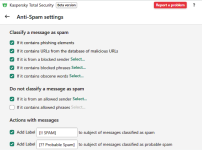
Kaspersky Anti-Spam module works with any email client in traffic level, old OutLook and ThunderBird tool-bars add-ons were removed due to some issues...

1608980247610.png

Still this module adds 2 labels in messages subjects, then You can create in any email client filtering rules to move those messages to a Spam Folder...