Kaspersky Application Control - KIS 2017 bug?

  • Thread starter Thread starter Deleted member 2913
  • Start date Start date
Status
Not open for further replies.
Your browser should be well protected out of the box with code injection into web pages.
Kaspersky, differs from many other products in the way it protects you when browsing. Kaspersky injects code into pages you are browsing to better protect you from malware.It is possible to be infected on secured web pages by carefully crafted "advertisements".
As to PDF's you could do that or invest in HMPA.
@harlan4096 can further elaborate:)
 
About to set PDF reader in Low Restriction group: since it can run normally and does not need to access or make some changes sin sensible areas/processes of the system, sure You can try to do it and check :)
 
Your browser should be well protected out of the box with code injection into web pages.
Kaspersky, differs from many other products in the way it protects you when browsing. Kaspersky injects code into pages you are browsing to better protect you from malware.It is possible to be infected on secured web pages by carefully crafted "advertisements".
As to PDF's you could do that or invest in HMPA.
@harlan4096 can further elaborate:)
I have disabled code injection in secure web pages, because it makes them inaccessible. For instance, I would not be able to load MT.
 
I have disabled code injection in secure web pages, because it makes them inaccessible. For instance, I would not be able to load MT.
Strange I don't have that issue!
I do however get a slight delay in loading of webpages with it enabled but I can live with that.
 
Strange I don't have that issue!
I do however get a slight delay in loading of webpages with it enabled but I can live with that.
just wondering: if you have the kaspersky extension in the browser, why do you also need scanning from the AV? Aside from special functions, such as parental control, etc.
 
just wondering: if you have the kaspersky extension in the browser, why do you also need scanning from the AV? Aside from special functions, such as parental control, etc.
I have disabled the KIS extension from the browser and rely on the av module only:)
 
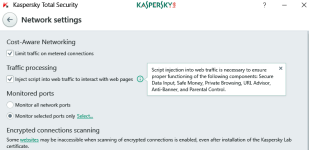
Script injection controls proper functioning of these special features:
Sin título.png
Although You disable it, You still are protected in traffic level by Web AV.
 
Script injection controls proper functioning of these special features:
Although You disable it, You still are protected in traffic level by Web AV.
why is it that on my version of KIS, which is 2017, the pop-up does not mention a limitation on secure data input?
 

Attachments

  • Capture.PNG
    Capture.PNG
    17.8 KB · Views: 490
  • Like
Reactions: Deleted member 2913
I just want to make sure I understand: there is a virtual keyboard, and there is encrypting keystrokes on the regular keyboard.
which one of these is "secure data input"?
You would use the virtual keyboard which provides that level of security!There is no encrypting on your hardware keyboard.
 
@shmu26: in Your post #33 You are referring to "Scan Encrypted Connections" and I was referring to Traffic Processing -> Script Injection.

Kaspersky Data Input is operational (if Script Injection On) in default browsers: IE, Chrome & FireFox. Also in Edge in the upcoming K2018.
 
Status
Not open for further replies.

You may also like...