


Expired Kaspersky Internet Security – Multi-Device for Student WVU-FREE 3 years
- Thread starter Rus Anca
- Start date
You are using an out of date browser. It may not display this or other websites correctly.
You should upgrade or use an alternative browser.
You should upgrade or use an alternative browser.
Disclaimer: We cannot guarantee that all promo codes will remain active. Some offers have a short validation period and expire.
- Status
- Not open for further replies.
- Promo page
- http://promo.kaspersky.com/wvu


How did you get 3 years (1095 days) Kaspersky licence? Have you updated with licence after licence?
( RO: Cum ai făcut de ai licență de 3 ani? Ți-ai actualizat licențele una după alta, adunându-se într-una singură? )

It's a 3 year giveawayHow did you get 3 years (1095 days) Kaspersky licence? Have you updated with licence after licence?
( RO: Cum ai făcut de ai licență de 3 ani? Ți-ai actualizat licențele una după alta, adunându-se într-una singură? )


Yeah, no attention to the thread title. SorryIt's a 3 year giveaway

yes or you will get the response license not working for your region just goThanks i got one for myself. Thanks @Rus Anca . Will this require a USA Proxy for activation ?
settings -> additonal -> network and enter a us proxy like 162.208.49.45 port 7808 to activate

hi now i have the key.
1) download ZenMate extension and change location to USA
2) disable javascript in your browser
3) put your email ( you dont need put @wvu.edu)
4) active
hm doesn't seem to work here. followed your steps, changed my location to USA. Still can't open promo page
Simple Open any Browser. Eg: Firefox1st step done. how to disable javascript
Step 1>> Disable Java Script. [Type about:config in the Nav Bar and select I will be careful, search for javascrip.enabled [type java in nav bar]and just double click to disable as it will be enabled by default]
Step 2>> Close the browser and Switch to a USA VPN/Proxy . I used CyberGhost VPN to do so.
Step 3>> Open Your Browser where u have disabled JS and Navigate the Page : promo.kaspersky.com/wvu
Step 4>> Fill out the fields. Enter the challenging text given there and select I AM A HUMAN
step 4>> A code will be generated after confirming the challenging text. copy the code to the blank area below and press Submit.
Step 5>> That's it u will receive an email confirming your order.
Last edited:

Use a Proxy.Kaspersky Lab
Invalid address for promo campaign.
Please check and try again.

Simple Open any Browser. Eg: Firefox
Step 1>> Disable Java Script. [Type about:config in the Nav Bar and select I will be careful, search for javascrip.enabled [type java in nav bar]and just double click to disable as it will be enabled by default]
Step 2>> Close the browser and Switch to a USA VPN/Proxy . I used CyberGhost VPN to do so.
Step 3>> Open Your Browser where u have disabled JS and Navigate the Page : promo.kaspersky.com/wvu
Step 4>> Fill out the fields. Enter the challenging text given there and select I AM A HUMAN
step 4>> A code will be generated after confirming the challenging text. copy the code to the blank area below and press Submit.
Step 5>> That's it u will receive an email confirming your order.
have done all this, and the page is down here...

Another metod:Kaspersky Internet Security – Multi-Device for Student WVU-FREE 3 years
promo page:http://promo.kaspersky.com/wvu
Note:
0)WVU=West Virginia University
1)Disable Javascript in your browser or use a proxy that doesn't support it. It's possible Kaspersky will block keys generated in that way.
2)You must have email type: @wvu.edu to get key.
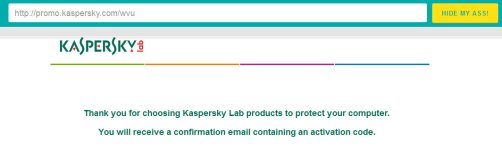
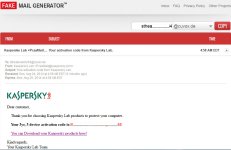
License will send you via email:
"Dear customer,
Thank you for choosing Kaspersky Lab products to protect your computer.
Your 3yr, 3 device activation code is:XXXXX-PCQK7-2P64E-XXXXX
You can Download your Kaspersky products here!
Kind regards,
Your Kaspersky Lab Team"
3)You must use US IP address to get it !
Mod edit: Disable Javascript in your browser if you can't get past the wvu.edu email requirement.
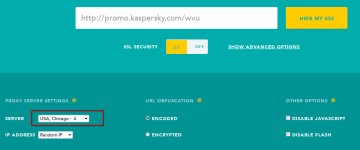
You can use HideMyAss with the instructions: view Attached Files !
And got a temp email from fakemailgenerator using @teleworm.us.
In the final use USA proxy(VPN) to activate serial !
Once you are activated, update normaly.
That's it !
Attachments

Last edited:
Yes it takes a lot of time , even i'm trying to fetch one. Previous one was better responsive.have done all this, and the page is down here...
Simple Open any Browser. Eg: Firefox
Step 1>> Disable Java Script. [Type about:config in the Nav Bar and select I will be careful, search for javascrip.enabled [type java in nav bar]and just double click to disable as it will be enabled by default]
Step 2>> Close the browser and Switch to a USA VPN/Proxy . I used CyberGhost VPN to do so.
Step 3>> Open Your Browser where u have disabled JS and Navigate the Page : promo.kaspersky.com/wvu
Step 4>> Fill out the fields. Enter the challenging text given there and select I AM A HUMAN
step 4>> A code will be generated after confirming the challenging text. copy the code to the blank area below and press Submit.
Step 5>> That's it u will receive an email confirming your order.
Tried with foxyproxy + all kinds of USA ip = Didn't work(Invalid campaing).
Tried with HotspotShield Elite = Didn't work(Invalid campaing).
Tried with CyberGhost(Your method) = Worked! (Got two licenses) but have to say that the site is SLOW.
Just fetched another one now. The server is slow, i believe that the page will surely be redirected even if server is slow. Thats what happened to me now. Be patient and wait.
After almost 10min waiting for the page...i have my key now...Thanks 

I tried to post this promotion today morning and Mr Xidus deleted my posts twice. Why this thread reappear here in others name Mr Xidus?
Last edited:
for me workshm doesn't seem to work here. followed your steps, changed my location to USA. Still can't open promo page

- Status
- Not open for further replies.
You may also like...
-
 On Sale! Bitdefender Total Security | 3 Devices | 12 + 6 free months EUR 23.09
- Started by Brownie2019
- Replies: 1
-
On Sale! Trend Micro Maximum Security (1 Year / 3 Devices) €2.40
- Started by Brownie2019
- Replies: 0
-
 Serious Discussion Data Collection Core Principles (Security Software)
- Started by Trident
- Replies: 7
-
Expired F-Secure Internet Security for all devices | 1 Year | 3 Devices | 23.31€
- Started by Brownie2019
- Replies: 0
-
Expired F-Secure Internet Security 3 months for free
- Started by Brownie2019
- Replies: 2