

Troubleshoot Kaspersky Rescue Disk

camo7782

Level 4
Thread author
Verified
Apr 29, 2019
168
264
267
Italy
Briefly explain your current issue(s)
KRD not performing system scan
Steps taken to resolve, but have been unsuccessful
made nws bootable FDD
I have tried to make a new Yumi FDD, I have formatted the old multiboot and made a new one with just KRD, this time it was responsive and performed a scan; however I think it just scanned the booted partition and not my C:\ since the partition size is about 100MB it cant be my HDD, here are some screens:
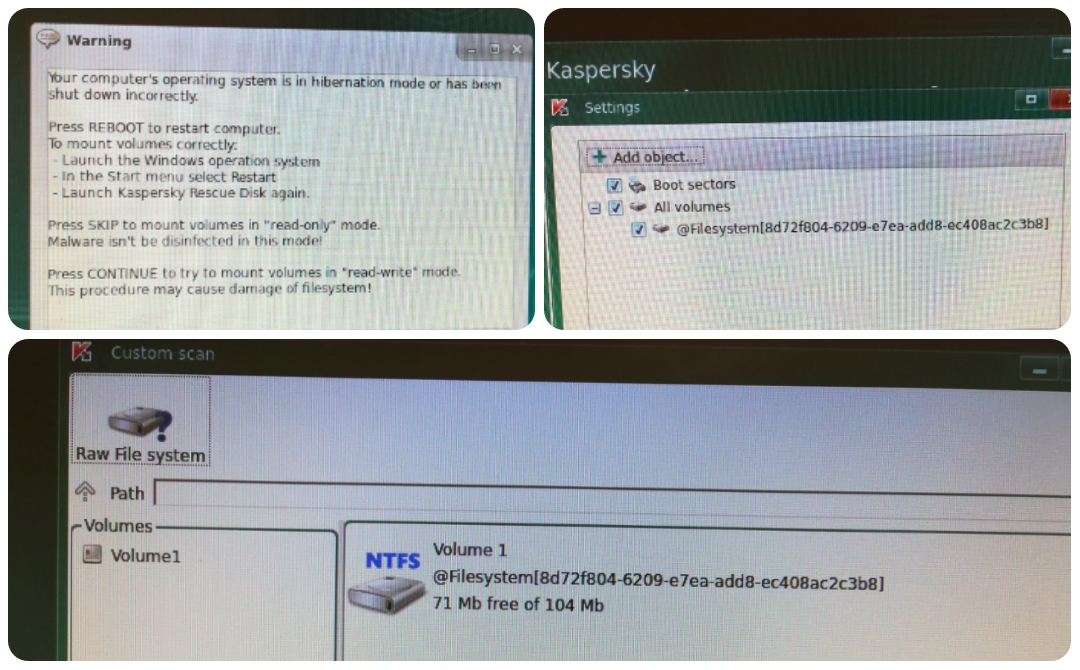
215261
 
Try use your keyboards " Print Screen " key if you like, and paste the screenshot into Paint or any other image tool of your own choice
it was made with phone since I could not save pictures under that boot, I normally use good quality captures :-)

is Your system in C:\ encrypted with BitLocker or any other tool?
not that I know, I run OSA and Emsisoft with SH but after boot they should not kick in

Always use USB-HDD method, for compatibility reasons.
ty, I'll try this and update you

I had found this but doesnt provide a real answer.
 
Upvote 0
You can take screenshots easily once You are in KRD2018 GUI, there is an option if I remember correctly...

The main operating system is in the hibernation mode....
 
Upvote 0