Troubleshooting Kaspersky TS blocks Internet Explorer.

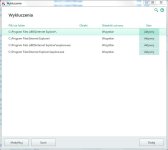
I suggest you add an Exclusion for the Internet Explorer folder.
Internet Explorer should be found here:

C:\Program Files (x86)\Internet Explorer\iexplore.exe on 64-bit

Add an exclusion like this:

upload_2016-12-14_17-42-33.png
 
Upvote 0
I do not know, but only after turning off the KTS I run IE. The problem appeared after updating databases KTS v.17.0.0.611 (b) v. 17.0.0.611 (c). Therefore, I put the video in order to better see.
 
Upvote 0
I use:
Kasperky Total Security 2017 - real time
VooDooShield Pro - real time
Zemana Anti Malware - real time
Malwarebytes AM v.2.2 - on demand
 
Upvote 0
I use:
Kasperky Total Security 2017 - real time
VooDooShield Pro - real time
Zemana Anti Malware - real time
Malwarebytes AM v.2.2 - on demand
I know there are issues with new MBAM and Anti-Exploit module on, some months ago MB had to fix some similar issues with MBAE and released a new one which fixed the incompatibilities with KIS and browsers, but it seems that with new version again are back...

I see there so many paranoid real time protection modules on :D I would keep ZAM for only on demands scans, and in other threads I read Voodoo Shield was working fine with KIS2017, so...

I would disable one by one real time protections of different products and check where is the issue...
 
Last edited:
Upvote 0
I stopped Services: MBAM, mbae, voodooshield and the problem remained.
I uninstalled programs: MBAM and MBAE, then ran the IE and it works !!!
I installed again MBAM v.2.2 - MBAE not because it is not needed - VS protects better.

At the moment I have:
KTS 2017 - real time
VS - real time
ZAM - real time
Maybe too much resident protection ... But sometimes ZAM detects threats that KTS does not inform...

Many thanks guys for help in solving the problem !!!!!!
 
Upvote 0
3.0.5 / December 19, 2016
Issues fixed
  • Fixed installer error that displayed 'External exception E06D7363'
  • Fixed issue where updates would get stuck in 'Checking' state
  • Fixed slow shutdown issue that could occur in Windows 7 with Malware Protection enabled
  • Fixed conflict with Kaspersky that would not allow browsers to open properly
  • Improved upgrade experience when installing over a previous version of the Malwarebytes anti-exploit technology
 
Upvote 0

Recently browsing

Members who viewed this thread in the last 5 minutes

Back
Top