Advice Request Keypass Questions

Share practical recommendations that address the author's needs.

n8chavez

Level 26
Verified
Well-known
Forum Veteran
There is another thread here that piqued my interest in Keepass 2.x about offline password managers. I don't want to further derail that thread, so I thought I'd make one where I can discuss Keepass more and as questions about it. I like it very much. I'm coming from Bitwarden and am looking for something without cloud storage, at least not cloud storage that I cannot control. Thanks to @Guilhermesene for sharing this video, I learned a lot about about Keepass. But I do have some questions.

  1. Is it possible to have keepass enter form data, such as addresses, names, CC info, etc.? If so, how? Without that, Keepass will not be a true Bitwarden replacement.
  2. Currently, to get entries to auto-type, I have to edit an entry with a custom sequence for a target window. For example, with MalwareTips the sequence for my TP entry is "MalwareTips Forums - Vivaldi". Without that auto-type will not work. Is there a way to avoid having to do that with every entry, yet still have auto-type work?
  3. Is there a way to enable two-channel auto-type obfuscation by default, rather than having to enable it for each entry?
More to come, I'm sure. But these are just the ones off the top of my head.


Thanks!
 
Regarding point 2
I don't know if I understood you correctly. In my case it looks like this:

Example based on MalwareTips website.
I start the MalwareTips page.
I click on Log in
I set the cursor to Your name or email address
I use the key combination CTRL+ALT+B (everyone can set the combination according to his liking)

4.jpg


A window appears. Click on the entry in the window
And that is all - you are logged into the forum


KeePass settings for MalwareTips entry

1.jpg


2.jpg


3.jpg

This is how KeePass works for me. This is just an example on one site.
I hope I understand you.
 
Last edited by a moderator:
Also, I found the solution to question number three. Here it is:

To enable "Two-Channel Auto-Type Obfuscation" for everything:
1. In KeePass go to File > Export and then select KeePass XML.
2. Open the XML file in a text editor.
3. In your text editor go to Edit > Replace.
4. Under find: <DataTransferObfuscation>0</DataTransferObfuscation>
5. Under replace: <DataTransferObfuscation>1</DataTransferObfuscation>
6. Click replace all. Save your file.
7. Back in KeePass go to File > Import and then select KeePass XML and import your editied file.
8. Under import behaviour select "Overwrite existing".
9. Your database should now have all entries with TCATO enabled.
 
Also, I found the solution to question number three. Here it is:

To enable "Two-Channel Auto-Type Obfuscation" for everything:
1. In KeePass go to File > Export and then select KeePass XML.
2. Open the XML file in a text editor.
3. In your text editor go to Edit > Replace.
4. Under find: <DataTransferObfuscation>0</DataTransferObfuscation>
5. Under replace: <DataTransferObfuscation>1</DataTransferObfuscation>
6. Click replace all. Save your file.
7. Back in KeePass go to File > Import and then select KeePass XML and import your editied file.
8. Under import behaviour select "Overwrite existing".
9. Your database should now have all entries with TCATO enabled.
Sorry, I don't know if I understood very well… But as far as I know, you don't need to do this procedure…

Just select all entries with the SHIFT key activated and click "Edit Entries", then just look for the "Autofill" tab → Check the box as per the image and click to Apply

Sorry if I said something wrong, I'm not an expert on KeePass, and I'm also learning new things about the program.

KeePass_q2hnEf16Yo.png
 
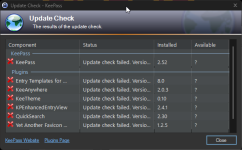
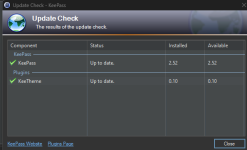
I'm having an issue with Keepass, and I wonder if o thers are too. Keepass won't update for me. In version 2.52, I can have it check for updates and it tries but never does. There's nothing blocking its connections

KeePass_zOlBOJHVIP.png
 
Maybe this is for the best. I was missing the form filler anyway. Plus, I kept my database on gdrive (w/key stored locally) and they have been giving me problems too with their new authentication restrictions. Maybe it's time to migrate back to bitwarden.
 

Recently browsing

Members who viewed this thread in the last 5 minutes

Back
Top