

The MalwareTips app
Your community, one tap away.
Open MalwareTips from your Home Screen or desktop. Follow discussions, find answers and pick up where you left off.
- Home Screen access
- Optional push alerts
- Your community
You're ready to explore.Explore what's new
Installation instructions
iPhone & iPad
- Open MalwareTips in Safari and tap Share. You may need to open the Page Menu first.
- Choose Add to Home Screen. If it is not listed, use Edit Actions to add it.
- Keep Open as Web App enabled if shown, then tap Add.
Android
- Open MalwareTips in Chrome or another browser that supports app installation.
- Open the browser menu and look for Install app, Install and create shortcut, or Add to Home screen.
- Choose Install and confirm. Wording varies by browser.
Desktop
- Chrome: use the install icon in the address bar, or the menu under Cast, save and share.
- Edge: open the menu, then More tools, Apps and Install this site as an app.
- Safari on Mac: choose Share or File, then Add to Dock. Firefox on Windows: look for the web apps button in the address bar.
If you cannot find an install option, update your browser or use its bookmark option to keep MalwareTips close.
Keep up with your conversations
After installation, open the app and sign in. Enable push notifications in Preferences if you want alerts. On iPhone and iPad, push requires a Home Screen web app and iOS or iPadOS 16.4 or later.
Sign in to manage notificationsInstallation is optional. Your notification settings stay under your control.
You are using an out of date browser. It may not display this or other websites correctly.
You should upgrade or use an alternative browser.
You should upgrade or use an alternative browser.
Advice Request KSC free is compatible with Spyshelter?
-
 Thread starter
Tiamati
Thread starter
Tiamati
- Start date
- 9 Replies
- 2,812 Views
Share practical recommendations that address the author's needs.

Yup, no issue so far for I'm using both

Are you using the free or premium version @HarborFrontYup, no issue so far for I'm using both
Ty guys!

No if you make proper each-other exclusion.Spyshelter system protection has potential to present any incompatibility with Kaspersky or any other AV? Should i disable Spyshelter System protection?
Ty guys!
Ty! How should i do this?No if you make proper each-other exclusion.
Free version
3 ways to do similar effects...but not the same!Ty! How should i do this?
- Exclude app folder with whole content using command from context menu, find needed folder and choose one of option. This method allows to disable monitoring of such folder and his content at all
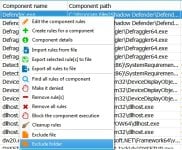
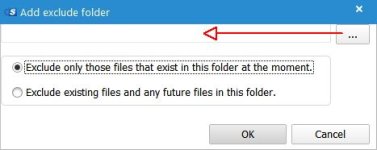
- Exclude specific file/process using command "exclude file" from context menu (above). That way works the same like in folder case.
In both as one of the results will be notification "All actions" in column "Action Type" in Rules/General tab.
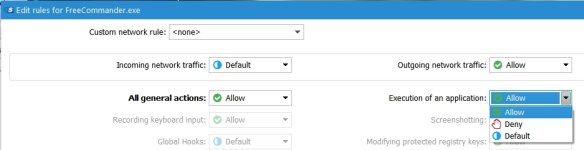
- Third way needs more your attention because you will edit advanced rules. Double click on needed process in rules list and new window will be open (screenshot below). If you woun't to monitor network traffic you can set both rules (in/out) on "allow". Than make "allow" action in box "All actions"...after that all options are greyed and inactive except one - "Execution of an application". This option is crucial because it allows/block launching edited (parent) process others processes as child.
At the end you can save such template of rules nad load in needed cases.
Tyvm!3 ways to do similar effects...but not the same!
- Exclude app folder with whole content using command from context menu, find needed folder and choose one of option. This method allows to disable monitoring of such folder and his content at all
View attachment 253243 View attachment 253244
- Exclude specific file/process using command "exclude file" from context menu (above). That way works the same like in folder case.
In both as one of the results will be notification "All actions" in column "Action Type" in Rules/General tab.
- Third way needs more your attention because you will edit advanced rules. Double click on needed process in rules list and new window will be open (screenshot below). If you woun't to monitor network traffic you can set both rules (in/out) on "allow". Than make "allow" action in box "All actions"...after that all options are greyed and inactive except one - "Execution of an application". This option is crucial because it allows/block launching edited (parent) process others processes as child.
At the end you can save such template of rules nad load in needed cases.
View attachment 253245

I am using SSFree with KSC Free. What is the best security setting for SSF, High or Medium? I have been using it at High with no compatibilty or other issues but is Medium better when using it with KSC? Thanks.
Recently browsing
Members who viewed this thread in the last 5 minutes

