Serious Discussion Microsoft Edge Stable (Chromium) Now Available for Download

For security this is a good step, but not for privacy or compatibility.
Disable/ change cipher or TLS standards change the fingerprint and may it make even unique. Also it can break sites.
For some years now, the disabling of those protocols has been recommended/desired by many parties:


Regarding privacy, if we consider TOR the optimum to be reached for all other browsers, a browser like Edge Chromium is 1000 miles away if you do not configure it a little bit for privacy.
And I don't think TOR has enabled TLS 1.0 and TLS 1 protocols.

P.S. Regarding the insecure cipher suites, deleting them all (in Edge there are 7) can actually break some websites but limit them to 2/3 for example, almost certainly not.
The problem is that when I checked it out I couldn't do it because the Command Line Switches wasn't working.
Now I don't know.
I have checked now, and it is not possible.
in this case Chrome has this extra possibility.
 
Last edited:
MS made a great move by adopting chromium. Chromium must rules, die FF, die. Mwahahahaha. :p

Only a dumb would say competition should die and one product should rule. Imagine if there was no FF, Chrome or Opera people would have still use Internet Explorer and at the mercy of MS for features, performance and security.
 
  • Like
Reactions: DDE_Server
Release notes for version 80.0.361.48 from February 7 are now available:
Nice to have, but my Edge is now at version 80.0.361.50 :rolleyes:

We have now release notes and Chromium security updates for Microsoft Edge:
 
Last edited:
Only a dumb would say competition should die and one product should rule. Imagine if there was no FF, Chrome or Opera people would have still use Internet Explorer and at the mercy of MS for features, performance and security.
Only a dumb would not understand the joke... (I even put a smiley...)

More seriously now, about your reply,

1- you can use FF and other browsers because MS allowed it, they could have prevented it from the start and then you will not be here to talk about monopoly and fair competition.
Not saying, FF went down so fast, there is not even competition...and now with ChromEdge, MS has a very secure and fast browser. most people, except the early fans and privacy freaks, won't even need anything else.

2- Mr Noob don't bother install 3rd party browsers, they don't even know how to do, they use whatever the OS offers.
In the early days, FF and later Chrome became popular because they either get installed by computer resellers, IT guys or geek friends (FF) , or by aggressive marketing (Chrome) bundling it with other popular softs.
How many FF installations I did for my customers, if it wasnt for me, some will still be on WinXP using IE...
 
My Edge Chromium just updated to build: 80.0.361.56

nCr3gcu.png
 
Without straying too far OT, I'm unable to get this site
to record my words. On Chrome all is good. But Edge... not so.

I've bypassed all extensions (using inPrivate window), and set tracking to basic, without success.

Just wondering if anyone else sees this. Thx.

FWIW, Win10 (Home) x64.
 
  • Like
Reactions: oldschool
Without straying too far OT, I'm unable to get this site
to record my words. On Chrome all is good. But Edge... not so.

I've bypassed all extensions (using inPrivate window), and set tracking to basic, without success.

Just wondering if anyone else sees this. Thx.

FWIW, Windows 10 (Home) x64.
No problem here with Edge Tracking on Balanced and the AdGuard browser extension using Kaspersky Security Cloud Free for AV.
Maybe it has to do something with your ad blocker and/or AV?
 
No problem here with Edge Tracking on Balanced and the AdGuard browser extension using Kaspersky Security Cloud Free for AV.
Maybe it has to do something with your ad blocker and/or AV?
Thanks for that. I have a similar setup except for Kaspersky. I used WD ... with Config Defender (hmmm... ) but that should affect Chrome as well. Good to know Edge is not the culprit.

EDIT 1:
Interesting that I see this now in Edge Settings
fF6dxiW.png

It's not present under Chrome (and I'm the sole user here... no "org").

More digging ahead...
 
Last edited:
Thanks for that. I have a similar setup except for Kaspersky. I used WD ... with Config Defender (hmmm... ) but that should affect Chrome as well. Good to know Edge is not the culprit.

EDIT 1:
Interesting that I see this now in Edge Settings
fF6dxiW.png

It's not present under Chrome (and I'm the sole user here... no "org").

More digging ahead...
If you use O&O ShupUp 10 it's probably the setting "Disable user feedback in toolbar".
 
Without straying too far OT, I'm unable to get this site
to record my words. On Chrome all is good. But Edge... not so.

I've bypassed all extensions (using inPrivate window), and set tracking to basic, without success.

Just wondering if anyone else sees this. Thx.

FWIW, Windows 10 (Home) x64.

Try checking with this:

 
If you use O&O ShupUp 10 it's probably the setting "Disable user feedback in toolbar".
Yep. Thanks again. I restored O&O and Configure Defender to Win defaults. Still no success. I'm guessing Edge is relying somehow on something else I did to slay Cortana. Not worth bothering with.
 
Last edited:
@Telos

Open regedit, navigate to this registry key: Computer\HKEY_LOCAL_MACHINE\SOFTWARE\Policies\Microsoft\Edge
Backup this registry key (right click on it), save as registry file (e.g Edge.reg) and delete this key
Reboot to see whether this problem persists
When problem persists, just double click the saved regsitry key (Edge.reg in my example above) and all your Edge policy registry settings are restored.
 
EDIT 1:
Interesting that I see this now in Edge Settings
fF6dxiW.png

It's not present under Chrome (and I'm the sole user here... no "org").

More digging ahead...

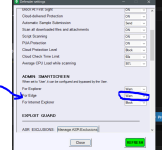
I believe this may be due to this ConfigureDefender setting which you may have set to "Block". It is an Admin setting.

Capture.PNG