
I blame Brave. It doesn't want you to try Edge.

Brave doesn't have some of Edge's granular browser settings but it hasn't given me the problems Edge has here and there.
Last edited:


Open MalwareTips from your Home Screen or desktop. Follow discussions, find answers and pick up where you left off.
If you cannot find an install option, update your browser or use its bookmark option to keep MalwareTips close.
After installation, open the app and sign in. Enable push notifications in Preferences if you want alerts. On iPhone and iPad, push requires a Home Screen web app and iOS or iPadOS 16.4 or later.
Sign in to manage notificationsInstallation is optional. Your notification settings stay under your control.
I blame Brave. It doesn't want you to try Edge.

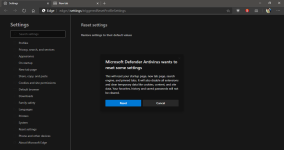
I don't know if it's relevant but sometimes Windows open the setup wizard after a Windows upgrade patch and the latest one ask the same question which reset all Edge settings + reset search engine back to Bing.This morning I opened Edge and this is what I'm greeted with. What is this? Why would Microsoft defender want me to reset settings? There's nothing malicious on the system.
View attachment 249600
I don't see any update installed recently. Everything has been the same. Scanned the C drive with WD and Emsisoft Emergency Kit just to be sure and they didn't find anything either. Who knows what triggered this!!! I haven't even used Edge much in the past few weeks. Anyway, I cleaned the cache manually. Didn't reset anything else.I don't know if it's relevant but sometimes Windows open the setup wizard after a Windows upgrade patch and the latest one ask the same question which reset all Edge settings + reset search engine back to Bing.
But I don't see anything like that directly from Defender oO

Can this issue cause it?I already ruled out the Windows Defender and app/browser control as factors.
20H2
Could that be related to the SmartScreen settings in Edge?This morning I opened Edge and this is what I'm greeted with. What is this? Why would Microsoft defender want me to reset settings? There's nothing malicious on the system.
View attachment 249600
I don't think so. I searched online and there are reports of similar popup even for Chrome dating back to as early as 2015. But still don't know the reason behind this.Could that be related to the SmartScreen settings in Edge?
Apparently not in my case. Edge was and is current.Can this issue cause it?
Windows 10 20H2-Upgrade: Microsoft Edge Downgrade as Pitfall | Born's Tech and Windows World (borncity.com)
The solution is to download and run the MSI installer from here:
Download Microsoft Edge for Business - Microsoft
(Insert terrible curse here)Apparently not in my case. Edge was and is current.
The bug described in your source is for Windows upgrades from earlier versions which installs a 2nd, older version of Edge.
I tried all the above suggestions from @razorfancy and @security123, including running the normal installer over the top, and ultimately solved the problem yesterday with a Windows restart.Did you try the MSI installer anyway?
Glad it's solvedI tried all the above suggestions from @razorfancy and @security123, including running the normal installer over the top, and ultimately solved the problem yesterday with a Windows restart.

Sad, that you lost copied items, but if you want system wide copying you must not use private browsing.One thing I noticed, if you use clipboard feature of Windows 10 then anything you copy in Edge's private browser window doesn't get saved in clipboard. It will work normally as if the clipboard function isn't enabled so you'll only be able to paste the last copied item.
This info might be helpful for those who use the clipboard feature. I learned my lesson and lost some important copied items few days back.
Yes. I'm not complaining and it probably makes sense to not record anything in private mode so, that even includes clipboard items. I'm just letting everyone know about it because I didn't know and this is probably implemented not so long ago. I don't remember facing this before.Sad, that you lost copied items, but if you want system wide copying you must not use private browsing.
IMO It should work that way.


 Was checking for updates anyway, since a cumulative KB for Insiders Beta Channel got installed (KB4586853).
Version 87.0.664.47: November 23
Fixed various bugs and performance issues.

I hope others can help you with that problem.OK, here is a small dilemma that's come up before, prob multiple times, but OS configurations change so what was frowned upon 3 years ago might not be nowadays. I'm using Edge exclusively at the moment, no other browser.
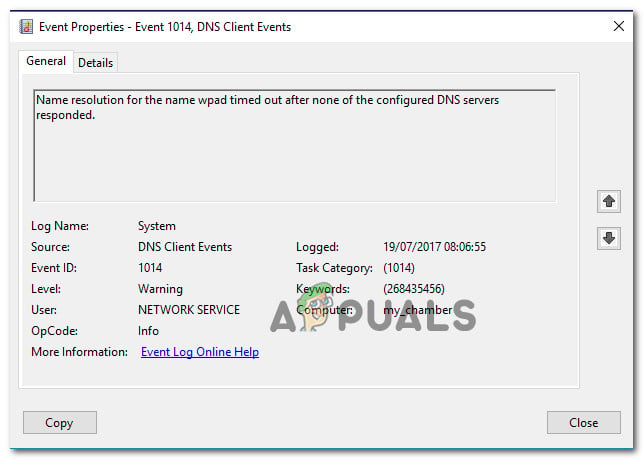
Anyway, occasionally in Event Viewer, I get these "warnings": id: 1014: dns name resolution on WPAD (or something) failed as none of the servers responded. Accordingly, webpages in Micro-Edge would take 3-5 sec. to load versus instantly. Annoying! So, Microsoft has conflicting stands on disabling IPv6, it seems. I followed this guide here to disable it. In another Doc, Microsoft warns against it.
I've done this before out of annoyance but things started gradually sliding south with regards to Windows. This was a few years ago, though. And yes: reset network adapter, changed DNS, flushed DNS multiple times, etc and slow webpage loading persisted.
Anyway, Edge loads pages normally now. But what do you all think about this? Is there a reason/s for keep IPv6 enabled now, in 20H2 and beyond? Thanks for insights. Oh, version is 87.0.664.47 as noted above, the latest.
Edit: maybe I'll add a preferred DNS provider to the IPv6 section in DNS Jumper. Maybe that's the ticket instead of disabling IPv6. What do you think?
 appuals.com
) but the long term benefit is the better test.
appuals.com
) but the long term benefit is the better test.Members who viewed this thread in the last 5 minutes

