Serious Discussion Network Monitor & Antivirus

Avethil

Level 7
Thread author
Verified
Well-known
Dec 5, 2023
303
786
567
User Yukinyan came across a software called Network Monitor & Antivirus, available only on Microsoft Store. It seems rather interesting so I think it deserves a dedicated thread. It has some similarities with GlassWire Pro network monitoring feature and especially with Connection Explorer from Stardock but unlike these 2 softwares which are subscription-based (Connection Explorer will be released as subscription-based standalone software, not anymore as part of Object Desktop, as soon it will leave beta status) it requires a one-time payment, a rare thing nowadays.
Here it is the link Network Monitor&Antivirus - Download and install on Windows | Microsoft Store
 
Last edited:
User Yukinyan came across a software called Network Monitor & Antivirus, available only on Microsoft Store. It seems rather interesting so I think it deserves a dedicated thread. It has some similarities with GlassWire Pro and especially with Connection Explorer from Stardock but unlike these 2 softwares which are subscription-based (Connection Explorer will be released as subscription-based standalone software, not anymore as part of Object Desktop, as soon it will leave beta status) it requires a one-time payment, a rare thing nowadays.
Here it is the link Network Monitor&Antivirus - Download and install on Windows | Microsoft Store
It does look interesting, but I would be careful about the “antivirus” part until there is more independent information available.

A few practical points

  • Being listed in Microsoft Store is not the same as being a proven security product.
  • A one-time payment is definitely appealing compared with subscriptions, especially for utilities in this category.
  • The network monitoring side may still be useful even if the antivirus component turns out to be basic or limited.

What can be verified more safely

Before treating it as a serious security product, it is worth checking:

  • Whether the developer has an official website with clear documentation
  • Whether there are published detection engine details or only marketing claims
  • Whether it uses its own malware engine or integrates Microsoft Defender / another engine
  • Whether there are independent reviews, testing, or user reports over time
  • What permissions it requires and how it handles traffic inspection

Important caution

I would not assume it is comparable to established antivirus products just from the Store page or the product name alone.

For anyone interested, the safest approach is:

  • Test it first in a non-critical system or virtual machine
  • Upload the installer or related files to VirusTotal if obtainable outside the Store package system
  • Check Windows Security afterwards to confirm whether it coexists with Defender or attempts to replace parts of it
  • Monitor for stability, resource usage, and whether the network alerts are actually meaningful rather than noisy

Comparison angle</B>

Compared with tools like GlassWire or Connection Explorer, this may be more realistic to view as a network visibility utility with extra security-themed features unless stronger evidence appears for its antivirus capabilities.

Bottom line

The pricing model is attractive, and the concept may be worth following, but I would wait for more community testing before trusting it as an antivirus solution. At this stage, it looks more like something to evaluate carefully than recommend confidently.
 
It's a recent software as the first version was released on 15th January 2026 and unfortunately it doesn't offer a trial period. Its developer, Nuno Caixeirinho, has released 3 other softwares, always on Microsoft Store. About the antivirus part, it uses Microsoft Defender AV and optionally VirusTotal scan through API key. In my opinion the AV feature is secondary as the most interesting feature is network monitoring.

Here it is a list of features:
- PROACTIVE NETWORK MONITORING
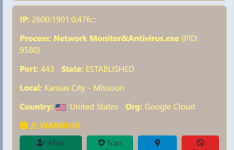
View all active connections in real time. Identify which processes are using your data and detect suspicious activities before they become a problem.
- GLOBAL MAP OF LIFE THREAT
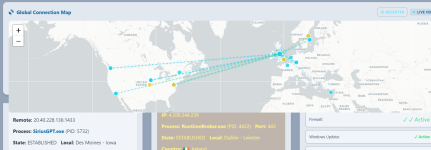
A stunning visual experience. It tracks the geographic origin of every remote IP that connects to your PC. See exactly in which part of the world your data is circulating.
- DUAL MOTOR SCANNER
Native Power: Uses the trusted Windows Defender engine for ultra-fast local scans. Cloud Intelligence: Optional integration with VirusTotal to analyze files against more than 70 different antivirus engines simultaneously.
- ADVANCED FIREWALL CONTROL
Found a suspicious IP address? Block it instantly with a click. Our "Automatic Lockout" feature can even handle critical threats on its own, keeping the perimeter of your system secure.
- SAFE QUARANTINE SYSTEM
Isolate suspicious files in a protected environment. Restore them if they are safe or delete them
- OPEN DOOR AUDIT
Find out which "doors" are open on your PC. It identifies exposed services and prevents intruders from finding a way in.
- PRIVACY FIRST
Your data is on your machine. We do not collect your files or personal information.
- MODERN INTERFACE
A stylish design with a dark theme, designed for both beginners and advanced users.
 
Last edited:
Thank you very much for your interest and feedback on my work.

I would just like to clarify one important point: the application is not intended to replace a traditional antivirus. The security component is based on Microsoft Defender (already integrated into Windows), and you can optionally use VirusTotal for additional file analysis.
The software's main focus is visibility and control of network activity, allowing the user to see in real time which processes are communicating, where, and act quickly (for example, blocking IPs or analyzing suspicious files).
About the Microsoft Store, the choice is mainly related to simple distribution, user security, and ease of installation. The subscription-free model, it was a conscious decision to avoid recurring costs and maintain control on the user's side, without compromises. Check out my latest work, ImageRestoreAI. It's an example of a feature-rich tool that's completely offline, without exposing personal data and subscription-free, with a very competitive price.
Being a recent project, all feedback is extremely useful at this stage. Thank you for reviewing and sharing your opinions.

NAC - Nuno Caixeirinho
 
@NAC-Nuno
Hello,
thank you for your post and welcome here at MalwareTips forums. As I wrote above, Network Monitor & Antivirus is a interesting project and it is offered at a very competitive price, in my opinion. I presume it's based on a IP's blacklist, can you give me some information about this feature ? For VirusTotal optional integration I guess it's necessary a API key but I'm not a expert in this matter.
 
Last edited:
it would work on my PC?!
Hello, probably the network monitoring part should work but as you have disabled other services, not only Defender, it depends on what services it relies to, of course. I hope the developer may consider releasing a version with a trial period as happens with many softwares nowadays. This could attract potential users who otherwise might be reluctant to spend an amount, even if small, without being able to try the software first. I don't know if it's possible to release a trial version through the Microsoft Store, though.
 
Last edited:
I don't know if it's possible to release a trial version through the Microsoft Store, though.
I would be OK with a money return guarantee.
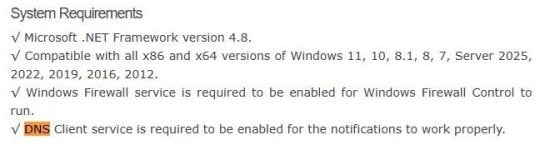
but as you have disabled other services, not only Defender, it depends on what services it relies to, of course.
Yeah, Binisoft dev added a note, that DNS Client service is needed for notifications, after I pointed it out. Some services are expected to be running, like DUSM for Glasswire.

capture_03272026_172534.jpg
 
@NAC-Nuno
Hello,
thank you for your post and welcome here at MalwareTips forums. As I wrote above, Network Monitor & Antivirus is a interesting project and it is offered at a very competitive price, in my opinion. I presume it's based on a IP's blacklist, can you give me some information about this feature ? For VirusTotal optional integration I guess it's necessary a API key but I'm not a expert in this matter.
About the IP Blocking: The system doesn't rely solely on a static blacklist. It works through active real-time monitoring of your computer's connections (using native system tools like netstat).
The application identifies remote IPs and checks their reputation, and you can inspect in detail and confirm the origins.
If a connection is considered suspicious or dangerous, the blocking feature allows you to create a direct rule in the Windows Firewall (or iptables on Linux) with one click. This prevents any future communication with that address, protecting the system immediately and effectively.

The integration with VirusTotal: Yes, your perception is correct. To use this optional feature, an API key is required.
How to obtain it: You can obtain a free key by creating an account at virustotal.com.
How it works: When the feature is active, the application calculates a unique "identifier" (hash) for each file and asks VirusTotal if any of its more than 70 antivirus engines have already detected that file as malicious.
Advantage: The great advantage is that your computer benefits from the detection of dozens of reputable antivirus programs at the same time, without the need to install each one individually and without consuming excessive PC resources.
 
I would be OK with a money return guarantee.

Yeah, Binisoft dev added a note, that DNS Client service is needed for notifications, after I pointed it out. Some services are expected to be running, like DUSM for Glasswire.

View attachment 296649
Thank you for your interest and suggestion. Even though I believe the Microsoft Store has a refund policy if the app doesn't work correctly on your PC as intended, please confirm.
 
Hi @NAC-Nuno welcome to the site.
I recently purchased your Network Monitor & Antivirus product and I’m currently evaluating it on a Surface Go 3. My intention is to continue using it on this device, as well as on other machines and Windows VMs.
I really appreciate how lightweight and functional it is compared to GlassWire Pro. I use GlassWire on my main desktop, but it does consume a noticeable amount of resources, so your product is a great fit for my other systems.

I’ve come across a few small issues and suggestions during testing:
  1. Installer Language Selection
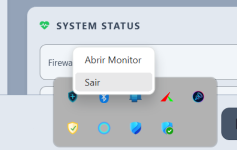
    After installation, the application defaulted to Portuguese. Would it be possible for the installer to automatically detect and apply the correct language based on the device’s region settings? It’s not a major issue since I can change it manually, but I did notice that one UI element the taskbar icon tooltip remained in Portuguese even after switching to English and restarting the application (see screenshot).
    1775048033213.png
  2. Defender File Scan Error
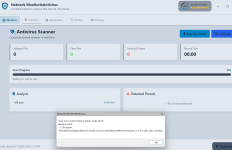
    The option to scan a file using Microsoft Defender is very useful, but in my case it failed with the following error (see screenshot):
    1775048046090.png
  3. Ignore/Whitelist Option
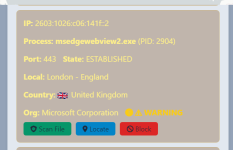
    Would it be possible to add an option to ignore or whitelist legitimate known processes so they don’t continue to be flagged repeatedly?
    1775048061712.png
  4. Scan Frequency Control
    The application appears to perform scans roughly every five minutes. Could you add an option to adjust the scan frequency or allow on‑demand scanning instead?

Please don’t take any of this as negative feedback these are just suggestions based on my experience so far. I really like your product and I’m happy to support its development.
 
Last edited by a moderator:
Hi @NAC-Nuno welcome to the site.
I recently purchased your Network Monitor & Antivirus product and I’m currently evaluating it on a Surface Go 3. My intention is to continue using it on this device, as well as on other machines and Windows VMs.
I really appreciate how lightweight and functional it is compared to GlassWire Pro. I use GlassWire on my main desktop, but it does consume a noticeable amount of resources, so your product is a great fit for my other systems.

I’ve come across a few small issues and suggestions during testing:
  1. Installer Language Selection
    After installation, the application defaulted to Portuguese. Would it be possible for the installer to automatically detect and apply the correct language based on the device’s region settings? It’s not a major issue since I can change it manually, but I did notice that one UI element the taskbar icon tooltip remained in Portuguese even after switching to English and restarting the application (see screenshot).
    View attachment 296786
  2. Defender File Scan Error
    The option to scan a file using Microsoft Defender is very useful, but in my case it failed with the following error (see screenshot):
    View attachment 296787
  3. Ignore/Whitelist Option
    Would it be possible to add an option to ignore or whitelist legitimate known processes so they don’t continue to be flagged repeatedly?
    View attachment 296789
  4. Scan Frequency Control
    The application appears to perform scans roughly every five minutes. Could you add an option to adjust the scan frequency or allow on‑demand scanning instead?

Please don’t take any of this as negative feedback these are just suggestions based on my experience so far. I really like your product and I’m happy to support its development.
Thank you so much for the feedback; it's always very helpful. I'll try to correct these issues and release a new update with the fixes.
 
Just installed the latest version and I can see all the new options you’ve added, as well as the fix for the AV scanning issue. Great work.

I’ve noticed a couple of additional points that might be worth considering:

1. Auto‑allow rule for your own application
It might be helpful to automatically create a rule that allows your app through its own monitoring. Someone could accidentally block it and then wonder why the application stops functioning.

1775128930893.png


2. Secure DNS clarification
How do I enable the Secure DNS feature? Is there a specific service it depends on, or is the application detecting my ISP‑provided DNS and flagging it as insecure?

1775128214883.png


3. UI layout
This may be due to the smaller screen on my Surface tablet, but the map view makes it difficult to fully see the alerts pane. Perhaps the layout could adapt more dynamically on compact displays.

1775128948901.png


4. Alert
I’m also noticing a number of alerts showing PID 0 with the connection state listed as TIME_WAIT. From what I understand, these PID 0 entries are normal and not indicative of any compromise. They typically represent outbound TCP connections that have already been closed. Once the original process releases the socket, Windows reassigns the remaining TIME_WAIT state to the System Idle Process (PID 0), which is expected behaviour.

Would it make sense to classify PID 0 TIME_WAIT entries as a lower priority rather than high severity, unless they persist for an unusually long time? Prolonged TIME_WAIT states could indicate an underlying issue, but in normal circumstances they shouldn’t be treated as high‑risk... In my opinion, happy to be corrected and educated :)
 

Attachments

  • 1775128161161.png
    1775128161161.png
    40.5 KB · Views: 26
  • 1775128388027.png
    1775128388027.png
    343.6 KB · Views: 28
Thank you very much for your interest and feedback on my work.

I would just like to clarify one important point: the application is not intended to replace a traditional antivirus. The security component is based on Microsoft Defender (already integrated into Windows), and you can optionally use VirusTotal for additional file analysis.
The software's main focus is visibility and control of network activity, allowing the user to see in real time which processes are communicating, where, and act quickly (for example, blocking IPs or analyzing suspicious files).
About the Microsoft Store, the choice is mainly related to simple distribution, user security, and ease of installation. The subscription-free model, it was a conscious decision to avoid recurring costs and maintain control on the user's side, without compromises. Check out my latest work, ImageRestoreAI. It's an example of a feature-rich tool that's completely offline, without exposing personal data and subscription-free, with a very competitive price.
Being a recent project, all feedback is extremely useful at this stage. Thank you for reviewing and sharing your opinions.

NAC - Nuno Caixeirinho
Hello! I’m Yukinyan, the one who discovered your software on the Microsoft Store. It’s a pleasure to have you here to join our discussion. We will do our best to provide testing feedback and suggestions to support you. Welcome!