Serious Discussion Network Monitor & Antivirus

I've installed on my desktop PC for testing, the map issue on the Surface tablet is not present so must be linked to the small size of the screen.

On my desktop PC I don't use Defender as my main AV and use another one, can the program identify the AV and populate the value.

I use the following WMIC command and look for the product state - 266240:
WMIC /Node:localhost /Namespace:\\root\SecurityCenter2 Path AntiVirusProduct get * /value

productState = 266240
From observed mappings:
Decimal: 266240
Hex: 0x41000
This value typically indicates:
Antivirus is ON
If the above isn't possible and is blocked by Microsoft just display Windows Defender is disabled and other AV active
1775133142028.png


If Windows Defender not active because another AV is active, does the file scanning work?

There is just one area that still shows a different language.
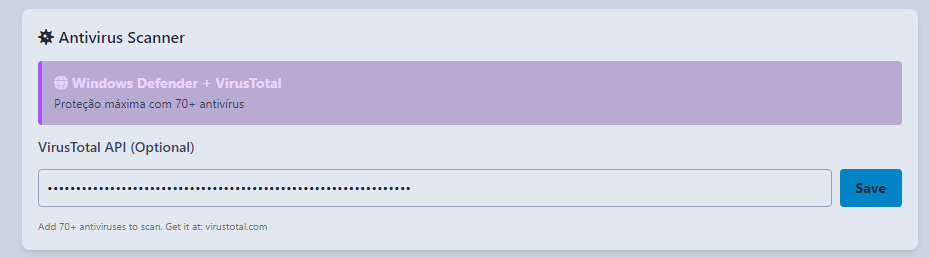
1775133807319.png
 
  • Like
Reactions: Trident
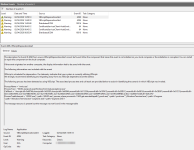
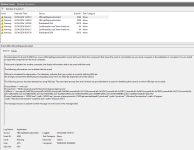
Looking at Windows events I noticed the following that needs to be looked at as it appears you are using VBScript and Microsoft is flagging this as its going to be a depreciated product.


I will leave the image here as reference but it looks like a red herring for your application, and it's looking likely it could be WMIC.exe command itself that is triggering the alert. - "naughty Microsoft"


=======================Warning Event VBScriptDeprecationAlert========================
1775135275343.png
 

Attachments

  • 1775134995006.png
    1775134995006.png
    93.9 KB · Views: 57
  • 1775135028137.png
    1775135028137.png
    93.1 KB · Views: 59
Last edited:
  • Like
Reactions: Trident
Yes, WMIC.exe (the command line tool for WMI) got phased out in 25H2, as it was doing more hard than good. This doesn’t affect APIs invoked through .Net, C++, C and so on

PowerShell can continue to serve as a CLI for WMI.
 
Just installed the latest version and I can see all the new options you’ve added, as well as the fix for the AV scanning issue. Great work.

I’ve noticed a couple of additional points that might be worth considering:

1. Auto‑allow rule for your own application
It might be helpful to automatically create a rule that allows your app through its own monitoring. Someone could accidentally block it and then wonder why the application stops functioning.

View attachment 296803


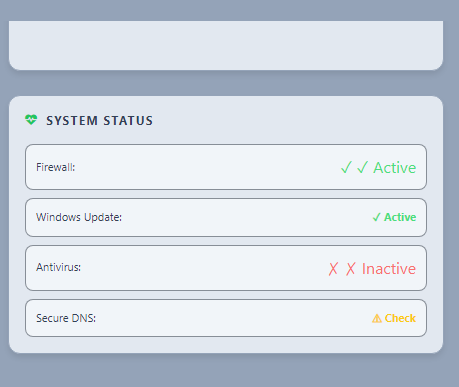
2. Secure DNS clarification
How do I enable the Secure DNS feature? Is there a specific service it depends on, or is the application detecting my ISP‑provided DNS and flagging it as insecure?

View attachment 296801

3. UI layout
This may be due to the smaller screen on my Surface tablet, but the map view makes it difficult to fully see the alerts pane. Perhaps the layout could adapt more dynamically on compact displays.

View attachment 296804

4. Alert
I’m also noticing a number of alerts showing PID 0 with the connection state listed as TIME_WAIT. From what I understand, these PID 0 entries are normal and not indicative of any compromise. They typically represent outbound TCP connections that have already been closed. Once the original process releases the socket, Windows reassigns the remaining TIME_WAIT state to the System Idle Process (PID 0), which is expected behaviour.

Would it make sense to classify PID 0 TIME_WAIT entries as a lower priority rather than high severity, unless they persist for an unusually long time? Prolonged TIME_WAIT states could indicate an underlying issue, but in normal circumstances they shouldn’t be treated as high‑risk... In my opinion, happy to be corrected and educated :)
Thank you for your feedback and suggestions.
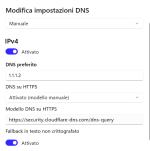
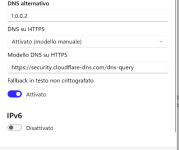
For the app to detect your Secure DNS, you need to enable it in your Windows system. You can check this tutorial:
On my Windows it looks like this:

DNS Seguuro.png


DNS active.png


About secure connections detected as SUSPICIOUS LINKS with risk alert, it's only to force the user to analyze all and keeping to white list or blocking any connection, however, I will be improving some this aspects in future updates.

I hope this help.
Thanks
 
Yes, WMIC.exe (the command line tool for WMI) got phased out in 25H2, as it was doing more hard than good. This doesn’t affect APIs invoked through .Net, C++, C and so on

PowerShell can continue to serve as a CLI for WMI.
Yes, WMIC.exe (the command line tool for WMI) got phased out in 25H2, as it was doing more hard than good. This doesn’t affect APIs invoked through .Net, C++, C and so on

PowerShell can continue to serve as a CLI for WMI.
Thank you for the additional information.
 
Has the developer thoroughly tested the software, and do they have a website? If not, why not?
And who is the developer? I’m just asking these questions because they’re important. Everyone remembers how developers pop up and then disappear without warning.
 
And who is the developer?
Hello,
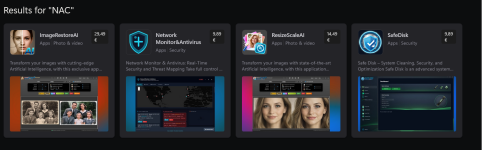
the developer's name is Nuno Caixeirinho (username NAC-Nuno here at MalwareTips) Other than Network Monitor & Antivirus he has released 3 other softwares, not related to cybersecurity, always on Microsoft Store. I don't think he has his own website, at least I haven't found it. About why his applications are only purchasable through the Microsoft store, he explained it here Serious Discussion - Network Monitor & Antivirus ("the choice is mainly related to simple distribution, user security, and ease of installation")

NAC Software on Microsoft Store.png
 
Last edited:
it reminds me of GlassWire, but it's cheaper.
Also it is similar to Connection Explorer from Stardock but unlike GlassWire Premium and Connection Explorer which are subscription-based (Connection Explorer will be released as subscription-based standalone software, not anymore as part of Object Desktop, as soon it will leave beta status) Network Monitor & Antivirus just requires a one-time payment and the installation is not limited to one device only but according to Microsoft Store "Get this app while signed in to your Microsoft account and install on up to ten Windows devices."
 
Last edited:
On my Windows it looks like this:
Hello,
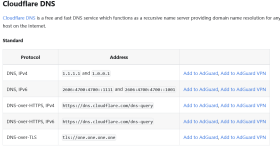
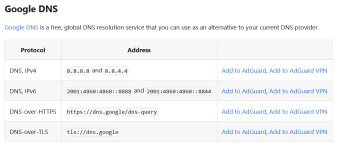
I need a clarification about DNS. I see from your screenshot that as primary DNS you have set 1.1.1.1 which is Cloudflare but as DNS-over-HTTPS you have manually inserted https://dns.google/dns-query which is Google. So is it possible to have 2 separate DNS providers for DNS address and DNS-over-HTTPS ? I'm just asking because I'm not a expert.
Cloudflare DNS.pngGoogle DNS.png

I've set my DNS like this (Cloudflare - Malware blocking only)

Cloudflare - Malware blocking only (Primary).pngCloudflare - Malware blocking only (Secondary).png
 
Last edited:
Hello,
I need a clarification about DNS. I see from your screenshot that as primary DNS you have set 1.1.1.1 which is Cloudflare but as DNS-over-HTTPS you have manually inserted https://dns.google/dns-query which is Google. So is it possible to have 2 separate DNS providers for DNS address and DNS-over-HTTPS ? I'm just asking because I'm not a expert.
View attachment 296880View attachment 296881

I've set my DNS like this (Cloudflare - Malware blocking only)

View attachment 296883View attachment 296884

that’s a good question. For a single DNS configuration, the DNS server IP and the DNS-over-HTTPS endpoint should normally belong to the same provider. So if you use 1.1.1.1, the matching DoH endpoint should be Cloudflare’s, not Google’s. If you want to use Google DoH, then the DNS servers should be Google’s, such as 8.8.8.8 and 8.8.4.4
It is possible to have different DNS providers configured as separate servers, but each one should use its own matching DoH configuration. So 1.1.1.1 together with https://dns.google/dns-query is not the recommended combination and may cause confusion or fallback behaviour.
In short:
1.1.1.1 / 1.0.0.1 -> https://cloudflare-dns.com/dns-query
8.8.8.8 / 8.8.4.4 -> https://dns.google/dns-query
My screenshot showed a mixed configuration, that part should be corrected. Sorry for the confusion.
For a correct Secure DNS configuration, the DNS server addresses and the DNS-over-HTTPS endpoint should belong to the same provider.
If you want the recommended secure setup, please use:
DNS servers: 1.1.1.2 and 1.0.0.2
DNS-over-HTTPS: https://security.cloudflare-dns.com/dns-query

This configuration keeps DNS encrypted and also enables malware domain blocking.
If you prefer standard encrypted DNS without filtering, use:
DNS servers: 1.1.1.1 and 1.0.0.1
DNS-over-HTTPS: https://cloudflare-dns.com/dns-query

The important point is not to mix providers. For example, 1.1.1.1 should not be used together with Google’s DoH URL.
If the system provides an option such as “encrypted only” or disabling fallback to unencrypted DNS, that is also recommended.
 
I've installed on my desktop PC for testing, the map issue on the Surface tablet is not present so must be linked to the small size of the screen.

On my desktop PC I don't use Defender as my main AV and use another one, can the program identify the AV and populate the value.

I use the following WMIC command and look for the product state - 266240:
WMIC /Node:localhost /Namespace:\\root\SecurityCenter2 Path AntiVirusProduct get * /value

productState = 266240
From observed mappings:
Decimal: 266240
Hex: 0x41000
This value typically indicates:
Antivirus is ON
If the above isn't possible and is blocked by Microsoft just display Windows Defender is disabled and other AV active

View attachment 296805

If Windows Defender not active because another AV is active, does the file scanning work?

There is just one area that still shows a different language.
View attachment 296806
Thank you, this is very useful feedback. Since the issue does not appear on your desktop PC, the map problem does seem likely to be related to the smaller Surface screen size / layout
Regarding antivirus detection, that is a good suggestion. I will review whether the app can read the active antivirus product from Windows Security Center / SecurityCenter2 and display the product name when available. If that is not reliable on some systems, then a fallback such as “Windows Defender disabled, third-party antivirus active” would be a sensible alternative.
This app works directly with Windows Defender and for file scanning, in the current version the local scan uses Windows Defender. So if Defender is disabled because another antivirus is active, the Defender-based local scan may not run. Online scanning can still work if VirusTotal is configured. I'll analyze it more carefully so I can make changes in the future.

About the different language I'll fix it in the next update.
 
Just installed the latest version and I can see all the new options you’ve added, as well as the fix for the AV scanning issue. Great work.

I’ve noticed a couple of additional points that might be worth considering:

1. Auto‑allow rule for your own application
It might be helpful to automatically create a rule that allows your app through its own monitoring. Someone could accidentally block it and then wonder why the application stops functioning.

View attachment 296803


2. Secure DNS clarification
How do I enable the Secure DNS feature? Is there a specific service it depends on, or is the application detecting my ISP‑provided DNS and flagging it as insecure?

View attachment 296801

3. UI layout
This may be due to the smaller screen on my Surface tablet, but the map view makes it difficult to fully see the alerts pane. Perhaps the layout could adapt more dynamically on compact displays.

View attachment 296804

4. Alert
I’m also noticing a number of alerts showing PID 0 with the connection state listed as TIME_WAIT. From what I understand, these PID 0 entries are normal and not indicative of any compromise. They typically represent outbound TCP connections that have already been closed. Once the original process releases the socket, Windows reassigns the remaining TIME_WAIT state to the System Idle Process (PID 0), which is expected behaviour.

Would it make sense to classify PID 0 TIME_WAIT entries as a lower priority rather than high severity, unless they persist for an unusually long time? Prolonged TIME_WAIT states could indicate an underlying issue, but in normal circumstances they shouldn’t be treated as high‑risk... In my opinion, happy to be corrected and educated :)
New update1.0.8 It's coming.
 
  • Like
Reactions: Avethil and Higgsie
Hi, can anyone help me with the startup? I already added it through shell:startup, shell:common startup, and Reg, but this still fails to run at startup. Any workarounds? Currently have Cyberlock, AiDefender, and Smadav on my system.
 
Hi, can anyone help me with the startup? I already added it through shell:startup, shell:common startup, and Reg, but this still fails to run at startup. Any workarounds? Currently have Cyberlock, AiDefender, and Smadav on my system.
By default, the app is not set to start with the windows; please confirm if it is checked in definitions
1775633109363.png
 
Hi, can anyone help me with the startup? I already added it through shell:startup, shell:common startup, and Reg, but this still fails to run at startup. Any workarounds? Currently have Cyberlock, AiDefender, and Smadav on my system.
? AIDefender -- not familiar with it, and quick search of "AIDefender" as a topic found nothing...

EDIT nevermind -- that's one of Trident's tools under development iirc, it can take a minute or 2 sometimes... :LOL:
 
Last edited:
  • HaHa
  • Like
Reactions: Trident and Avethil
I guess Trident should rename the main executable file of Defender Hardening Console from AiDefender.exe to DHC.exe ;)
 
Last edited:
  • Hundred Points
Reactions: Trident